Telegram Desktop is still one of the easier messaging downloads to trust in 2026 if your main concern is finding the real official desktop build instead of a generic software-directory listing. This review is based on official sources checked on April 20, 2026. I verified the official desktop product page, Telegram’s official apps directory, official FAQ, official support page, official desktop changelog, the full changelog history page, the official GitHub repository, the latest official GitHub release, and the Thaiware discovery listing used only for product provenance.
Key takeaways
- Telegram Desktop is best for people who want the official Telegram desktop client from a clearly traceable source path instead of an unofficial mirror or a vague third-party listing.
- Official proof checked: desktop.telegram.org as the product page, telegram.org/apps as the apps directory, GPL v3 licensing on the official desktop page, public source code on GitHub, and the latest official release seen as v6.7.6 published on April 15, 2026.
- Download decision: use desktop.telegram.org and Telegram’s own official links, not Thaiware or random mirrors, when you want the real Telegram Desktop installer path.
Official download path for Telegram Desktop Review
Hubkub does not host installers. Use the official vendor/project page first, then use this review to check fit, limits, and safer setup notes.
Hubkub verification notes for Telegram Desktop Review
- Official download/support links already cited on this page were checked as the preferred source path for Telegram Desktop Review.
- Hubkub does not host installer files; the download action points readers back to the official vendor or project source.
- This page separates practical fit, trade-offs, and safety notes so readers can decide whether Telegram Desktop Review matches their workflow.
Last updated: April 20, 2026
- Rechecked the official desktop homepage, apps directory, FAQ, support page, changelog, full changelog history, repository, and latest release source.
- Confirmed the current official release marker, the platform support statements visible on Telegram’s own pages, the GPL v3 license reference, and the official image URL used for this review.
What I verified for this review
- Review basis: official source checks
- Thaiware discovery URL: https://software.thaiware.com/12600.html
- Official homepage: https://desktop.telegram.org/
- Official download URL: https://desktop.telegram.org/
- Official apps directory: https://telegram.org/apps
- Official FAQ/help URL: https://telegram.org/faq
- Official support URL: https://telegram.org/support
- Official changelog: https://desktop.telegram.org/changelog
- Full changelog history: https://telegramdesktop.github.io/tdesktop/changelog/
- Official repo: https://github.com/telegramdesktop/tdesktop
- Official release source: https://github.com/telegramdesktop/tdesktop/releases/tag/v6.7.6
- Latest official release seen: v6.7.6
- Release date shown on official source: April 15, 2026
- License/pricing checked: free and open-source under GPL v3
- Supported platforms verified: Windows, macOS, Linux
- Extra platform detail verified from official changelog page: up-to-date versions support Windows 7 and later, macOS 10.12 and later, and 64-bit Linux
- Specific numeric evidence: the latest official GitHub release page showed 11 assets when checked
- Image mode used: official_hero_capture
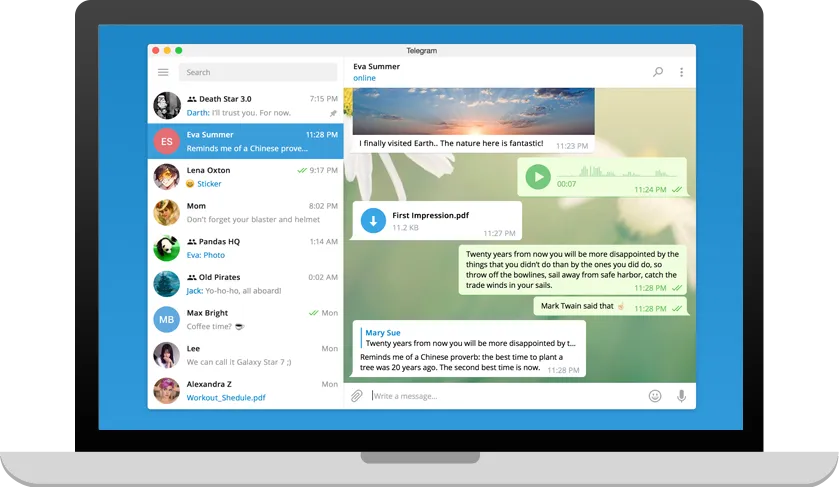
- Official featured_image_url: https://desktop.telegram.org/img/td_laptop.png
Official resources
Use Telegram’s official source path below if you decide to install Telegram Desktop.
Why Telegram Desktop still matters in 2026
Telegram Desktop still matters because the official source path is unusually easy to verify once you stop treating every page called “Telegram” as the same thing. That distinction matters here. Thaiware lists the product generically as Telegram, but the canonical desktop product page is desktop.telegram.org, and Telegram’s own official apps directory points desktop users to Telegram for Windows/Mac/Linux at that exact URL. That is the anchor that makes this review trustworthy: the desktop client is tied to the official desktop site, not to a generic third-party catalog entry and not to a different Telegram app branch.
The homepage also makes the product identity clear in plain language. Telegram describes it as a fast and secure desktop app, perfectly synced with your mobile phone. Even if you already know the Telegram brand, it helps to have the desktop value proposition stated directly on the official page rather than inferred from app-store chatter or stale mirror descriptions. For a canonical downloads page, that kind of official framing matters because it lets readers judge the download by the vendor’s live source material rather than by recycled copy from old directory entries.
There is also a cleaner proof chain here than many messaging tools offer. The desktop page links directly to Telegram’s GitHub repository and labels the software as available under GPL v3. The apps directory adds another useful trust marker by stating that Telegram apps are open source and support reproducible builds, which means the published code and the distributed apps are meant to be independently verifiable. You do not need to oversell that claim to see why it is useful. For a reader trying to choose between an official installer and a random mirror, a public repository plus reproducible-build language is a much stronger trust story than “download here” with no visible provenance.
What the official sources prove
The most important proof marker for this review is version identity. The latest official release seen on the Telegram Desktop GitHub releases page was v6.7.6, and GitHub showed that release as published on April 15, 2026. That same release page exposed a normal public release surface instead of a hidden or invite-only channel, which is exactly what you want for a mainstream desktop download page. It also showed 11 assets, a useful numeric proof point that confirms Telegram Desktop is shipping a real multi-artifact release set rather than a vague placeholder tag.
Telegram’s official changelog page adds more practical detail. It links to the full changelog history and explicitly distinguishes the stable version from the beta version, explaining that the stable version is updated less frequently but tested better than beta. the practical effect is many software directory pages flatten everything into one generic version claim. Telegram’s own changelog page makes the release model much clearer: there is a stable track, there are beta links for people who want faster updates, and there is a historical changelog trail for readers who want to confirm the product’s ongoing maintenance.
The changelog page also provides specific platform support detail that is useful on a download review. Telegram states that up-to-date versions of Telegram Desktop support Windows 7 and later, macOS 10.12 and later, and 64-bit Linux. That is more informative than simply saying “Windows, Mac, Linux” and stopping there. It gives readers an immediate compatibility reality check without forcing them to guess whether an older machine or an unusual Linux setup may need a legacy build.
On top of that, the homepage exposes multiple official platform paths right away. The visible main button offered Get Telegram for Linux x64 when checked, and the same page also surfaced official Flatpak and Snap links plus a Show all platforms path. The changelog page goes further by showing beta links for Windows x64 setup, Windows x64 portable, Windows on ARM setup, Windows on ARM portable, standard Windows setup, Windows portable, macOS setup, and Linux 64-bit with glibc 2.28 or newer. Even if you are only planning to install the stable release, those links prove Telegram Desktop is maintained as a real cross-platform desktop product, not a desktop afterthought.
Best for and real-world fit
Telegram Desktop is best for people who already want Telegram on the desktop and care about getting the authentic build from the authentic source. That may sound obvious, but it is exactly the problem many software-directory searches create. A user searches for “Telegram download,” lands on a directory page, sees a familiar name, and may never verify whether the actual install path still points to the official desktop product page. A good canonical review should solve that confusion first.
If your priority is source clarity, Telegram Desktop does well. The desktop homepage, the official apps directory, the public repository, the FAQ, the support page, and the changelog all belong to the same official product surface. That consistency reduces ambiguity. It also makes it easier to recommend the software without pretending that a third-party directory is the authority on versions or support. In practical terms, the safest user behavior is simple: discover it wherever you want, but install it from desktop.telegram.org or one of Telegram’s own linked desktop routes.
Telegram Desktop also fits people who value a desktop client with an active release trail and visible public source code. The official project does not hide behind a locked enterprise download portal. It publishes the source on GitHub, exposes release history publicly, and keeps support and FAQ surfaces accessible from the main Telegram domain. That does not mean every reader will like Telegram’s overall product philosophy more than Signal’s or another messenger’s. It means the desktop download itself has a straightforward trust path, and that is the main question this page is supposed to answer.
Where you should be careful is product naming and platform assumptions. The official apps directory lists Telegram for Windows/Mac/Linux at desktop.telegram.org and also lists a separate Telegram for macOS page. That is exactly why this review is anchored to Telegram Desktop, not to a vague “Telegram” label from a directory listing. If you want the desktop client covered by this review, use the desktop.telegram.org branch. Also, this review does not claim FreeBSD support, because the verified official platform set for this package is Windows, macOS, and Linux.
Pricing, license, and trust reality
The pricing and licensing story is refreshingly clear. Telegram Desktop is free and open-source under GPL v3 based on the official desktop page and repository licensing references. the practical effect is many software-directory listings blur the difference between freeware, freemium, ad-supported downloads, and genuinely open-source software. Here, the official project gives you a clean answer instead of forcing you to infer the truth from marketing language.
That clarity helps the recommendation. A reader does not need to wonder whether Telegram Desktop is only “free” until some premium upsell appears in the installer itself. The official desktop page states the GPL v3 license plainly and links the source code directly. The official apps directory strengthens that picture by highlighting open-source status and reproducible builds. For a downloads package, that combination is exactly the kind of evidence that supports a review based on official sources.
The practical trust rule is equally simple: use the official source path and ignore the temptation to treat mirrors as interchangeable. Thaiware is useful for discovery provenance only. It is not the source of truth for current release tracking, licensing, platform support, or update history. Telegram’s own desktop page, apps directory, changelog, and repository are the truth layer for all of those questions.
Platform support and update trail
Telegram Desktop’s official platform support is broad enough to make it a sensible canonical download, but the official pages are honest enough to show nuance. The homepage and apps directory verify the big three desktop platforms: Windows, macOS, and Linux. The changelog page then narrows that into more actionable support information: current versions support Windows 7 and later, macOS 10.12 and later, and 64-bit Linux. That is a better support statement than a generic platform badge because it gives real baseline expectations.
The update trail is also solid. Telegram keeps an official desktop changelog, a separate full changelog history page, and a live GitHub releases page. Those layers matter for a reader who wants to confirm that Telegram Desktop is still actively maintained rather than just historically popular. A product can be famous and still have a weak release trail. Telegram Desktop does not have that problem. The release chain is public, current, and connected directly to the official product surface.
The beta/stable distinction is another positive sign. Telegram’s changelog page explicitly tells users that beta updates arrive faster while the stable version is tested better. That may sound minor, but it shows release discipline. Users who want the safest mainstream path can stick with stable, while users who intentionally want faster feature testing can use beta links provided by Telegram itself. That is a healthier setup than leaving users to hunt around unofficial forums for pre-release builds.
Safe official download notes for Telegram Desktop Review
If you decide to install Telegram Desktop, the safest route is straightforward: start at https://desktop.telegram.org/ or confirm the same destination through https://telegram.org/apps. From there, use the official download links Telegram exposes for your platform. If you want release confirmation first, check the official changelog and the official GitHub release page for v6.7.6.
What you should avoid is treating any generic “Telegram download” page as interchangeable with the official desktop product page. Telegram is a broad product family with multiple apps and platform pages, so naming sloppiness can lead to wrong assumptions. This package is specifically about Telegram Desktop from desktop.telegram.org. Keeping that anchor in mind prevents the most common source-path confusion.
Telegram Desktop Review pros and cons: fit notes
Pros
- Official product identity is easy to verify through desktop.telegram.org and telegram.org/apps.
- Free and open-source GPL v3 licensing is clearly exposed on the official desktop page.
- Public GitHub repository and public release history strengthen the trust story.
- Official support covers Windows, macOS, and Linux, with extra baseline detail on the changelog page.
- The official apps directory highlights open-source status and reproducible builds.
Cons
- Telegram’s broad app naming can confuse readers who do not distinguish Telegram Desktop from other Telegram app pages.
- Third-party directory pages may still present the product too generically, which makes official-source discipline necessary.
- Linux support is officially real, but the changelog page specifically frames current support around 64-bit Linux, so users on unusual setups need to read carefully.
Related Hubkub reads
Who should download Telegram Desktop Review?
Telegram Desktop is worth downloading in 2026 if what you want is the official Telegram desktop client from a source path you can actually verify. The strongest reason to trust it is not hype about chat features. It is the quality of the official proof chain: a dedicated desktop product page, an official apps directory, visible GPL v3 licensing, public source code, public changelog history, and a current official release page showing v6.7.6 published on April 15, 2026.
That does not automatically make Telegram Desktop the best messenger for every person. It does make it one of the easier messaging downloads to validate responsibly. If you only remember one rule, remember this: treat desktop.telegram.org as the canonical desktop source, and use Telegram’s own FAQ, support, changelog, and repository pages to verify anything important before you install.
Telegram Desktop Review download and safety questions
Is Telegram Desktop safe to download?
Telegram Desktop is safest when you use the official desktop product page at desktop.telegram.org or confirm the same route through Telegram’s official apps directory. This review verified the official homepage, apps directory, FAQ, support page, changelog, full changelog history, repository, and latest official release source. Avoid treating random mirrors as equivalent to Telegram’s own desktop source path.
Is Telegram Desktop really free and open-source?
Yes. The official desktop page states that the software is available under the GPL v3 license, and it links directly to the Telegram Desktop source code on GitHub. That makes the licensing story much clearer than a generic freeware listing.
What platforms does Telegram Desktop officially support?
The verified official platform set for this package is Windows, macOS, and Linux. Telegram’s changelog page gives extra detail by saying that up-to-date versions support Windows 7 and later, macOS 10.12 and later, and 64-bit Linux.
What is the latest official Telegram Desktop release verified for this review?
The latest official release seen during verification was v6.7.6, and the official GitHub release page showed it as published on April 15, 2026. That release page also showed 11 assets when checked, which served as one of the numeric proof markers for this review.
Where should I check updates, help, or support before installing?
Use Telegram’s own pages: desktop.telegram.org/changelog for release notes, telegramdesktop.github.io/tdesktop/changelog/ for full changelog history, telegram.org/faq for official FAQ/help content, and telegram.org/support for official support contact. Those are the official verification paths used for this review.
Reader-first software checklist
Before installing or switching to this software, use this quick checklist to confirm whether it fits your needs and risk tolerance.
- Official source: prefer the developer website, official documentation, or a clearly trusted distribution channel.
- Platform fit: check whether your Windows, macOS, Linux, Android, or iOS version is supported.
- License and cost: confirm whether the app is free, open source, freemium, trial-based, or paid.
- Privacy and permissions: review what files, folders, network access, account data, or browser permissions the app may use.
- Backup first: for recovery, storage, networking, privacy, or system utilities, back up important data before changing settings.
Safe download and setup notes
Hubkub does not recommend clicking misleading download buttons or installing unknown bundles. When possible, use the official source and avoid third-party installers that add toolbars, browser changes, or unrelated offers. After downloading, verify the file name, publisher, version, and installer prompts before continuing.
Pros, limits, and alternatives to consider
- Best fit: readers who need the core function described in this guide and prefer a practical setup path.
- Watch out for: outdated versions, unsupported platforms, unclear installers, or features that require paid upgrades.
- Compare alternatives: if this app feels too complex, too limited, or not maintained enough for your workflow, compare it with similar tools before installing.
Related Hubkub resources: Safe Software Downloads, Software Reviews, How We Review Software, and Content Quality Standards.
FAQ
Should I download this software from any mirror site?
Use the official developer website or a trusted distribution channel whenever possible. Mirror sites can be useful in limited cases, but they may also include outdated installers, misleading ads, or unwanted bundles.
What should I check before installing?
Check the publisher, version, license, supported operating system, installer prompts, and whether the app requests sensitive permissions.