Key takeaways
- WinDirStat is a Windows disk-usage analyzer: it maps folders and files so you can investigate what is using space, not decide automatically what to delete.
- Hubkub checked the official project download page and release repository on 29 July 2026. The latest listed GitHub release was WinDirStat 2.7.0, published 1 July 2026.
- Choose it when a visual treemap and folder hierarchy will help you investigate a full Windows drive. Treat unfamiliar paths, synced folders, backups, and application data as verification tasks—not cleanup targets.
- The project distributes WinDirStat under GPLv2 and offers Store, architecture-specific installer, archive, hash, and package-manager routes from its official download guidance.
Editorial scope and sources
This is a source-verified download guide, not a test, benchmark, or claim that Hubkub installed WinDirStat. On 29 July 2026, Hubkub checked the official product page, download page, and the project’s GitHub releases. The official pages describe WinDirStat as a Windows disk-usage analyzer and cleanup assistant, list its supported distribution routes, and identify the project as GPLv2 software. The release feed listed version 2.7.0, published 1 July 2026. Check the live official pages before installing because package names, support details, and release status can change.
Official download URL: windirstat.net/download.html
Download WinDirStat from the Official Site
Use the project’s download page or its linked release assets—not a third-party “download” advertisement or bundled installer.
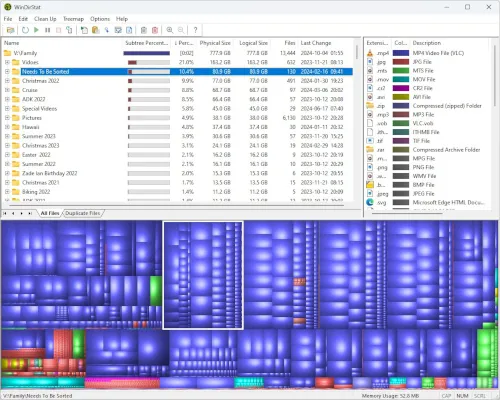
WinDirStat is useful when Windows says a drive is nearly full but the next decision is unclear. It scans a selected drive or folder, then presents a folder tree, file-type information, and a treemap in which larger rectangles represent larger files. That visual map can turn a vague capacity problem into a list of folders to investigate: old installers, duplicate exports, an archive that belongs on external storage, or a project directory that needs a deliberate retention decision.
The important limit is that a disk map is evidence about size, not evidence about safety. A large block might be a virtual machine, a photo library, a cloud-sync cache, a game installation, a system component, or a backup set. WinDirStat can point to it; it cannot know whether another application, another person, or a recovery plan depends on it. Use it to narrow the search, then confirm the path and its owner before changing anything.
Choose WinDirStat when the visual map changes the decision
The official project describes several views: All Files and Largest Files, a tree view ordered by size, an extension list, and a treemap. That makes WinDirStat a sensible fit when a reader needs both the directory hierarchy and a visual sense of where capacity went. It is especially relevant after a large media export, a long period of accumulating downloads, or a migration that left old data behind.
It is less direct when the actual task is already known. If you know the filename or extension you need to locate, a filename-search tool may be the better first step. If the task is to uninstall an application, recover deleted data, remove malware, or repair Windows, use the procedure designed for that job instead. A capacity report should not be used as a shortcut around an app’s uninstaller, a backup policy, or Windows’ own recovery controls.
Use the official route that matches your device and update policy
The official download page links to a Microsoft Store listing, Intel 64-bit, Intel 32-bit, and ARM64 MSI installers, ZIP and 7-Zip archives, and a file-hash list hosted with the project’s GitHub releases. It also lists package-manager commands for winget, Chocolatey, and Scoop. The current release feed checked for this guide listed WinDirStat 2.7.0, published on 1 July 2026, with MSI packages for x64, x86, and ARM64 plus archive formats and hashes.
- Microsoft Store: consider this route when Store-managed installation and updates fit the device policy.
- Architecture-specific MSI: choose only after confirming whether the Windows device is x64, x86, or ARM64; do not guess from the PC brand.
- ZIP or 7-Zip archive: consider a self-contained copy only when a portable workflow is appropriate and permitted on that device.
- Package manager: use it only if you already manage software through that tool and can verify the package identifier and publisher route.
The official page also provides a hash file. A checksum is useful only if you obtain it from the project’s official route and compare it with the file you actually downloaded. It is not a reason to trust a file from an unrelated mirror.
A safer storage-triage workflow
- Scan a deliberate scope. Choose the drive or folder whose capacity problem you are investigating. A report is easier to reason about when it answers one question at a time.
- Start with recognizable candidates. Review old downloads, duplicate exports, disposable installers, or archives whose purpose you can identify. Do not begin with unfamiliar Windows or application-data folders.
- Verify ownership and recovery options. Open the path, identify the creating application or account, and copy or back up valuable files before moving or deleting them. Consult that application’s documentation if the folder looks like a cache, database, sync store, or workspace.
- Make one reversible change. Remove a clearly unnecessary item, use the Recycle Bin where appropriate, then recheck free space. A small confirmed change is safer than a broad cleanup based only on rectangle size.
That workflow intentionally separates discovery from deletion. The tool can make discovery faster, but it does not validate a cleanup action for you. On a work-managed device, shared PC, or machine with active backups, pause before removing anything outside an established policy.
WinDirStat, WizTree, TreeSize, and Everything solve adjacent problems
| Tool | Use it when | Keep this boundary in mind |
|---|---|---|
| WinDirStat | You want a disk-usage tree and visual treemap to investigate capacity on Windows. | A map identifies large items; it does not mark them safe to remove. |
| WizTree | You want another Windows disk-space analysis workflow, especially when evaluating its NTFS-focused scan approach. | Compare the scan scope and interface for your drive rather than assuming similar tools are interchangeable. |
| TreeSize Free | You prefer folder reporting and want to compare a free edition with a vendor’s paid options. | Check the live edition and licensing details before relying on a feature for business work. |
| Everything | You need fast filename or path lookup rather than a capacity treemap. | Finding a filename is not the same task as explaining disk usage. |
For a disk-map comparison, read Hubkub’s WizTree guide. If the problem is locating a known file rather than auditing storage, the Everything guide covers that different search-first workflow. For folder-size reporting alternatives, see the TreeSize Free guide.
License and maintenance boundary
The project’s official site states that WinDirStat is open-source software under the GNU General Public License version 2. That describes the project license; it does not remove an organization’s need to assess its own deployment, support, security, and change-management rules. For a personal device, the practical question is whether the visual inspection workflow helps solve a real storage problem. For a managed fleet, the relevant questions include approved installation routes, supported architecture, update ownership, and whether staff have a documented cleanup process.
Verdict: keep the map, keep the judgment
WinDirStat is worth considering when a Windows storage problem needs to become an understandable folder-and-file investigation. Its official distribution page gives clear route choices, and its visual treemap can make large data sets easier to inspect than a plain file list. The durable value is not an automatic cleanup promise; it is a better starting point for a careful storage decision.
Start from the official download page, select the package only after confirming the device architecture and policy, scan a defined location, and verify every candidate before removing or moving it. If the underlying problem is recovery, malware, system repair, or application removal, switch to the purpose-built tool and procedure for that job.