Last verified: July 31, 2026 — against the official Kdenlive download page, documentation, and 26.04.3 release page.
- Kdenlive is a free, open-source non-linear video editor for multi-track projects; it is not the quickest choice for a simple cut or a format conversion.
- The official download page is the safe starting point for Windows, macOS, and Linux packages. Check the platform-specific route and the current release notes before replacing an existing editor.
- Project settings, source codecs, proxy media, and export verification are separate decisions. A successful install does not guarantee that every camera, screen recording, or delivery preset will behave the same way.
- This guide checks the official download path, version, and features from public sources. not a hands-on test. It does not claim that Hubkub installed Kdenlive, edited a project, generated proxies, rendered a timeline, or benchmarked hardware.
- Guide type: source-verified download and workflow guide; no personal installation or performance test is represented.
- Checked: July 31, 2026.
- Official download route: kdenlive.org/download.
- Documentation route: Kdenlive documentation.
- Release reference checked: Kdenlive 26.04.3 release page.
- Package availability, compatibility, codec support, and export results can change. Confirm the current notes and your own delivery requirements before committing an important project.
Use the publisher’s route
Download Kdenlive from the Official Site
- Official download URL: https://kdenlive.org/download/
- Read the official documentation
- Check the 26.04.3 release notes
Choose Kdenlive when the work is a project, not just a file task
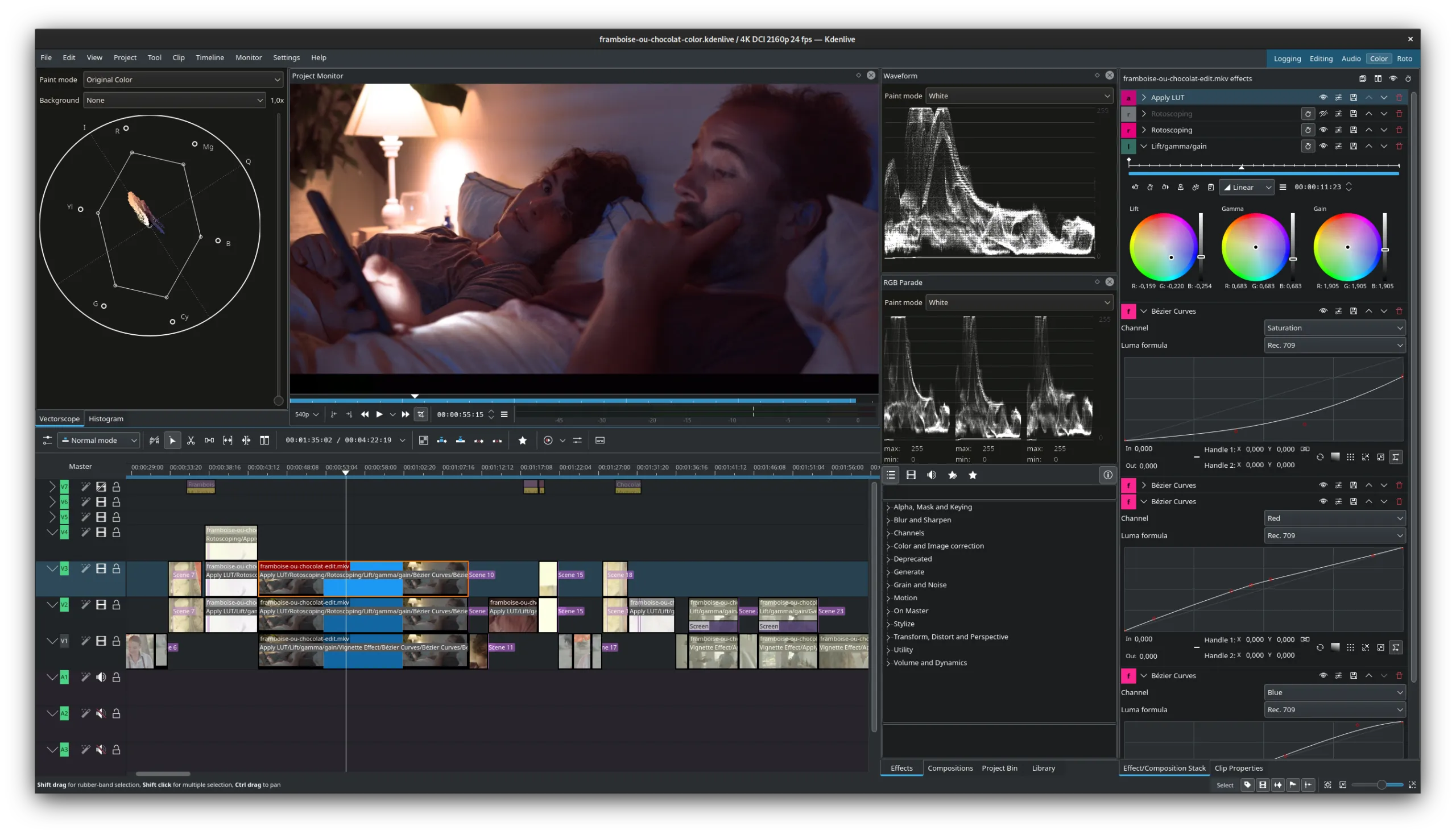
Kdenlive is best evaluated as a non-linear editor: a workspace for arranging clips, audio, titles, effects, and transitions across a timeline. That makes it a plausible fit for a tutorial, an interview with cutaways, a screen-recording sequence, or another project where timing and layers matter.
It is less direct for tasks that do not need a timeline. If the job is only to remove a section without re-encoding, a dedicated cutter such as LosslessCut is the narrower tool to examine. If the job is to convert a batch of files into a delivery format, HandBrake is designed around transcoding rather than editorial assembly. Making that distinction before downloading helps avoid solving a simple task with a larger project workflow.
Use the official package route for your platform
The Kdenlive download page separates platform choices rather than sending every visitor to one generic installer. Use that page for the current Windows, macOS, or Linux route, and read the release material before moving an active project to a newer build. Avoid sites that wrap the download in a separate downloader, do not identify the publisher, or mix testing builds with a stable recommendation.
For managed work or school devices, follow the organization’s software policy before installing a standalone build or adding a new package source. A portable or sandboxed package can change where files, settings, and permissions are handled; that can matter when media is stored on network drives or when a team needs a predictable update process. The official download page and documentation are the appropriate places to confirm the current route, rather than relying on an old mirror listing.
Project settings come before effects and export presets
A video project has choices that are independent of the editor: frame rate, frame size, audio rate, color workflow, source-media location, and final delivery target. The official documentation is the reference for Kdenlive’s project and timeline controls, but the correct settings still depend on the footage and where the finished file will be delivered.
Before investing time in a long edit, create a small disposable project and compare its settings with the source material and the destination requirements. This is a validation step, not a performance promise: it can reveal a mismatched frame rate, an unexpected audio layout, or an export setting that needs more research. Keep the project file and source media in a stable folder structure, and avoid moving source clips after a project has been linked to them unless you are prepared to relink assets.
Proxy media and codec compatibility are workflow boundaries
Proxy media is relevant when high-resolution or highly compressed sources make a timeline difficult to preview. It is a workflow option for lighter editing copies; it does not remove the need to keep original media available or to validate the final output. Whether proxies are worthwhile depends on the source codec, resolution, storage speed, and project complexity, so this guide does not claim a universal hardware result.
Codec support also needs a practical boundary. A file that opens is not automatically proof that every effect, audio stream, subtitle, or final delivery setting will behave as expected. Consult the Kdenlive documentation for supported workflow options, preserve a short test segment, and verify the exported file in the player or platform that will receive it. That is especially important before a deadline or when footage came from multiple cameras, phones, screen recorders, or collaborators.
Export verification is a separate final step
Rendering is not the same as publishing. After choosing an export format, check a short representative result for picture, audio, duration, captions, and the destination’s requirements. Keep the editable project and original media until that review is complete. If the final file must meet a client, platform, or archive specification, use that specification as the authority instead of assuming a generic preset is appropriate.
The 26.04.3 release page is useful for understanding what the project itself announced for that release, but it is not a substitute for testing a delivery file in your own environment. Use release notes to decide whether an update addresses a relevant issue; use a small controlled export to decide whether your footage and target workflow are ready.
Pick an alternative by the job, not by a generic ranking
| If you need to… | Consider | Why the boundary matters |
|---|---|---|
| Build a multi-track edit with titles, transitions, audio, and a project timeline | Kdenlive | Its scope is a full non-linear editing project rather than a one-file utility. |
| Use a different free timeline-editor workflow | Shotcut | It is an adjacent editor, but its interface and project approach are not interchangeable. |
| Cut segments without a full multi-track project | LosslessCut | A focused cutter can be a safer, simpler choice when no layered edit is needed. |
| Transcode or prepare video files for a delivery format | HandBrake | Transcoding is a different task from editing a timeline. |
| Require formal vendor support or a studio-specific workflow | A commercial NLE evaluated against that workflow | Support, collaboration, hardware, and delivery requirements may outweigh a free license. |
Who should download it—and who should pause first
Choose Kdenlive when you need a free, open-source timeline editor and are willing to learn project settings, media organization, and export checks. It has a clearer purpose than a generic “free video editor” recommendation: it is for an editable project with layers and a timeline.
Pause before downloading if you only need a trim, only need a conversion, cannot use unapproved software on a managed device, or have a fixed delivery requirement that has not been validated. In those cases, selecting the narrower tool or confirming the required workflow first can be more useful than installing another editor.
FAQ
Is Kdenlive free?
Kdenlive is presented by its official project as free and open-source software. Check the official download page for the current package route for your platform.
Where should I download Kdenlive?
Use kdenlive.org/download. It is the publisher route used for this source-verified guide; avoid unexplained wrapper installers and stale mirror listings.
Is Kdenlive the right tool for simple trimming?
Not necessarily. Kdenlive is designed for timeline projects. If you only need cuts, a focused cutter may have fewer settings and a more direct workflow.
Will Kdenlive work with every video codec and computer?
No universal result can be promised. Source codecs, resolution, storage, drivers, operating system, and destination requirements all affect a workflow. Consult the documentation and verify a short representative export before relying on a project for an important deadline.