MobaXterm is one of the most convenient remote-access and admin tools you can install on Windows if you want SSH, SFTP, RDP, VNC, X11 forwarding, tabs, and session management in one app. The tradeoff is that it feels busier than lighter terminal tools, and its free Home edition sits beside a paid Professional edition. For Windows users who value an all-in-one toolbox more than a minimalist interface, it remains an easy recommendation.
Last updated: April 23, 2026
- Verified the official homepage, download page, documentation, and Home Edition page.
- Added a clear official download CTA and refreshed the edition/pricing explanation for the first live publish.
Key takeaways
- Review type: official-source review
- Best for: Windows users who want SSH, SFTP, RDP, VNC, X11, and saved sessions in one place
- Main strength: all-in-one remote-admin convenience without stitching together several separate tools
- Main weakness: busier interface than simple terminal apps, plus an edition split between free Home and paid Professional
- Bottom line: MobaXterm is a strong fit for admins, developers, and power users on Windows who want breadth and convenience more than a clean minimal UI
Official download path for MobaXterm Review
Hubkub does not host installers. Use the official vendor/project page first, then use this review to check fit, limits, and safer setup notes.
Hubkub verification notes for MobaXterm Review
- Official download/support links already cited on this page were checked as the preferred source path for MobaXterm Review.
- Hubkub does not host installer files; the download action points readers back to the official vendor or project source.
- This page separates practical fit, trade-offs, and safety notes so readers can decide whether MobaXterm Review matches their workflow.
What I verified for this review
- Review type: official-source review
- Verified on: April 22, 2026
- Official homepage: https://mobaxterm.mobatek.net/
- Official download URL: https://mobaxterm.mobatek.net/download.html
- Documentation: https://mobaxterm.mobatek.net/documentation.html
- Home Edition page: https://mobaxterm.mobatek.net/download-home-edition.html
- Pricing model checked: free Home edition + paid Professional edition
- Supported platform checked: Windows
- File size: check the official download page before installing
- Display unit used: MB
- Signature check: verify on your device after downloading from the official source
- VirusTotal result: run your own malware scan before installing
- Hash if available: compare with the publisher hash when provided
- Evidence standard used here: official Mobatek pages only; no claimed fresh hands-on install test
Official resources
- Official download URL: https://mobaxterm.mobatek.net/download.html
- Official docs: https://mobaxterm.mobatek.net/documentation.html
- Home Edition page: https://mobaxterm.mobatek.net/download-home-edition.html
What MobaXterm is
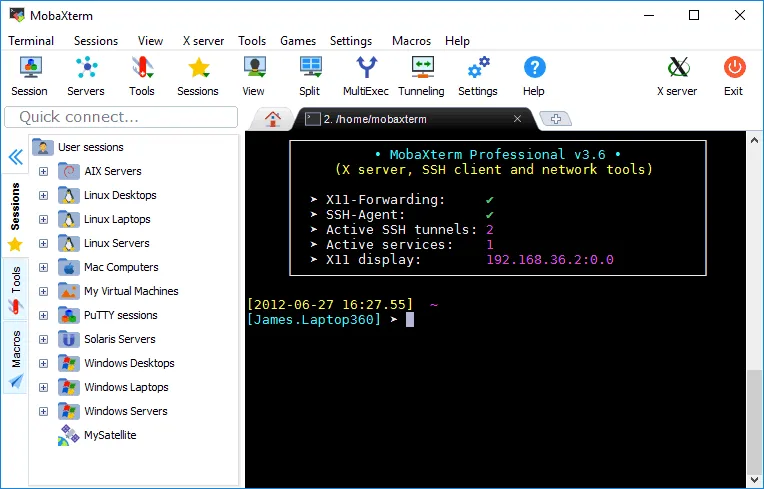
According to Mobatek’s official site, MobaXterm combines a tabbed terminal with built-in support for common remote-access protocols and related admin utilities. The official download messaging highlights SSH, telnet, RDP, VNC, X11, and more, which is why MobaXterm is often described less as a single terminal app and more as a Windows remote-work toolbox.
That positioning matters. Many terminal tools do one job very well: open shells, manage SSH connections, or provide file transfer. MobaXterm’s appeal is that it tries to reduce app switching. If you regularly jump between Linux servers, network devices, remote desktops, and graphical Linux apps over X11 forwarding, that convenience can save time every day.
Supported OS, stable version, and safety checks
| Check | What we could verify |
|---|---|
| Supported OS | Windows is explicitly central to the official positioning and download pages |
| Stable version | The official pages confirm an actively maintained downloadable release, but the exact current build number should be checked on the official download or Home Edition page at install time |
| Editions | Free Home edition and paid Professional edition are both disclosed on official pages |
| Documentation | Official documentation is available at https://mobaxterm.mobatek.net/documentation.html |
| Download source | Official HTTPS download page hosted on the Mobatek domain |
| Safety check | Use the official Mobatek download pages, confirm you are on the mobatek.net domain, and match the edition you actually need before installing |
This is an important distinction for buyers: MobaXterm appears safe to consider for SSH and SFTP work when obtained from its official site, but safety still depends on downloading it from the official Mobatek pages rather than mirrors or repackaged installers.
Who should use MobaXterm
- Windows users who want one program for shell sessions, file transfer, and multiple remote protocols
- Admins and developers who need SSH often but also use RDP, VNC, telnet, or X11 forwarding
- Users who manage many hosts and benefit from saved sessions and a central launcher
- People who prefer convenience and feature density over a stripped-down terminal interface
Who should skip MobaXterm
- Anyone who wants the cleanest possible terminal UI with fewer visible tools and panels
- Users who only need a lightweight SSH client and do not care about the extra remote-access features
- People who work across many platforms and want a more cloud-synced or mobile-friendly experience
- Buyers who strongly prefer software with a simpler edition story and fewer feature gates between free and paid plans
Why MobaXterm stands out in 2026
The easiest way to understand MobaXterm is to compare it with simpler alternatives. A tool like Windows Terminal focuses on a modern shell experience. A tool like PuTTY focuses on being lightweight and reliable for SSH-style access. MobaXterm goes wider: it tries to be the single dashboard you open before a remote work session.
That all-in-one design has real value. On Windows, it can be annoying to combine separate tools for SSH, SFTP, X11 forwarding, and remote desktop access. MobaXterm’s official positioning directly targets that pain point. If your daily work includes bouncing between command-line administration and graphical remote tasks, its integrated design is its best selling point.
The downside is equally clear: when software does many things, it usually feels denser. MobaXterm is not the app you choose for a minimal, distraction-free terminal window. You choose it because you want tabs, sessions, utilities, and remote-access shortcuts available immediately.
Simplified tasks MobaXterm is good at
- Connecting to Linux or Unix hosts over SSH from a Windows desktop
- Moving files over SFTP without opening a separate transfer client for basic workflows
- Launching remote desktop sessions from the same workspace you use for shells
- Running X11-forwarded applications when you need Linux GUI support on Windows
- Managing repeat connections with saved sessions instead of typing the same details again and again
For users who touch several of those tasks in the same week, MobaXterm can replace a small stack of standalone tools.
MobaXterm vs Windows Terminal, Termius, and PuTTY
MobaXterm vs Windows Terminal
Windows Terminal is a better fit if you mainly want a polished, modern terminal shell experience on Windows and do not need MobaXterm’s broader remote toolbox. It feels cleaner and more focused.
MobaXterm is the better fit if your workflow regularly expands beyond shell tabs into integrated remote-access tasks. If you want a Microsoft-first terminal, read Hubkub’s review of Windows Terminal.
MobaXterm vs Termius
Termius makes more sense if your priority is a cleaner SSH-centric experience and cross-device account-style workflow. It is easier to recommend to users who care more about SSH organization than bundled Windows admin extras.
MobaXterm wins when you specifically want a wider Windows toolkit that includes more remote protocol variety and X11-oriented convenience from one local application.
MobaXterm vs PuTTY
PuTTY stays attractive because it is well-known, lightweight, and focused. If you only need straightforward SSH-style connectivity and do not want a feature-heavy workspace, PuTTY remains a sensible alternative.
MobaXterm pulls ahead when you want tabs, richer session convenience, and a broader bundle of remote-access features under one roof.
Direct substitutes worth considering
- Windows Terminal for a free, modern, shell-focused Windows terminal: Windows Terminal review
- PuTTY if you want a simpler, classic SSH-first option
- Termius if you want a more SSH-centric experience with cleaner organization
- WinSCP if your priority is file transfer and SFTP workflows more than all-in-one remote administration: WinSCP review
Related remote-access tools on Hubkub include Parsec for low-latency remote streaming and scrcpy for Android screen mirroring.
MobaXterm Review pros and cons: fit notes
Pros
- Broad all-in-one remote-admin convenience on Windows
- Officially positioned around SSH, telnet, RDP, VNC, X11, and more
- Useful for people who want fewer separate apps in their workflow
- Official documentation is easy to locate
- Free Home edition lowers the barrier for personal evaluation
Cons
- Interface can feel busier than cleaner terminal-only tools
- Not the best choice if you only need a minimal shell app
- Edition split means some users may outgrow the Home edition and need to assess paid Professional options
- Windows-centric value proposition will be less compelling if you mainly work across non-Windows environments
Pricing and edition split
The official pages make the commercial structure clear: MobaXterm offers a free Home edition and a paid Professional edition. That is neither unusual nor a deal-breaker, but it does affect the buying decision.
For many individual users and home lab scenarios, the Home edition is the obvious starting point because it lets you evaluate whether the integrated workflow is worth adopting. Teams, consultants, and heavy professional users should compare the Home and Professional pages carefully to decide whether the paid edition’s limits and features align with their workload.
Who should download MobaXterm Review?
MobaXterm remains one of the most compelling Windows remote-admin toolboxes because it solves a very specific problem better than simpler terminals do: it gathers many remote-access tasks into one place. That convenience is its strongest argument, and it is exactly why so many Windows admins and developers keep it on shortlists.
The catch is that it is not trying to be minimal. If you want a clean terminal above all else, Windows Terminal, Termius, or PuTTY may fit better. But if your real-world workflow mixes SSH, SFTP, remote desktop access, and X11-related tasks, MobaXterm’s broad feature set makes practical sense.
Final verdict: MobaXterm is a strong buy for Windows users who value an all-in-one SSH and remote-access toolbox, but users who prefer a simpler interface should compare it carefully against lighter alternatives.
MobaXterm Review download and safety questions
Is MobaXterm free for home use?
Yes. The official pages supplied for this review indicate that MobaXterm offers a free Home edition alongside a paid Professional edition.
Is MobaXterm safe for SSH and SFTP work?
It is reasonable to treat MobaXterm as safe to evaluate for SSH and SFTP work when downloaded from the official Mobatek pages referenced above. As always, use the official domain and avoid third-party mirrors or repackaged installers.
What does MobaXterm do better than Windows Terminal?
MobaXterm’s main advantage is breadth. Official positioning emphasizes that it bundles remote-access features such as SSH, RDP, VNC, X11, and related tools in one application, while Windows Terminal is better understood as a cleaner terminal environment.
Who should pay for the Professional edition?
Users who rely on MobaXterm heavily for professional remote administration, need more than the Home edition comfortably provides, or want to standardize around it for work should compare the Professional offering against the free Home edition on the official site.
Reader-first software checklist
Before installing or switching to this software, use this quick checklist to confirm whether it fits your needs and risk tolerance.
- Official source: prefer the developer website, official documentation, or a clearly trusted distribution channel.
- Platform fit: check whether your Windows, macOS, Linux, Android, or iOS version is supported.
- License and cost: confirm whether the app is free, open source, freemium, trial-based, or paid.
- Privacy and permissions: review what files, folders, network access, account data, or browser permissions the app may use.
- Backup first: for recovery, storage, networking, privacy, or system utilities, back up important data before changing settings.
Safe download and setup notes
Hubkub does not recommend clicking misleading download buttons or installing unknown bundles. When possible, use the official source and avoid third-party installers that add toolbars, browser changes, or unrelated offers. After downloading, verify the file name, publisher, version, and installer prompts before continuing.
Pros, limits, and alternatives to consider
- Best fit: readers who need the core function described in this guide and prefer a practical setup path.
- Watch out for: outdated versions, unsupported platforms, unclear installers, or features that require paid upgrades.
- Compare alternatives: if this app feels too complex, too limited, or not maintained enough for your workflow, compare it with similar tools before installing.
Related Hubkub resources: Safe Software Downloads, Software Reviews, How We Review Software, and Content Quality Standards.
FAQ
Should I download this software from any mirror site?
Use the official developer website or a trusted distribution channel whenever possible. Mirror sites can be useful in limited cases, but they may also include outdated installers, misleading ads, or unwanted bundles.
What should I check before installing?
Check the publisher, version, license, supported operating system, installer prompts, and whether the app requests sensitive permissions.