Ventoy is still one of the most practical boot-media downloads in 2026 if your real goal is to build a reusable bootable USB drive without reformatting it for every new ISO. This review is based only on official sources checked on April 20, 2026. I verified the official homepage, official download page, official docs and news hub, official FAQ and getting-started pages, the official license page, and the official GitHub release source for the current public version story.
Last updated: April 20, 2026
- Rechecked the official homepage, download page, docs/news hub, FAQ, license page, and GitHub release source for the current public version story.
- Confirmed the current stable version, release date, Windows and Linux download artifacts, checksum availability, and the official screenshot path used as the featured image.
Key takeaways
- Ventoy is best for people who want one reusable bootable USB workflow for many ISO, WIM, IMG, VHD(x), and EFI files instead of rebuilding media every time.
- The official site currently lists v1.1.11 with Windows and Linux packages dated 2026-04-05, plus SHA-256 values on the official download page and matching release notes on the official GitHub release.
- Ventoy is free and open-source, with the official license page stating that the author-developed code follows GPLv3+ while other included open-source components keep their own licenses.
- Download decision: use the official Ventoy site and its linked official distribution paths, not stale catalog pages or random mirrors, for the real install path.
Official download path for Ventoy Review
Hubkub does not host installers. Use the official vendor/project page first, then use this review to check fit, limits, and safer setup notes.
Hubkub verification notes for Ventoy Review
- Official download/support links already cited on this page were checked as the preferred source path for Ventoy Review.
- Hubkub does not host installer files; the download action points readers back to the official vendor or project source.
- This page separates practical fit, trade-offs, and safety notes so readers can decide whether Ventoy Review matches their workflow.
Verification notes checked for Ventoy Review
Review type: official-source review
Verified on: April 20, 2026
Thaiware discovery URL: https://software.thaiware.com/11227.html
Official homepage: https://www.ventoy.net/en/index.html
Official download URL: https://www.ventoy.net/en/download.html
Official docs/news hub: https://www.ventoy.net/en/doc_news.html
Official FAQ/help: https://www.ventoy.net/en/faq.html
Official get started: https://www.ventoy.net/en/doc_start.html
Official license page: https://www.ventoy.net/en/doc_license.html
Official repo: https://github.com/ventoy/Ventoy
Official release source: https://github.com/ventoy/Ventoy/releases/tag/v1.1.11
Latest stable version checked: v1.1.11
Release date shown on official sources: April 5, 2026
Official download artifacts seen: ventoy-1.1.11-windows.zip, ventoy-1.1.11-linux.tar.gz, and ventoy-1.1.11-livecd.iso
Checksum proof: SHA-256 values are published on the official download page and repeated on the official GitHub release for the current release assets
Pricing / license truth: free, open-source; author-developed code GPLv3+ with other OSS components
Official app availability checked: Windows and Linux downloads
Compatibility wording checked separately: Ventoy says it can boot many OS image types and supports x86 Legacy BIOS plus IA32 UEFI, x86_64 UEFI, ARM64 UEFI, and MIPS64EL UEFI variants
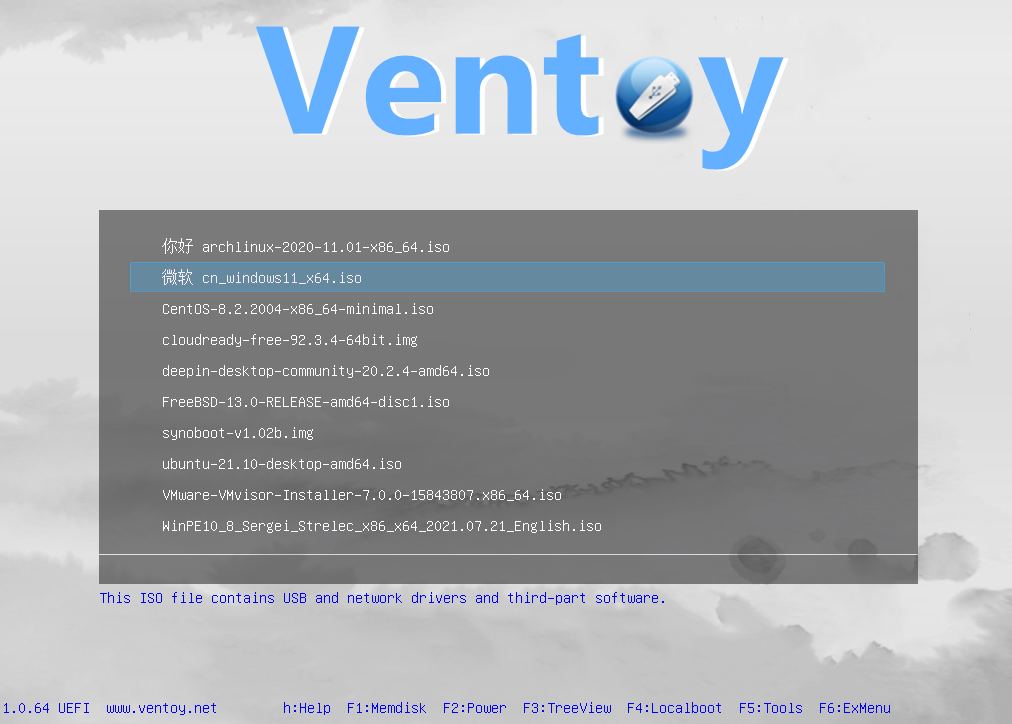
Featured image mode: official_screenshot
Featured image source: https://www.ventoy.net/static/img/screen/screen_uefi.png
Hands-on install test for this update: not performed
Official resources
Who Ventoy is for
Ventoy is for users who repeatedly need bootable media and are tired of rebuilding USB sticks from scratch. The official homepage still describes it as an open-source tool that creates a bootable USB drive for ISO, WIM, IMG, VHD(x), and EFI files. The practical promise is simple: you install Ventoy to a drive once, then copy supported image files onto that drive and boot them directly. That is a materially different workflow from older single-image USB creators that expect you to erase and rewrite the stick every time you want a new installer or rescue environment.
That makes Ventoy especially attractive for IT generalists, repair technicians, lab admins, Linux hobbyists, and careful home users who keep several installation and recovery images around. If you regularly switch among Windows installers, Linux distributions, rescue tools, firmware utilities, and maintenance environments, the one-drive-many-images model is still its biggest reason to exist. The official homepage also says 1300+ image files are tested and that support spans many operating-system image types, but that compatibility story should be treated as image compatibility, not as proof that Ventoy itself ships a native desktop app for every OS under the sun.
What makes it different from a normal bootable USB creator
The easiest way to understand Ventoy is to focus on what it removes. With many traditional tools, the normal routine is choose one image, write it to the device, lose the previous contents, then repeat when your needs change. Ventoy’s official positioning is different: install the Ventoy framework once, keep your main data partition, and add or remove bootable image files as needed. The homepage also highlights that the menu can present multiple boot entries, that both MBR and GPT partition styles are supported, and that the same project aims to work across x86 Legacy BIOS and several UEFI variants.
That flexibility is why Ventoy still matters in 2026. It is not just a convenience feature. It changes the maintenance burden for anyone who keeps a toolbox USB on hand. The official getting-started documentation also says that upgrading Ventoy on an already prepared USB drive is intended to be safe and that files in the first partition remain unchanged during version upgrades. That non-destructive update model is one of the strongest reasons advanced users keep coming back to it.
Pricing and license reality
Ventoy has a clean pricing story: it is free and open-source. More importantly, the official license page explains the nuance instead of hiding it. Ventoy says it is composed of many open-source projects and some code developed by the author, and that the author-developed code follows GPLv3+ while modified third-party code follows each project’s own license. That is the correct licensing reality to communicate on a canonical download page. It is not a freeware teaser for a paid upgrade. It is not a subscription utility disguised as a official download page. It is an open-source project with a mixed-component license stack that the official site documents openly.
For cautious downloaders, that transparency matters. A lot of software in the boot-media category gets mirrored, repackaged, or summarized poorly by directories that flatten important license and support details. Ventoy’s own site gives a clearer trust path than most portals do, and for this review that clarity is more important than flashy marketing.
Current version, download proof, and platform wording
The official download page currently lists v1.1.11 and exposes three primary release artifacts: a Windows ZIP package, a Linux tar.gz package, and a LiveCD ISO, all dated 2026-04-05. The same version appears on the official homepage news block and on the official GitHub release page labeled Ventoy 1.1.11 release (6th Anniversary Ver.). The GitHub release notes also repeat the SHA-256 section and name the same current assets. That kind of agreement across homepage, download page, and release source is exactly what a source-verified download review should want.
It is also important to keep the platform wording disciplined. The official current app availability I verified is Windows and Linux downloads. Separately, the official compatibility story is much broader: Ventoy says it supports many image types and many boot environments, including Windows, WinPE, Linux, ChromeOS, Unix, VMware, and Xen images, with support for Legacy BIOS and several UEFI variants. Those are not the same claim. Saying Ventoy can boot many kinds of OS images is accurate. Saying Ventoy is a native app download for every one of those operating systems would be overstated, so this review does not do that.
Safety and trust signals
Ventoy has a stronger-than-average trust story for this category because the official website itself surfaces practical proof markers. The download page publishes SHA-256 values beside the current binary packages. The official GitHub release page repeats those SHA-256 values and documents what changed in v1.1.11, including fixes and improvements around Windows or WinPE display behavior, AutoInstall plugin options, and script improvements. The site also links directly to the source repository instead of hiding development behind a vague brand page.
That said, readers should keep the right boundary in mind. I did not run a local install, recalculate hashes, or audit the code for this update. This is an official-source review, not a reverse-engineering report. The practical meaning is that the official distribution path looks credible and well-documented, not that every boot scenario or every third-party ISO you place on a Ventoy drive is automatically safe. Ventoy can make the boot medium workflow cleaner, but the trustworthiness of the images you add still depends on where those images came from.
Ease of use and learning curve
Ventoy’s core idea is beginner-friendly even though the product sits close to advanced system tasks. The official getting-started page shows a straightforward model for Windows and Linux: install Ventoy to the target disk, then copy image files onto the prepared partition. That is conceptually simpler than many multiboot tools that expect heavy manual configuration just to get started. The official homepage also emphasizes that no extraction is needed for supported image files and that the USB drive can still be used normally for data storage.
Where the learning curve appears is in edge cases. The official docs and FAQ go deep into Secure Boot notes, local-disk use, browser boot modes, plugin-based automation, non-destructive install recovery, special boot modes, and troubleshooting when the installer cannot detect a device or when a specific ISO behaves unexpectedly. That is not a negative. It actually suggests the project has grown into a serious toolkit. But it does mean beginners should not confuse Ventoy with a single-click toy app. It is easy to start with, yet powerful enough to expose more advanced controls when you need them.
Ventoy vs Rufus vs balenaEtcher in 2026
| Product | Choose it when | Main compromise |
|---|---|---|
| Ventoy | You want one reusable USB workflow for many bootable images and value non-destructive upgrades | Best experience assumes you understand boot media basics and occasional compatibility nuances |
| Rufus | You want a focused Windows utility to write a specific image to a USB drive quickly | Not built around the same keep-many-images-on-one-drive workflow |
| balenaEtcher | You want a simple mainstream flasher with a cleaner consumer-style interface | Less specialized around multiboot toolbox behavior |
The key decision rule is simple. Choose Ventoy when the reusable multiboot model is the feature you actually need. If you only ever write one installer to one drive once in a while, another flasher may feel simpler. But if you are maintaining a toolkit drive over time, Ventoy still has the clearer advantage.
Ventoy Review pros and cons: fit notes
Pros
- Official homepage, download page, and GitHub release source all agree on the current v1.1.11 release story
- Windows and Linux downloads are clearly exposed on the official site
- Official download page publishes SHA-256 values for current artifacts
- The one-drive-many-images workflow is still genuinely different from ordinary USB writers
- Official docs cover advanced use cases such as Secure Boot notes, plugins, and non-destructive operations
Cons
- Ventoy is more powerful than a basic one-click flasher, so some troubleshooting scenarios are inherently more technical
- Compatibility spans many tested images, but some edge-case ISOs still need readers to check official docs or FAQ notes
- Safety of the USB tool does not guarantee safety of every ISO or image file added to the drive
Safe official download notes for Ventoy Review
Use the official Ventoy homepage and official download page as your starting point. The download page itself notes that the website is underprovisioned and points users to the official file-hosting path, which is better than pretending the binaries live only on the marketing page. For this review, the safest trust sequence was: official homepage, official download page, official docs and FAQ, official license page, then official GitHub release source. Thaiware was used only as the discovery provenance layer.
If you decide to install Ventoy, keep two habits in place. First, get the package from the official source path rather than third-party mirrors. Second, verify that the version and checksums shown on the download page match the current official release source. That is the right level of caution for a utility that sits close to disk and boot workflows.
Who should download Ventoy Review?
Ventoy remains one of the strongest canonical download candidates in the bootable-media category in 2026. The official source path is unusually clear, the current release story is easy to verify, the licensing page is honest about GPLv3+ author code plus other open-source components, and the product still solves a real pain point that simpler flashers do not address. It is not the right choice for every casual one-off USB write job, but if your real workflow involves maintaining a flexible multiboot or recovery drive, Ventoy is still an excellent official download.
Ventoy Review download and safety questions
Is Ventoy safe to download?
Ventoy looks trustworthy when you use the official site and the official release path. The official download page publishes SHA-256 values, and the official GitHub release page matches the current version and asset names. I did not perform a hands-on malware or code audit for this update, so the conclusion is source-verified rather than lab-tested.
Is Ventoy really free?
Yes. The official site presents Ventoy as open source, and the official license page says the author-developed code follows GPLv3+ while other included open-source components follow their own licenses. There is no paid desktop tier shown on the official Ventoy download path.
Does Ventoy work only with Linux ISOs?
No. The official homepage says Ventoy supports ISO, WIM, IMG, VHD(x), and EFI files and references broad image compatibility across Windows, WinPE, Linux, ChromeOS, Unix, VMware, and Xen image types. That is image compatibility wording, not a claim about native app downloads for all those platforms.
Does Ventoy support BIOS and UEFI systems?
Yes. The official homepage says Ventoy supports x86 Legacy BIOS as well as IA32 UEFI, x86_64 UEFI, ARM64 UEFI, and MIPS64EL UEFI. The FAQ and docs also include Secure Boot notes for readers who need those details.
What is Ventoy’s biggest advantage over ordinary USB writers?
The main advantage is that you install Ventoy once and then copy multiple supported image files to the prepared drive instead of repeatedly reformatting the USB stick for each new installer. For anyone who maintains a rescue or deployment toolkit, that remains the main reason to choose it.
Software review and safety note
Hubkub reviews software pages with a safety-first checklist: we check the product purpose, supported platforms, license or pricing signals, common user risks, official documentation or vendor pages where available, and whether the download path could confuse readers. For safety, prefer the developer’s official website or a clearly trusted source, avoid installer bundles you do not recognize, and scan downloaded files with your device security tools before installing.
Learn more about our standards in Editorial Policy, Content Quality Standards, and Corrections Policy.
Related Hubkub resources
Reader-first software checklist
Before installing or switching to this software, use this quick checklist to confirm whether it fits your needs and risk tolerance.
- Official source: prefer the developer website, official documentation, or a clearly trusted distribution channel.
- Platform fit: check whether your Windows, macOS, Linux, Android, or iOS version is supported.
- License and cost: confirm whether the app is free, open source, freemium, trial-based, or paid.
- Privacy and permissions: review what files, folders, network access, account data, or browser permissions the app may use.
- Backup first: for recovery, storage, networking, privacy, or system utilities, back up important data before changing settings.
Safe download and setup notes
Hubkub does not recommend clicking misleading download buttons or installing unknown bundles. When possible, use the official source and avoid third-party installers that add toolbars, browser changes, or unrelated offers. After downloading, verify the file name, publisher, version, and installer prompts before continuing.
Pros, limits, and alternatives to consider
- Best fit: readers who need the core function described in this guide and prefer a practical setup path.
- Watch out for: outdated versions, unsupported platforms, unclear installers, or features that require paid upgrades.
- Compare alternatives: if this app feels too complex, too limited, or not maintained enough for your workflow, compare it with similar tools before installing.
Related Hubkub resources: Safe Software Downloads, Software Reviews, How We Review Software, and Content Quality Standards.
FAQ
Should I download this software from any mirror site?
Use the official developer website or a trusted distribution channel whenever possible. Mirror sites can be useful in limited cases, but they may also include outdated installers, misleading ads, or unwanted bundles.
What should I check before installing?
Check the publisher, version, license, supported operating system, installer prompts, and whether the app requests sensitive permissions.