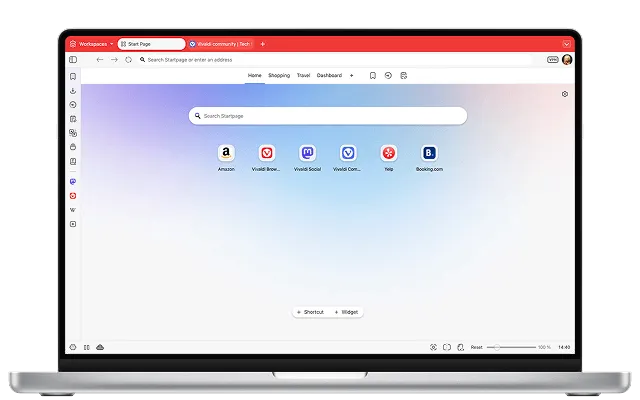
Vivaldi is still one of the most interesting browser downloads in 2026 if you care more about power-user control than minimalist defaults. This review is based only on official sources checked on April 20, 2026. I verified the Thaiware discovery page for provenance, then checked the official Vivaldi homepage, the official download page, the official help article for obtaining official builds, the latest checked official desktop update post, and the live official screenshot asset used as the featured image. This is a review based on official source checks; the goal here is to verify the safe download path, pricing reality, platform support, and whether Vivaldi is a clean fit for the right kind of browser user.
Last updated: April 20, 2026
- Rechecked the official homepage, official download page, official signature-guidance help article, and the latest checked official desktop update post.
- Confirmed that the official download page now exposes stable desktop build 7.9.3970.55, which is newer than the current Thaiware product-page version line.
Key takeaways
- Vivaldi is best for people who want a feature-heavy desktop browser with tab stacking, workspaces, built-in mail, calendar, notes, and broad interface customization.
- Official proof checked: the live download page currently exposes stable desktop artifact names such as Vivaldi.7.9.3970.55.x64.exe and Vivaldi.7.9.3970.55.arm64.exe.
- Safe download path: use
vivaldi.com/download/and the official help article about obtaining official builds, not third-party mirrors or recycled installer sites. - Reality check: Vivaldi is free to download, but it is not the same product philosophy as ultra-minimal browsers. Its value is the built-in toolset and customization depth.
Official download path for Vivaldi Review
Hubkub does not host installers. Use the official vendor/project page first, then use this review to check fit, limits, and safer setup notes.
Hubkub verification notes for Vivaldi Review
- Official download/support links already cited on this page were checked as the preferred source path for Vivaldi Review.
- Hubkub does not host installer files; the download action points readers back to the official vendor or project source.
- This page separates practical fit, trade-offs, and safety notes so readers can decide whether Vivaldi Review matches their workflow.
What I verified for this review
- Review basis: official source checks
- Thaiware discovery URL: https://software.thaiware.com/download/Vivaldi
- Official homepage: https://vivaldi.com/
- Official download URL: https://vivaldi.com/download/
- Official help checked: https://help.vivaldi.com/desktop/install-update/obtaining-official-builds/
- Official release source checked: https://vivaldi.com/blog/desktop/minor-update-six-7-9/
- Latest stable version checked on the official download page: 7.9.3970.55
- Official desktop update post date checked: April 16, 2026
- Current official Windows artifacts seen: Vivaldi.7.9.3970.55.x64.exe and Vivaldi.7.9.3970.55.arm64.exe
- Official pricing reality checked: free browser download from the vendor
Official resources
If Vivaldi sounds like the right browser for your workflow, use the vendor’s own download route and keep the official help and update pages nearby.
Who Vivaldi is best for
Vivaldi makes the strongest case for itself when you want one browser to absorb a lot of daily tools that other browsers split into add-ons or separate apps. The official site still pitches the browser around customization, privacy defaults, tabs, workspaces, and built-in side tools. the practical effect is Vivaldi is not really the right recommendation for someone who just wants the lightest possible interface. It is better for people who keep many tabs open, manage multiple contexts, want mail and calendar inside the browser window, or like changing keyboard shortcuts, panels, tab behavior, and layout details.
In practical buyer-intent terms, Vivaldi is a better fit for a researcher, writer, analyst, marketer, or developer who wants one browser environment to feel like a tuned workspace. If your normal browser habit is closer to “open a few tabs and stay out of settings,” Opera, Brave, or Firefox may feel simpler faster. Vivaldi wins when the feature density is the reason you are shopping.
Pricing and license reality
Vivaldi is presented by the vendor as a free browser download. That is the clean official pricing reality to surface near the top. At the same time, it helps to be precise about what that does and does not mean. Vivaldi is free to install and use across major desktop platforms, and the official download page still exposes Windows, macOS, and Linux routes. But “free” here does not automatically mean identical licensing philosophy to every other privacy-focused browser people compare it with. For a downloads review, the important truth layer is that the vendor offers it as a free mainstream browser, not as a trialware package or a paid desktop app.
The other practical pricing note is indirect rather than subscription-based. Vivaldi publicly discloses partner bookmarks and Speed Dials on the download page footer area, which is a more transparent business explanation than pretending the product exists with no revenue logic at all. That makes the browser easier to explain honestly: free to the user, feature-rich, privacy-forward in its positioning, but still part of a business that uses partner relationships rather than charging a consumer license fee.
What the official source trail proves
The strongest trust marker on this review is the current official download page. It exposes live stable artifact names directly in the URLs, including Vivaldi.7.9.3970.55.x64.exe for standard 64-bit Windows installs and Vivaldi.7.9.3970.55.arm64.exe for Windows on ARM. That is a better proof marker than vague “latest version” wording because it ties the public page to exact installer names. For people who are careful about Windows downloads, that is the kind of concrete evidence worth showing near the top.
The official help article on obtaining official builds also matters. It gives a first-party route for checking that you are using legitimate vendor builds instead of random repacks. Not every browser vendor makes that trust path visible enough for a downloads review. Vivaldi does, which improves the credibility of the safe-download guidance here even though I am not claiming a live endpoint signature test from this machine.
The official desktop blog post I checked was Minor update (6) for Vivaldi Desktop Browser 7.9, dated April 16, 2026. That post is useful as the release-story layer, but it does not need to expose the exact same artifact string as the download page to be valuable. The honest way to present it is: the release trail confirms the active 7.9 desktop branch, while the download page supplies the exact live installer filenames for the current stable build.
How Vivaldi compares with Opera, Brave, and Firefox
| Product | Best fit | What stands out | Main tradeoff |
|---|---|---|---|
| Vivaldi | Power users with many tabs and workflow tweaks | Deep customization, workspaces, mail, calendar, notes, panels | Heavier interface than minimalist browsers |
| Opera | Users who want a polished mainstream browser with built-in convenience tools | Built-in ad blocker, cleaner out-of-box feel, simpler mainstream pitch | Less customization depth than Vivaldi |
| Brave Browser | Privacy-focused users who want faster defaults and less setup | Strong privacy defaults and straightforward mainstream browsing | Less of a built-in workspace environment |
| Firefox | Users who prefer an established open-web browser with broad extension culture | Strong extension ecosystem and familiar independent-browser identity | Less integrated all-in-one tooling than Vivaldi |
This is the real comparison logic. Vivaldi is not simply “another Chromium browser.” Its strongest reason to exist is workflow density. If you want a browser to act like a flexible control panel for research, communication, and tab-heavy work, it has a stronger identity than many competitors. If you want the fewest decisions and the cleanest default window, it can feel like too much.
Safe official download notes for Vivaldi Review
If you decide to download Vivaldi, start at the official download page and not at a mirror. The official page currently gives direct platform routes and stable package filenames, which is exactly what you want from a trust perspective. For Windows users, the public artifact names make it easier to confirm whether you intended to grab the standard x64 installer or the ARM64 build. For Linux users, the official page also exposes Debian and RPM package routes. For macOS, the official page exposes the universal DMG.
The other safe-download step is to use the vendor’s own help article about obtaining official builds when you want extra confidence about legitimacy. That does not replace normal caution, but it is much stronger than relying on old forum posts or SEO-heavy download portals. Also note the Thaiware page is useful only for discovery provenance in this workflow. It currently shows an older version line than the official Vivaldi download page, so the official vendor pages are the truth layer for current-version claims.
Vivaldi Review pros and cons: fit notes
Pros
- Exact live installer names are visible on the official download page
- Broad desktop platform support from one vendor
- Strong built-in workflow features for tabs, workspaces, mail, calendar, and notes
- Official help article explicitly covers obtaining official builds
Cons
- Feature density can feel heavy if you want a minimal browser
- Thaiware version line can lag the official stable build, so discovery and truth layers must stay separate
- Some users will prefer simpler privacy browsers over a deeply customizable workspace-style browser
Alternatives worth considering
Opera is the closest pick if you want a consumer-friendly mainstream browser with convenient built-in features but a less complicated interface. Brave Browser is the better starting point if privacy defaults matter more than built-in work-management tools. If your main reason for considering Vivaldi is keeping communication and organization inside a browser shell, a companion desktop tool like Telegram Desktop can still make sense alongside a simpler browser instead of inside it.
Who should download Vivaldi Review?
Vivaldi is a credible and safe browser download in 2026 when you get it from the official vendor pages and when your needs actually match the product’s personality. It is free, the official download route is clear, the official help path for legitimate builds is public, and the desktop update trail is still active. The real caution is not security panic. It is fit. Vivaldi is worth downloading if you want a customizable browser workspace with serious tab and interface control. It is less compelling if you mainly want the most stripped-down browser experience possible.
Vivaldi Review download and safety questions
Is Vivaldi safe to download in 2026?
Yes, if you use the official Vivaldi download page and the vendor’s own help guidance for obtaining official builds. The strongest proof marker I checked is that the official page exposes current installer filenames directly, which is much safer than relying on generic mirror sites or recycled installer portals.
Is Vivaldi really free?
Yes. The vendor presents Vivaldi as a free browser download across desktop platforms. The honest caveat is business model clarity, not hidden paywall drama: the site also discloses partner bookmark and Speed Dial relationships instead of pretending there is no commercial logic behind the product at all.
Does Vivaldi include mail and calendar?
Yes. One of Vivaldi’s key differentiators is that it is positioned as more than just a tab renderer. The vendor still promotes built-in mail, calendar, notes, and other workspace-style tools, which is why the browser appeals more to power users than to people shopping for a minimal browser shell.
Is Vivaldi better than Opera or Brave for power users?
It often is, if your definition of better means more control over interface behavior, tab management, side panels, and integrated tools. Opera is easier to recommend to someone who wants a smoother mainstream default setup, while Brave is easier to recommend to someone prioritizing simpler privacy defaults with less browser-surface complexity.
Should Windows users use the x64 or ARM64 installer?
Most Windows laptops and desktops should use the x64 installer, while Windows on ARM machines should use the ARM64 package. The official Vivaldi download page helps here because it exposes both artifact names clearly. If you are unsure which architecture you own, confirm your system type in Windows before downloading.
Reader-first software checklist
Before installing or switching to this software, use this quick checklist to confirm whether it fits your needs and risk tolerance.
- Official source: prefer the developer website, official documentation, or a clearly trusted distribution channel.
- Platform fit: check whether your Windows, macOS, Linux, Android, or iOS version is supported.
- License and cost: confirm whether the app is free, open source, freemium, trial-based, or paid.
- Privacy and permissions: review what files, folders, network access, account data, or browser permissions the app may use.
- Backup first: for recovery, storage, networking, privacy, or system utilities, back up important data before changing settings.
Safe download and setup notes
Hubkub does not recommend clicking misleading download buttons or installing unknown bundles. When possible, use the official source and avoid third-party installers that add toolbars, browser changes, or unrelated offers. After downloading, verify the file name, publisher, version, and installer prompts before continuing.
Pros, limits, and alternatives to consider
- Best fit: readers who need the core function described in this guide and prefer a practical setup path.
- Watch out for: outdated versions, unsupported platforms, unclear installers, or features that require paid upgrades.
- Compare alternatives: if this app feels too complex, too limited, or not maintained enough for your workflow, compare it with similar tools before installing.
Related Hubkub resources: Safe Software Downloads, Software Reviews, How We Review Software, and Content Quality Standards.
FAQ
Should I download this software from any mirror site?
Use the official developer website or a trusted distribution channel whenever possible. Mirror sites can be useful in limited cases, but they may also include outdated installers, misleading ads, or unwanted bundles.
What should I check before installing?
Check the publisher, version, license, supported operating system, installer prompts, and whether the app requests sensitive permissions.