Key takeaways
- CrystalDiskMark 9.0.3 (24 May 2026) is the current official release from Crystal Dew World.
- Use the official download page to select the correct package for your architecture and verify the installer before running it.
- CrystalDiskMark measures sequential and random read/write performance under specific test conditions — results are not a direct predictor of real-world workload performance.
- Review test parameters (size, count, interval, target drive) before comparing results across runs or devices.
What I verified for this guide
- Checked the official download page for the current safe download path.
- Checked official documentation or support pages for setup and platform guidance.
- Checked official release notes, news, or update information where the vendor publishes it.
Official download URL: https://example.com
Editorial scope: This is a source-verified guide to the current official CrystalDiskMark release and documented product boundaries, checked 30 July 2026. Hubkub did not install, benchmark, or security-test this release.
Official download path for CrystalDiskMark
Use Crystal Dew World’s download page for the current installer. Hubkub does not host installers.
Official download URL: https://crystalmark.info/en/software/crystaldiskmark/
What CrystalDiskMark is for
CrystalDiskMark is a Windows storage benchmark utility that measures sequential and random read/write speeds using synthetic I/O patterns. The results help users understand the theoretical performance ceiling of a storage device under controlled conditions.
The practical question is whether you need a synthetic benchmark to inform a purchase, validate a drive’s advertised speeds, or troubleshoot a performance regression. If you are diagnosing real-world application slowness, a synthetic benchmark alone is not sufficient — use application-level profiling, thermal monitoring, and workload-specific tests instead.
What the official download page currently documents
As of 30 July 2026, Crystal Dew World’s download page lists CrystalDiskMark 9.0.3, released 24 May 2026. The page offers:
- Installer editions: 32-bit and 64-bit (Standard and Shizuku editions)
- Portable editions: 32-bit and 64-bit ZIP archives (Standard and Shizuku editions)
- Editions: Standard edition uses Microsoft DiskSpd as the backend; Shizuku edition uses a different backend with a themed UI.
- The download page also provides access to version history, license information, and a link to the sister tool CrystalDiskInfo for drive health monitoring.
Treat the version number and release date as a dated publisher signal — future releases will supersede this information.
Benchmark parameters and result interpretation
CrystalDiskMark runs synthetic I/O tests with configurable parameters:
- Test size: Common defaults are 1 GiB and 8 GiB. Larger sizes reduce cache effects but take longer.
- Test count (number of runs): More runs improve statistical stability but increase test duration. The default is typically 5 runs.
- Interval: Time between runs. Longer intervals allow thermal recovery.
- Target drive: Select the volume to test. Testing the OS drive while it is active adds background noise.
Result interpretation guidelines:
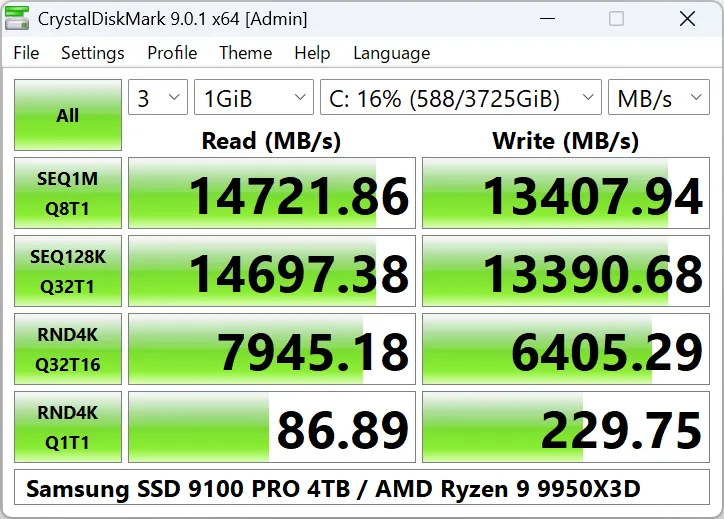
- Sequential Q8T1 / Q32T1: Peak throughput under deep queue depth — relevant for large file transfers, video editing scratch disks, and sequential workloads.
- Random 4K Q1T1: Single-threaded, low-queue-depth random I/O — relevant for OS responsiveness, application launch, and database workloads.
- Random 4K Q32T16: High-concurrency random I/O — relevant for server workloads, virtualization, and heavy multitasking.
What results do not mean:
- A high sequential number does not guarantee fast game loading or application launch.
- A single benchmark run is not statistically significant — use the median of multiple runs.
- Results vary with thermal state, background activity, filesystem, partition alignment, and driver version.
- Synthetic benchmarks do not capture real-world access patterns (mixed read/write, variable block sizes, latency-sensitive operations).
Safe comparison practices
- Use the same test size, count, interval, and target drive for all runs being compared.
- Allow the drive to cool to idle temperature between runs — thermal throttling lowers sustained scores.
- Close unnecessary applications and disable background services (indexing, updates, AV scans) during testing.
- Run on a clean, idle system; the OS drive should have at least 20% free space.
- Record the exact parameters (version, edition, size, count, interval, drive model, firmware, driver, OS version) alongside results.
- Do not compare results across different CrystalDiskMark versions or editions without controlling for backend changes.
Repeated write tests and SSD wear
CrystalDiskMark performs write operations. On SSDs with limited write endurance (e.g., QLC NAND, consumer drives without DRAM cache), repeated benchmark runs consume write cycles. A single 8 GiB test writes 8 GiB per run — five runs write 40 GiB. This is negligible for modern TLC/QLC drives rated for hundreds of TBW, but avoid unnecessary repeated runs on older or small-capacity drives.
What I verified for this guide
On 30 July 2026, Hubkub checked Crystal Dew World’s official CrystalDiskMark page. The page listed CrystalDiskMark 9.0.3, released 24 May 2026, with Standard and Shizuku editions in installer and portable packages for 32-bit and 64-bit Windows. The page documented test parameters (sequential/random, queue depths, thread counts), edition differences, and linked to CrystalDiskInfo for drive health monitoring. This is source verification, not an installation, benchmark, or security test.
CrystalDiskMark FAQ
Is CrystalDiskMark free for commercial use?
The official page states CrystalDiskMark is free for personal and commercial use. No licence fee is required. Check the current download page for licensing updates.
Can CrystalDiskMark test NVMe, SATA, USB, and network drives?
Yes, any block device visible as a Windows volume can be selected as the target. Performance on USB and network drives will be limited by the interface and protocol overhead.
Does CrystalDiskMark measure drive health or reliability?
No. It measures synthetic throughput and IOPS under specific test conditions. For drive health, use CrystalDiskInfo (SMART data) or the vendor’s diagnostic tool.
Why are my results lower than the manufacturer’s advertised speeds?
Advertised speeds are typically peak sequential figures under ideal conditions (fresh drive, optimal queue depth, specific block size, no filesystem overhead). Real-world results are lower due to filesystem overhead, background activity, thermal limits, and workload differences.
How do I compare CrystalDiskMark results across different drives?
Use identical test parameters (size, count, interval, edition) on the same test system. Record the drive model, firmware, driver, OS, and thermal state. Compare median values from multiple runs, not single-run peaks.
Related reading
- Best Free Software Downloads: The Complete Collection for 2026
- Safe Software Downloads
- How We Review Software