Bulk Rename Utility is still one of the most capable Windows batch renamers you can download in 2026, but the big decision point is not only feature depth. It is licensing clarity. This review is based on the official homepage, official download page, help path, release notes page, and the Thaiware discovery listing supplied for provenance. The official vendor pages clearly state that Bulk Rename Utility is free for personal, private home use, while commercial or business use requires a paid license. If you need serious file-renaming rules, preview controls, numbering, metadata tools, and regex or script-assisted patterns on Windows, it still looks like a strong download. If you need a fully free business deployment or a simpler beginner interface, that license split and the dense UI both matter.
Last updated: April 19, 2026
- Rechecked the official homepage, official download page, help path redirect, release notes page, and screenshot source for this refresh.
- Confirmed current version 4.1.0.1, Windows support claims, official installer artifact path, visible license language, and the public MD5 shown on the vendor download page.
Key takeaways
- Bulk Rename Utility version 4.1.0.1 is the current release shown on the official download page checked for this review.
- The vendor explicitly says the software is free of charge for personal, private use, at home, but business, company, or commercial use requires a license.
- The official Windows support statement is broad, covering Windows 11, Windows 10 including Windows on ARM, Windows 8, Windows 7, and multiple Windows Server releases.
- The interface is powerful but busy, so it is best for users who want rules, previews, and repeatable naming patterns rather than a polished minimalist experience.
Official download path for Bulk Rename Utility Review
Hubkub does not host installers. Use the official vendor/project page first, then use this review to check fit, limits, and safer setup notes.
Hubkub verification notes for Bulk Rename Utility Review
- Official download/support links already cited on this page were checked as the preferred source path for Bulk Rename Utility Review.
- Hubkub does not host installer files; the download action points readers back to the official vendor or project source.
- This page separates practical fit, trade-offs, and safety notes so readers can decide whether Bulk Rename Utility Review matches their workflow.
Verification notes checked for Bulk Rename Utility Review
- Review basis: official source checks
- Verified on: April 19, 2026
- Discovery provenance: Thaiware listing supplied in task context and rechecked at software.thaiware.com/5204.html
- Latest stable version checked: 4.1.0.1
- Beta version: none visible on the official pages checked for this update
- Release date shown on the official page: 18 Nov 2025
- Official homepage: https://www.bulkrenameutility.co.uk/
- Official download URL: https://www.bulkrenameutility.co.uk/Download.php
- Official help URL: https://www.bulkrenameutility.co.uk/help/ (redirects to https://bulkrename.software/help/)
- Official release notes URL: https://www.bulkrenameutility.co.uk/Whatsnew.php
- Supported OS shown officially: Windows 11, 10 (including Windows on ARM), 8, 7; Server 2025, 2022, 2019, 2016, 2012, 2008
- File size: official installer link resolved to BRU_setup_4.1.0.1.exe at about 12.22 MiB; official no-installer ZIP resolved at about 21.57 MiB
- Display unit used: MiB
- Installation path: use the official installer defaults unless your setup requires changes
- Signature check: verify on your device after downloading from the official source
- VirusTotal result: run your own malware scan before installing
- Hash if available: official download page shows MD5 50da7720a426c444ddf27313ac9275ed for the installer
- Specific numeric evidence: installer redirect exposed BRU_setup_4.1.0.1.exe with 12,814,424 bytes; portable ZIP exposed 22,619,712 bytes
Official resources
Use the vendor download page for the current installer and the portable ZIP, then use the help and release notes links to confirm workflow fit before deploying it widely.
Who should use Bulk Rename Utility
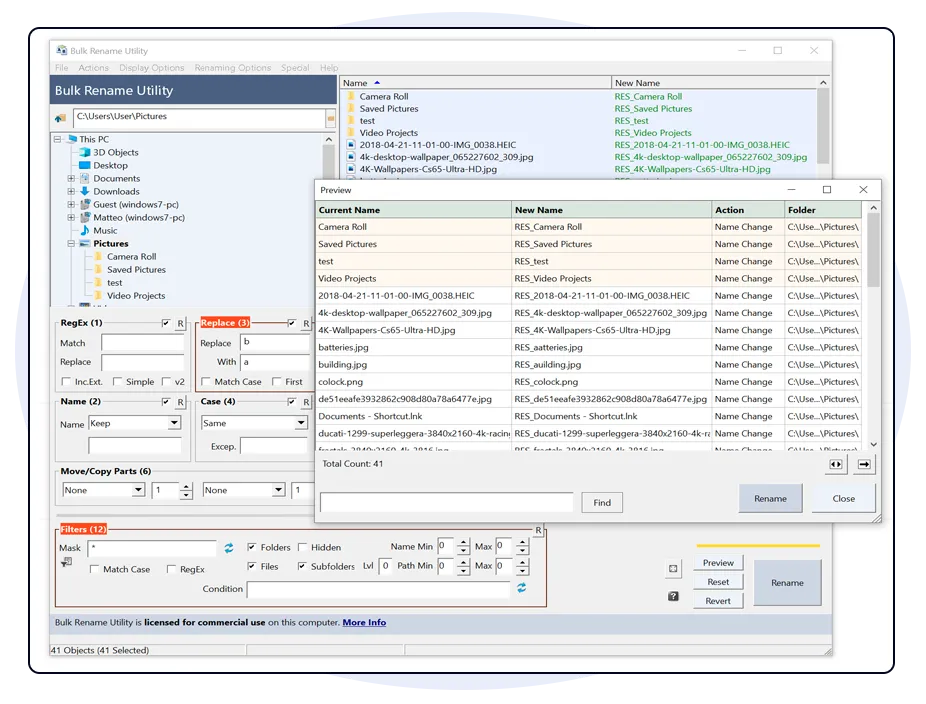
Bulk Rename Utility makes the most sense for Windows users who rename lots of files in patterns instead of one by one. Good fits include photographers cleaning up camera filenames, music collectors standardizing track names, office users reorganizing exports, and power users building repeatable renaming rules across folders. The attraction is not beauty. The attraction is control. The layout exposes many rename modules at once, so you can combine numbering, case changes, text replacement, date handling, append or prepend logic, folder import logic, and metadata-based changes without moving through a wizard every time.
It also makes sense for users who want a dedicated renaming tool instead of stretching a file manager beyond its comfort zone. Windows File Explorer can rename groups in a basic numeric sequence, and PowerRename is easier for some modern Windows users, but Bulk Rename Utility goes much deeper when you need multiple rules in a single pass.
Who should skip it
You should probably skip Bulk Rename Utility if you want a clean beginner-first interface, broad cross-platform support, or a product that is obviously free in every work context. The official language is very clear: personal and private home use is free, while business or commercial use requires a license. That alone removes it from the shortlist for some teams. You may also prefer something simpler if you only rename files occasionally. The screen is dense, and that density is part of the product design, not a temporary rough edge.
What the product simplifies for beginners
Even though the interface looks intimidating at first glance, the underlying value proposition is straightforward. Bulk Rename Utility puts most common rename building blocks into one place and shows a preview before you commit. That means a beginner does not need to memorize command-line syntax just to clean up a folder. Common jobs include replacing spaces with hyphens, adding project prefixes, removing camera junk from filenames, numbering files in a sequence, moving text from one part of the name to another, changing upper or lower case, or standardizing dates.
The reason the tool remains relevant is that it handles those jobs in combinations. A single rename pass can normalize case, remove a token, add a prefix, and apply numbering while showing what the new names should look like. That is where it starts to outperform simple built-in rename features.
Supported OS, download options, and safety signals
The official download page presents Bulk Rename Utility as a Windows desktop tool. The vendor explicitly lists Windows 11, Windows 10 including Windows on ARM, Windows 8, Windows 7, and several Windows Server versions. The installer page also states that the main installer includes both 32-bit and 64-bit versions, which is useful for older or mixed environments. There is also a no-installer ZIP for portable use, described as suitable when you do not have installation privileges or want a more portable setup.
For safety signals, the main positives are the consistency of the official site, the direct version labeling, the visible release date, the documented help path, and the public MD5 exposed on the download page. Those are useful trust markers because they give you concrete details to compare against the file you fetch. However, I did not rerun a local installer execution, signature verification, or VirusTotal submission for this update, so those items are disclosed here as not tested for this refresh.
If you are downloading it for personal use, the official path is easy to verify: go to the vendor domain, use the official download page, and avoid random mirror bundles. If you are deploying it in an office or business workflow, the licensing note is not optional reading. The official site states that business entity, company, or commercial use requires a commercial license.
Licensing and pricing reality
This is the most important practical point for many readers. Bulk Rename Utility is not positioned as unrestricted freeware for every scenario. The vendor text checked for this review says the software is free of charge for personal, private use at home. It separately says that use within a business entity, company, or for commercial purposes requires a commercial license. The site also references home or academic licenses that unlock all features. In other words, the free status is real for private home use, but it should not be summarized lazily as simply “free software” without the scope limitation.
That distinction matters because file utilities often get copied into office environments informally. If you are a solo home user organizing photos or documents, the free path is attractive. If you are buying for a business, school, managed desktop fleet, or any commercial workflow, you should treat the official buy pages as part of the download decision.
Bulk Rename Utility vs direct alternatives
| Tool | Best for | Why choose it instead | Why still choose Bulk Rename Utility |
|---|---|---|---|
| PowerRename | Windows 10 and 11 users who already use PowerToys | Cleaner modern integration, easier search-and-replace style batch jobs, lighter learning curve for many users | Bulk Rename Utility exposes many more rename modules in one screen and is better when you need layered rules beyond simple replacements |
| Advanced Renamer | Users who want a rich dedicated renamer with methods and batch workflows | Strong preset-style workflow, broad rename methods, often easier to reason about in staged jobs | Bulk Rename Utility stays appealing if you prefer a highly compact panel layout and the mature BRU workflow |
| Windows File Explorer rename | Very basic sequential rename jobs | Already built into Windows, zero extra install, best for occasional low-risk numbering tasks | Explorer falls short quickly when you need metadata, pattern replacement, conditional logic, or multiple rename actions at once |
| Total Commander multi-rename | Existing Total Commander users who already live in a dual-pane manager | Useful if file management and rename work already happen in Total Commander and you prefer one environment | Bulk Rename Utility is the more specialized choice when renaming depth is the main requirement rather than file manager integration |
The simple rule is this: choose PowerRename for simpler modern Windows convenience, choose Advanced Renamer for another strong specialist path, choose File Explorer for basic sequential renames, and choose Bulk Rename Utility when deep rename combinations are the actual priority.
For related file-management reading on Hubkub, see Q-Dir Review 2026, Total Commander Review 2026, and TeraCopy Review 2026.
Where Bulk Rename Utility Review works well — and where it may not
Pros
- Very deep batch renaming feature set for Windows users
- Official page clearly lists current version, release date, OS support, and download options
- Free for personal, private home use
- Portable no-installer ZIP is available officially
- Preview-driven workflow is better than blind rename scripting for many users
Cons
- Interface is dense and can overwhelm beginners
- Commercial or business use requires a license, so the free claim has limits
- Windows-focused rather than cross-platform
- This review did not include fresh live install, signature, or malware-scan verification
- Less visually modern than some newer Windows utilities
Who should download Bulk Rename Utility Review?
Bulk Rename Utility remains an easy recommendation in 2026 for one specific audience: Windows users who need serious batch renaming power and understand that utility software does not need to look elegant to be useful. The official site still provides enough concrete proof points to support a trustworthy source-verified recommendation, including version 4.1.0.1, release-date labeling, help and release-note paths, and separate installer and portable downloads. The key caveat is licensing. For a private home user, the free path is real and attractive. For a business or commercial environment, the official license requirement changes the buying decision immediately. If that split works for you, Bulk Rename Utility still looks like one of the stronger dedicated renamers in the Windows catalog.
Bulk Rename Utility Review download and safety questions
Is Bulk Rename Utility really free?
Yes, but only within the scope the vendor states. The official site says Bulk Rename Utility is free of charge for personal, private use at home. It also says business, company, or commercial use requires a license, so it is not unrestricted free use in every environment.
Is Bulk Rename Utility safe to download?
The safest path is the official vendor site at bulkrenameutility.co.uk, using the official download page rather than a third-party bundle or mirror. For this update I verified the official URLs, version labeling, release date, and the MD5 shown publicly, but I did not rerun a fresh local signature or VirusTotal check.
What version of Bulk Rename Utility is current in this review?
The official download page checked for this review listed Bulk Rename Utility version 4.1.0.1 and showed a release date of 18 Nov 2025. The installer redirect also exposed the filename BRU_setup_4.1.0.1.exe, which matches that version labeling.
Does Bulk Rename Utility work on Windows 11?
Yes. The official support text includes Windows 11 and Windows 10, including Windows on ARM, along with older Windows desktop releases and several Windows Server editions. This review is source-verified only, so that support statement comes from the vendor pages rather than a fresh live install test.
Is there a portable version of Bulk Rename Utility?
Yes. The official download page offers a no-installer ZIP called BRU_NoInstall.zip. The vendor describes it as useful when you want a portable copy or do not have installation privileges on the PC where you need to run it.
Is Bulk Rename Utility good for beginners?
It depends on the beginner. It can simplify complex rename jobs because everything is exposed in one interface with previews, but it is not a minimalist app. Beginners doing only occasional simple renames may prefer PowerRename or Windows File Explorer. Beginners who are willing to learn one dense but capable utility may appreciate Bulk Rename Utility’s depth.
What are the best alternatives to Bulk Rename Utility?
The closest direct substitutes depend on your workflow. PowerRename is strong for modern Windows convenience, Advanced Renamer is a good specialist alternative, File Explorer is fine for basic sequential renames, and Total Commander is useful if rename work is part of a larger dual-pane file-management workflow.
Reader-first software checklist
Before installing or switching to this software, use this quick checklist to confirm whether it fits your needs and risk tolerance.
- Official source: prefer the developer website, official documentation, or a clearly trusted distribution channel.
- Platform fit: check whether your Windows, macOS, Linux, Android, or iOS version is supported.
- License and cost: confirm whether the app is free, open source, freemium, trial-based, or paid.
- Privacy and permissions: review what files, folders, network access, account data, or browser permissions the app may use.
- Backup first: for recovery, storage, networking, privacy, or system utilities, back up important data before changing settings.
Safe download and setup notes
Hubkub does not recommend clicking misleading download buttons or installing unknown bundles. When possible, use the official source and avoid third-party installers that add toolbars, browser changes, or unrelated offers. After downloading, verify the file name, publisher, version, and installer prompts before continuing.
Pros, limits, and alternatives to consider
- Best fit: readers who need the core function described in this guide and prefer a practical setup path.
- Watch out for: outdated versions, unsupported platforms, unclear installers, or features that require paid upgrades.
- Compare alternatives: if this app feels too complex, too limited, or not maintained enough for your workflow, compare it with similar tools before installing.
Related Hubkub resources: Safe Software Downloads, Software Reviews, How We Review Software, and Content Quality Standards.
FAQ
Should I download this software from any mirror site?
Use the official developer website or a trusted distribution channel whenever possible. Mirror sites can be useful in limited cases, but they may also include outdated installers, misleading ads, or unwanted bundles.
What should I check before installing?
Check the publisher, version, license, supported operating system, installer prompts, and whether the app requests sensitive permissions.