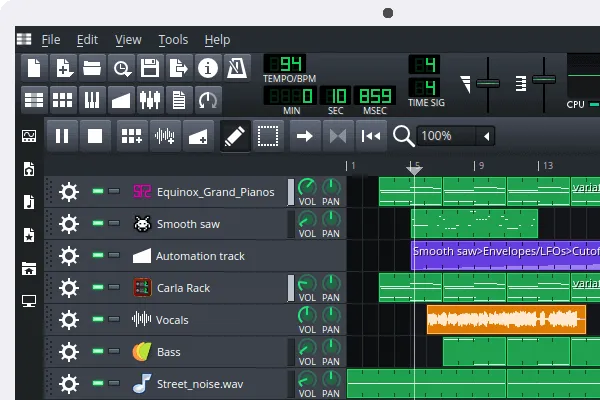
- LMMS is a free, open-source music-production application built around MIDI sequencing, instruments, samples, patterns, and song arrangement—not a recording-first audio editor.
- The official download page lists LMMS 1.2.2 as the stable release. Choose that route for a new or important project; do not treat pre-release files as interchangeable with the stable build.
- LMMS makes the most sense for beatmaking, electronic composition, and learning arrangement without paying for a DAW. It is a weaker first choice when the job begins with recording vocals, guitars, interviews, or a podcast.
- This is a source-verified download guide. It does not report a personal installation, recording session, performance test, or benchmark.
- Official download route: lmms.io/download
- Official documentation: LMMS User Manual
- Official release repository: LMMS releases on GitHub
- Version signal checked: the official download page lists LMMS 1.2.2 as its stable release. Recheck the page before choosing a file because platform packages and release status can change.
Official download URL: https://lmms.io/download
Choose LMMS when the project starts with MIDI and arrangement
LMMS is best understood as a composition workspace. Its core tools are aimed at putting musical ideas together: a song editor for arranging sections, a beat and bassline editor for repeated patterns, a piano roll for MIDI notes, automation controls, instruments, effects, and a mixer. That combination can be useful when a project begins with drum patterns, synth parts, sampled sounds, or a simple electronic arrangement.
That is a different starting point from editing a spoken recording or tracking a live band. If your first task is to clean an interview, cut a podcast, or record several microphone inputs, a recording-focused application is usually a clearer fit. Choosing by the first task avoids the common mistake of installing a full music workstation when an audio editor would be simpler.
Stable versus pre-release: make the choice around project risk
The official LMMS download page lists version 1.2.2 as stable. For a first project, a classroom computer, or a file you need to keep working on, the stable download is the sensible default because it is the channel the project presents for general use.
A pre-release can be useful only when you specifically want to evaluate newer project work and can protect your files. Before opening an important project in any experimental build, keep a separate copy of the project and any custom samples. This is ordinary file-safety practice, not a claim that a particular release will damage projects. The point is to make testing reversible.
- the operating system section matches your computer;
- the release is labelled stable or pre-release as you expect;
- the file link stays on lmms.io or the official LMMS GitHub project;
- you have a backup of any project you plan to open with a different release.
What the workflow is good at—and where it changes shape
LMMS is a reasonable fit for a reader who wants to learn sequencing without an account requirement or commercial subscription. The pattern-and-MIDI workflow is especially relevant for electronic sketches, rhythm programming, virtual instruments, and arrangements that grow from repeated sections. It can also be a useful no-cost way to learn how a piano roll, automation, mixer, and song arrangement relate to one another.
The trade-off is that this workflow asks you to think in parts and arrangements rather than a single recording timeline. A beginner who only wants to trim a voice recording may find the surrounding production tools unnecessary. A musician whose work depends on recording-heavy sessions should compare LMMS with a DAW or editor designed for that job before moving a project into a new tool.
A practical decision: LMMS, Audacity, or a recording-oriented DAW?
| Your starting task | Better first choice | Why |
|---|---|---|
| Build beats, MIDI parts, synth lines, or an electronic sketch | LMMS | Its workflow is organized around instruments, patterns, MIDI editing, and arrangement. |
| Trim, clean, or export an existing audio recording | Audacity | An audio editor is more direct when the work begins with recorded sound rather than composition. |
| Plan a video project that needs a separate soundtrack workflow | Kdenlive plus a dedicated audio tool | Video editing and music composition solve different parts of the project; avoid expecting one application to replace both. |
| Listen to a finished music library | foobar2000 | A media player is the simpler choice when you do not need to create or arrange music. |
This is a task-based comparison, not a product ranking. LMMS can be the right tool for a free MIDI-based composition project and still be the wrong first installation for a recording or playback task.
Download and file-safety checks that matter
Start at the project’s own download page rather than a mirror that places unrelated “Download” buttons around the file. The official page links to the project’s platform options, and the official GitHub repository provides a second place to inspect release information. If a site inserts a separate downloader, changes the file name unexpectedly, or makes the publisher unclear, leave it and return to the official route.
Music projects often depend on more than the application itself: sample packs, presets, plugins, and project files can each have their own licenses and sources. “Free” for the main program does not automatically mean every third-party sound library is safe to install or cleared for commercial reuse. Read the license or usage terms for any extra material before relying on it in a project.
Limits to know before committing a project
LMMS has a clear value proposition—no-cost composition tools—but it is not presented here as a universal studio replacement. The official sources can describe the project and its downloads; they do not substitute for a reader’s own compatibility check with a specific audio interface, plugin, or recording workflow. If that compatibility is essential, test it with a disposable project and keep the original files unchanged.
Readers who need polished multitrack recording, a particular commercial-plugin workflow, or paid vendor support should compare alternatives using their exact hardware and project requirements. That is more reliable than assuming a feature list alone will decide a production workflow.
Verdict: who should download LMMS?
Download LMMS if you want a free, open-source entry point for MIDI sequencing, beatmaking, virtual instruments, and electronic music arrangement. It is most compelling when cost control and a composition-first workflow matter more than a recording-first studio setup.
Choose a different starting tool if your immediate job is recording or cleaning audio, editing a podcast, or confirming a particular hardware or plugin workflow. In those cases, the safest decision is to define the first task, use the official documentation to check the relevant path, and keep your existing project files backed up before changing applications.
FAQ
Is LMMS free?
The official LMMS download page presents the application as free to download. Check the official project pages for the current licensing details, and separately check the terms for any samples, presets, or plugins you add.
What is the safest LMMS download link?
Use lmms.io/download. It is the project’s own download route. The official LMMS GitHub releases page is useful for inspecting project release information; avoid unrelated download portals that add installers or obscure the source.
Which LMMS version should I choose?
As checked on July 29, 2026, the official download page lists LMMS 1.2.2 as stable. That is the default choice for an important project. Check the page again before downloading, and keep a separate copy of any project before opening it in a pre-release build.
Is LMMS the right tool for recording vocals?
This guide does not make a hands-on compatibility claim for recording. LMMS is centered on MIDI, patterns, instruments, and arrangement; readers whose work begins with recording should compare a recording-oriented editor or DAW for their specific hardware and workflow.