Last updated: April 20, 2026
Mini changelog:
- Verified the official homepage, downloads page, docs portal, and release notes for Build 3135.
- Confirmed the current public Windows installer and portable package names plus the release date shown on the official source.
- Refreshed the comparison section so it directly covers Total Commander, Double Commander, Q-Dir, and File Explorer.
Multi Commander is a strong download in 2026 if you want a faster, more keyboard-friendly replacement for standard Windows file browsing. This is an official-source review built from the official Multi Commander homepage, official downloads page, official documentation URL, official release notes for Build 3135, and the discovery provenance supplied for this run. I did not treat it as a macOS or Linux tool because the official product positioning and download surface are clearly Windows-focused.
Key takeaways
- Multi Commander is best for Windows users who want dual-pane file management, heavy keyboard use, tabbed workflows, and more control than File Explorer gives by default.
- The official site currently shows Multi Commander v15.8 (Build 3135) with both installer and portable packages, and the release notes page lists the release date as 02 feb. 2026.
- It is a better fit for power users and repetitive file operations than for casual users who only need very light copy, paste, and search behavior.
Official download path for Multi Commander Review
Hubkub does not host installers. Use the official vendor/project page first, then use this review to check fit, limits, and safer setup notes.
Hubkub verification notes for Multi Commander Review
- Official download/support links already cited on this page were checked as the preferred source path for Multi Commander Review.
- Hubkub does not host installer files; the download action points readers back to the official vendor or project source.
- This page separates practical fit, trade-offs, and safety notes so readers can decide whether Multi Commander Review matches their workflow.
Verification notes checked for Multi Commander Review
- Review type: official-source review
- Verified on: April 20, 2026
- Official download URL: https://multicommander.com/downloads
- Homepage checked: https://multicommander.com/
- Documentation URL checked: https://multicommander.com/docs
- Release notes checked: https://multicommander.com/ReleaseInfo/3135
- Discovery provenance supplied for this review: https://software.thaiware.com/3113.html
- Latest stable version checked: Multi Commander v15.8 (Build 3135)
- Release date shown on the official source: 02 feb. 2026
- Official OS support checked: Windows
- Current official installer/package artifacts seen: MultiCommander_x64_(15.8.0.3135).exe, MultiCommander_win32_(15.8.0.3135).exe, MultiCommander_x64_Portable_(15.8.0.3135).zip, and MultiCommander_win32_Portable_(15.8.0.3135).zip
- Hash/checksum visibility: SHA1 values are shown beside the listed downloads on the official site
- Store edition note on the official page: a separate Multi Commander SE version is offered through the Microsoft Store
- XP support note on the official page: the normal version no longer works on Windows XP, and a separate XP edition is listed
Official resources
Use the vendor links below so you get the current Windows installer or portable build from the official source.
What Multi Commander actually is
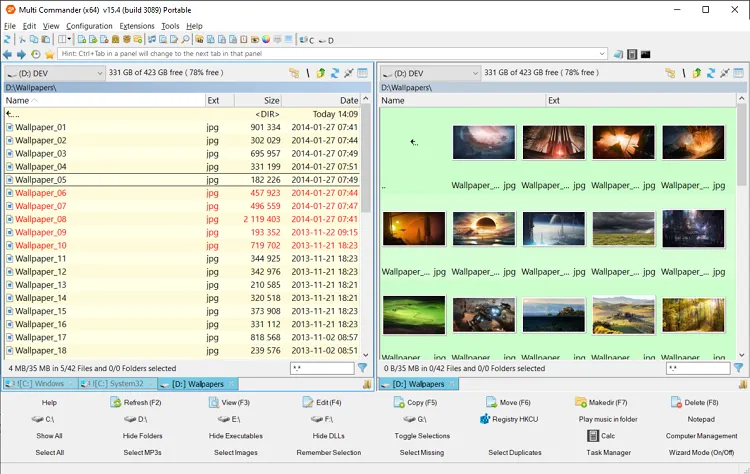
Multi Commander is a Windows file manager built around the classic dual-pane idea. The homepage describes it as an alternative to the standard Windows Explorer, and that framing is accurate. The software is designed for people who move, rename, compare, search, sort, and inspect files all day, not just once in a while. The official feature summary highlights tabbed panes, archive browsing, filters, background tasks, file viewing modes, registry access, FTP access, and scripting support. That is a much broader scope than the default experience in File Explorer.
The most important thing to understand before downloading it is that Multi Commander is not trying to look minimal or simplified. Its value comes from density. You get two panes, multiple tabs, many commands, and lots of actions that can be triggered from the keyboard. If your current pain point is slow folder hopping, repetitive renaming, or constant drag-and-drop between locations, that density is probably a feature rather than a drawback. If you mainly open Downloads, Documents, and a few cloud folders each day, the extra surface area may feel like more application than you need.
Why it stands out in 2026
What still makes Multi Commander relevant in 2026 is that it solves a very specific Windows productivity problem: File Explorer is fine for light use, but it becomes awkward once your work involves many windows, large trees of folders, repeated copy and move jobs, or keyboard-first habits. Multi Commander leans into those advanced scenarios instead of hiding them. The official homepage still promotes fast browsing, strong filtering, archive support, background operations, and automation hooks. That combination matters because serious file management is usually not about one big feature. It is about shaving friction from dozens of tiny actions you repeat hundreds of times per week.
The download page also makes distribution choices clear. There are full installers for 32-bit and 64-bit Windows, plus portable zip builds for both architectures. That is useful for IT users, portable toolkit builders, and anyone who wants to test the app without a typical installation path. The official page additionally notes that the portable package uses the same binaries as the installed version but stores configuration in the same folder it runs from. That is a practical detail, not just marketing copy.
The release notes for Build 3135 reinforce another positive signal: the project is still maintained. The page labels version 15.8 Build 3135 as released on 02 feb. 2026 and describes it as mostly stability fixes, with multiple changes since 15.7. That does not promise a dramatic redesign, but it does show the software is still receiving upkeep rather than sitting abandoned.
Who should download Multi Commander
Multi Commander makes the most sense for Windows users who spend serious time inside local drives, external drives, network shares, or large media and project folders. That includes developers managing build folders, IT admins working across system paths, analysts handling exports, photographers with many image directories, and office power users who batch-rename and reorganize documents regularly. If you value shortcuts and command density, this tool is pointed directly at you.
It is also a logical choice if you specifically want a free dual-pane manager without subscription pressure. The official downloads page says you can download and use Multi Commander free of charge, with donations encouraged. That makes it easier to recommend to budget-conscious users who still want something meaningfully more capable than File Explorer.
On the other hand, Multi Commander is less compelling for users who want a highly modern visual design, cross-platform parity, or built-in collaboration workflows. The official site does not position it as a cloud workspace, team product, or Linux/macOS manager. So the honest recommendation is simple: choose it for Windows file operations power, not for ecosystem breadth.
Strengths confirmed by the official sources
Several strengths show up consistently across the homepage, downloads page, and release notes. First, the dual-pane and tabbed workflow remains the core pitch. the practical effect is the split view is the practical reason many people switch away from File Explorer in the first place. Second, the product still emphasizes keyboard efficiency, which is a real differentiator from more casual file tools. Third, the official feature set still includes archive browsing, filtering, a file viewer, image and media helpers, and scripting support. Those are meaningful workflow upgrades for users who do more than basic copy and paste.
Another positive is transparency on the download page. The site lists installer and portable packages, exposes SHA1 values next to them, links to release notes, and states that the downloads are clean from third-party software. While every user should still download from the official site and apply normal caution, that is a better trust posture than vague third-party mirrors or unlabeled installer-button portals.
Limits and trade-offs to know before downloading
The same characteristics that make Multi Commander appealing to experts can make it feel heavy to everyone else. Dual-pane managers often have a learning curve, and this one is no exception. The interface is built for function more than visual simplicity. New users may need time to understand panes, tabs, filters, custom commands, and optional tools before the speed benefits show up.
Another honest limitation is platform scope. If you need one file manager across Windows, macOS, and Linux, Multi Commander is not the straightforward answer. The official site and current download surfaces are Windows-only. That is not a flaw if your world is Windows, but it matters if you are trying to standardize one tool across mixed-device teams.
Finally, people who only want better search may find Multi Commander broader than necessary. If your main complaint is just locating files quickly, a dedicated search utility can be a simpler fix. Multi Commander shines when the task is end-to-end file management, not only search.
Multi Commander vs direct alternatives
| Tool | Best for | Why someone picks it instead | Why Multi Commander can win |
|---|---|---|---|
| Total Commander | Veteran power users who want a long-established dual-pane standard | Total Commander has a huge long-term reputation, plugin ecosystem familiarity, and a workflow many advanced users already know. | Multi Commander is easier to recommend to users who want a free Windows option with strong core power and no trial-to-paid decision. |
| Double Commander | Users who want a more cross-platform path | Double Commander is often the substitute when Windows users also care about Linux support or open-source alignment. | Multi Commander stays more tightly focused on Windows-specific file management and still offers a polished installer-plus-portable distribution story. |
| Q-Dir | Users who want multiple panes with very lightweight overhead | Q-Dir appeals to people who want several folder views quickly without digging deep into advanced file manager automation. | Multi Commander has a richer power-user feature pitch around scripting, file operations, archive handling, and keyboard efficiency. |
| File Explorer | Casual Windows users who want zero setup | File Explorer is already installed, familiar, and good enough for light everyday browsing. | Multi Commander is far better once folder work becomes repetitive, multi-location, batch-heavy, or keyboard-driven. |
If you are comparing these options, the simplest framing is this: choose File Explorer for convenience, Q-Dir for lightweight pane experiments, Double Commander for broader platform flexibility, Total Commander for a classic power-user ecosystem, and Multi Commander when you want a serious free Windows file manager with both installer and portable paths from an actively maintained official site.
Safety and download guidance
If you decide to install it, use the official downloads page rather than a mirror. The official site lists the current package names, publishes SHA1 values beside those packages, and links directly to the Build 3135 release notes. That gives you a clean path to confirm you are getting the expected build. The portable version is convenient, but the site itself warns that zip archives can be altered by others, so you should only obtain the portable package from the official site.
The page also notes that Multi Commander SE is offered through the Microsoft Store and that XP users need a separate legacy edition. Those notes matter because they set clear expectations about which package fits which environment. For most current users on Windows 10 or Windows 11, the 64-bit installer or portable build is the obvious default.
Who should download Multi Commander Review?
Multi Commander is an easy yes for the right Windows audience in 2026. It is not trying to be a universal file browser for every platform or a simplified mainstream shell replacement. Instead, it focuses on being a capable, efficient, dual-pane Windows file manager for people who work with files all day. The official sources still support that positioning with current downloads, release notes for Build 3135, portable options, and a deep feature list around tabs, filters, archives, scripting, and keyboard control.
If that matches your workflow, Multi Commander is one of the more credible free downloads in this category. If your needs are lighter or cross-platform, one of the substitutes above may be a better fit. But for Windows-first file power, the official evidence still makes a solid case.
Multi Commander Review download and safety questions
Is Multi Commander free to use?
Yes. The official downloads page says you can download and use Multi Commander free of charge, with donations encouraged to support development.
Does Multi Commander support macOS or Linux?
No official macOS or Linux support was claimed in the sources checked for this review. The current product site and downloads page are Windows-focused, so this review treats it as a Windows-only recommendation.
What version did this review verify?
This review verified Multi Commander v15.8 Build 3135, which the official release page lists as released on 02 feb. 2026.
Can I use Multi Commander without installing it?
Yes. The official downloads page offers portable zip versions for both 32-bit and 64-bit builds. The site says the portable version uses the same binaries as the installed version and stores its configuration in the same folder.
Is Multi Commander better than File Explorer?
For heavy file work, usually yes. Multi Commander offers dual panes, tabs, more keyboard-driven control, archive browsing, and automation-oriented features that go well beyond the default File Explorer workflow. For light everyday browsing, File Explorer may still be enough.
Who should skip Multi Commander?
Users who want a minimal interface, cross-platform support, or only a simple search enhancement may prefer a different tool. Multi Commander is strongest when you need a real file management workspace, not just a cleaner folder window.
Where Multi Commander Review works well — and where it may not
| Pros | Cons |
|---|---|
| Clear official-source path for evaluating Multi Commander safely. | May not fit every platform, license, or team workflow. |
| Useful when its core workflow matches the reader’s daily task. | Advanced features can depend on account, paid tier, or setup details. |
| Good candidate for comparison before installing alternatives. | Readers should still verify current release notes before downloading. |
Software review and safety note
Hubkub reviews software pages with a safety-first checklist: we check the product purpose, supported platforms, license or pricing signals, common user risks, official documentation or vendor pages where available, and whether the download path could confuse readers. For safety, prefer the developer’s official website or a clearly trusted source, avoid installer bundles you do not recognize, and scan downloaded files with your device security tools before installing.
Learn more about our standards in Editorial Policy, Content Quality Standards, and Corrections Policy.
Related Hubkub resources
Reader-first software checklist
Before installing or switching to this software, use this quick checklist to confirm whether it fits your needs and risk tolerance.
- Official source: prefer the developer website, official documentation, or a clearly trusted distribution channel.
- Platform fit: check whether your Windows, macOS, Linux, Android, or iOS version is supported.
- License and cost: confirm whether the app is free, open source, freemium, trial-based, or paid.
- Privacy and permissions: review what files, folders, network access, account data, or browser permissions the app may use.
- Backup first: for recovery, storage, networking, privacy, or system utilities, back up important data before changing settings.
Safe download and setup notes
Hubkub does not recommend clicking misleading download buttons or installing unknown bundles. When possible, use the official source and avoid third-party installers that add toolbars, browser changes, or unrelated offers. After downloading, verify the file name, publisher, version, and installer prompts before continuing.
Pros, limits, and alternatives to consider
- Best fit: readers who need the core function described in this guide and prefer a practical setup path.
- Watch out for: outdated versions, unsupported platforms, unclear installers, or features that require paid upgrades.
- Compare alternatives: if this app feels too complex, too limited, or not maintained enough for your workflow, compare it with similar tools before installing.
Related Hubkub resources: Safe Software Downloads, Software Reviews, How We Review Software, and Content Quality Standards.
FAQ
Should I download this software from any mirror site?
Use the official developer website or a trusted distribution channel whenever possible. Mirror sites can be useful in limited cases, but they may also include outdated installers, misleading ads, or unwanted bundles.
What should I check before installing?
Check the publisher, version, license, supported operating system, installer prompts, and whether the app requests sensitive permissions.