TeraCopy is still worth downloading in 2026 if your biggest file-management problem is not browsing folders but surviving large copy jobs with fewer interruptions. This review is based on official product pages, the official downloads page, the official support collection, and official release posts checked on April 19, 2026. The big reason to look at TeraCopy is simple: it gives Windows users more control over copy, move, retry, and verification tasks than standard File Explorer does by default.
Last updated: April 19, 2026
- Checked the official homepage, download path, and release surface again for this update.
- Rebuilt the page as a canonical review with a visible verification block and official CTA path.
TL;DR
- The official downloads page still lists TeraCopy 3.17 as the stable build and separates 4.0 Release Candidate 2 clearly, which is exactly the kind of stable-vs-RC distinction a safe downloads page should surface.
- The base app is easy to recommend for safer copy and verify jobs, but the official purchase page makes it clear that TeraCopy Pro is a paid upgrade rather than a hidden free entitlement.
- If your real problem is unreliable large file transfers on Windows, TeraCopy is more relevant than a broader file manager. If your problem is browsing, not transfer reliability, choose a different tool.
Official download path for TeraCopy Review
Hubkub does not host installers. Use the official vendor/project page first, then use this review to check fit, limits, and safer setup notes.
Hubkub verification notes for TeraCopy Review
- Official download/support links already cited on this page were checked as the preferred source path for TeraCopy Review.
- Hubkub does not host installer files; the download action points readers back to the official vendor or project source.
- This page separates practical fit, trade-offs, and safety notes so readers can decide whether TeraCopy Review matches their workflow.
Verification notes checked for TeraCopy Review
- Review basis: official source checks
- Verified on: April 19, 2026
- Official download URL: https://www.codesector.com/downloads
- Latest stable version checked: TeraCopy 3.17
- Beta version: TeraCopy 4.0 Release Candidate 2
- Release date shown on the official source: December 3, 2023 for stable 3.17; September 4, 2025 for 4.0 RC 2
- Official OS support checked: Windows 7-11 and Windows Server 2003-2025 for the stable Windows build; an official Mac variant also exists
- Account requirement: No account is required to download or use the base app
- File size: 10 MB on the official downloads page; direct stable installer resolved at 12,403,216 bytes
- Display unit used: MB
- Current official installer artifact seen: teracopy.exe
- Signature check: verify on your device after downloading from the official source
- VirusTotal check: run your own malware scan before installing
- Hash/checksum: Official site documents checksum features, but the download page did not expose a direct checksum line checked for this update
Why this software still matters in 2026
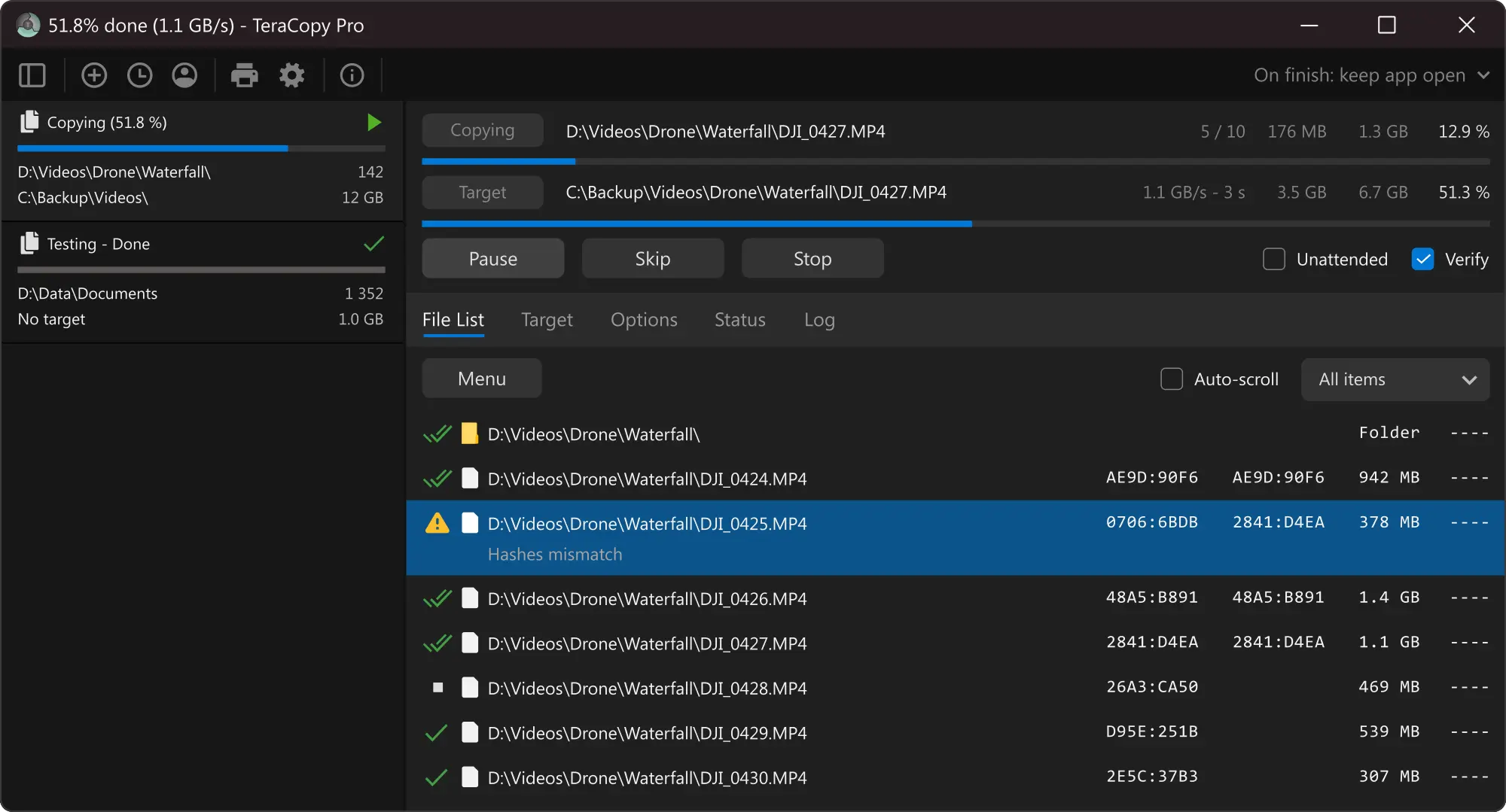
TeraCopy is strongest when you treat it as a file-transfer layer rather than as a full file manager. The official feature set emphasizes queueing, retries, verification, checksums, reporting, shell integration, and safer handling of errors. the practical effect is many Windows users do not actually need another giant utility suite. They need one narrower tool that makes copy, move, and verify jobs less fragile than the default Windows workflow. The free base app already covers core copy, verification, timestamp preservation, explorer integration, and checksum-file generation. The Pro tier adds convenience and automation features rather than changing the basic idea of the product.
Who should use it and who should skip it
People moving or verifying large file batches on Windows, users who want better retry behavior than File Explorer, and anyone who values checksum-aware transfers.
Skip it if: People who only do tiny casual copies, users who need a fully free tool with no paid upsell, or users who want a broader dual-pane file manager rather than a transfer specialist.
Supported OS, stable version, file size, and safety checks
For this review I checked the official source path rather than a mirror summary. TeraCopy is currently documented by the vendor as supporting Windows 7-11, Windows Server 2003-2025, Mac. The official proof markers also surfaced Stable 3.17 shown on official downloads page; RC 4.0 Release Candidate 2 shown separately; Windows installer size 10 MB on downloads page; teracopy.exe direct installer resolved at 12,403,216 bytes; stable release post dated December 3, 2023; purchase page lists TeraCopy Pro for Windows at $29.95 with lifetime license updates.
Use the Code Sector downloads page and not third-party mirrors. The official site links the stable Windows installer, lists supported Windows ranges clearly, separates the release-candidate channel from the stable build, and exposes a vendor support center plus release posts. That is the right trust path for a downloads page. You should still avoid mixing stable and RC builds casually. If you just want dependable day-to-day file transfers, use the stable 3.17 line rather than the 4.0 RC stream unless you specifically want new features and accept release-candidate risk.
Pricing or license reality
Free base app with paid Pro upgrade. Official purchase page lists TeraCopy Pro for Windows at $29.95 and says all products include lifetime license updates.
The official Code Sector purchase page makes the commercial reality straightforward. TeraCopy is not a hidden trial and it is not a fake-free landing page. You can download and use the base product, but the vendor clearly monetizes TeraCopy Pro. The listed price checked for this review was $29.95 for TeraCopy Pro for Windows, and the purchase page says all products come with lifetime license updates. That makes the buying decision more reasonable than a subscription for a utility you may keep for years, but it also means the best question is not “is it free?” The better question is whether the free workflow already covers what you personally do. If you mostly want safer copy, retry, and verification behavior, the base app may be enough. If you want more automation, richer ignore-list behavior, or broader convenience features, the Pro tier is the real upgrade target.
Comparison snapshot
| Tool | Best for | Pricing reality | Bottom line |
|---|---|---|---|
| TeraCopy | Windows file transfer acceleration and verification | Free base app + Pro upgrade | Best for safer copy/move jobs and checksum-aware transfers |
| Windows File Explorer | Built-in file moves and copies | Included with Windows | Best for users who do not need extra retry or verification features |
| Total Commander | Dual-pane file management plus transfer tools | 30-day shareware trial | Better if you want a deeper file manager, not just a copy utility |
| Q-Dir | Lightweight multi-pane file navigation | Freeware | Better if your bottleneck is file browsing rather than transfer verification |
Safe official download notes for TeraCopy Review
Use the Code Sector downloads page and not third-party mirrors. The official site links the stable Windows installer, lists supported Windows ranges clearly, separates the release-candidate channel from the stable build, and exposes a vendor support center plus release posts. That is the right trust path for a downloads page. You should still avoid mixing stable and RC builds casually. If you just want dependable day-to-day file transfers, use the stable 3.17 line rather than the 4.0 RC stream unless you specifically want new features and accept release-candidate risk.
If you want nearby alternatives already covered on Hubkub, start with Total Commander, Everything, PeaZip. Those pages help anchor the decision so you do not confuse a transfer utility with a file browser, or a mainstream commercial note platform with a simpler open-source note tool.
Where TeraCopy Review works well — and where it may not
Pros
- Clear official stable-vs-RC separation
- Focused on copy reliability, verification, and retry logic
- Base app covers the core workflow without forcing a subscription
Cons
- The best convenience features still push power users toward Pro
- Windows-first identity is stronger than the Mac story
- Not the right tool if your pain point is navigation rather than transfer reliability
Alternatives worth considering
A canonical review should not pretend there is only one good answer. These nearby Hubkub downloads pages are the closest realistic alternatives or adjacent tools for the same workflow cluster:
Who should download TeraCopy Review?
TeraCopy is still a worthwhile Windows download in 2026 if your real pain point is copy reliability, verification, and queue control. It is not trying to replace every part of your storage workflow. It is trying to make one common Windows job feel less fragile and more transparent. The base app is easy to recommend for people who move large folders or external-drive data often, and the Pro pitch is honest enough that advanced users can decide whether the extra convenience justifies $29.95.
TeraCopy Review download and safety questions
Is TeraCopy free or paid?
TeraCopy is best described as a free base utility with a paid Pro upgrade. The official product and downloads pages let you download the software directly, while the purchase page lists TeraCopy Pro for Windows at $29.95. That means the tool is not pure freeware in the way Q-Dir is, but it also is not locked behind a subscription wall just to try the core workflow.
Is TeraCopy safe to download?
It is reasonably safe when you use the official Code Sector path only. For this review I verified the official homepage, downloads page, support collection, and release posts. The stable installer path resolved successfully, and the vendor separates the stable 3.17 line from the 4.0 release-candidate stream. That is the trust path you should follow instead of grabbing repacks or mirror bundles.
What does TeraCopy do better than File Explorer?
The official feature set focuses on retry behavior, queueing, verification, checksum handling, logs, and more transparent control when a transfer hits bad files or a flaky device. File Explorer is simpler and perfectly fine for casual use, but TeraCopy is the more specialized choice for users who move large batches, external-drive backups, or mixed-quality storage media often.
Should I use TeraCopy 3.17 or the 4.0 RC build?
Most readers should stay on the stable 3.17 line. The official downloads page lists 3.17 as the stable build and shows 4.0 Release Candidate 2 separately. If you are just trying to get safer everyday file copies, the stable branch is the clearer recommendation. The RC exists for users who want newer features and accept pre-release tradeoffs.
Does TeraCopy support Mac too?
Yes, the official product page explicitly labels TeraCopy for Windows and Mac, and the product navigation links to a Mac variant. Still, the strongest official proof layer right now is the Windows downloads page, support collection, and release posts. So this canonical review should be read as Windows-first, with a note that an official Mac option also exists.
Reader-first software checklist
Before installing or switching to this software, use this quick checklist to confirm whether it fits your needs and risk tolerance.
- Official source: prefer the developer website, official documentation, or a clearly trusted distribution channel.
- Platform fit: check whether your Windows, macOS, Linux, Android, or iOS version is supported.
- License and cost: confirm whether the app is free, open source, freemium, trial-based, or paid.
- Privacy and permissions: review what files, folders, network access, account data, or browser permissions the app may use.
- Backup first: for recovery, storage, networking, privacy, or system utilities, back up important data before changing settings.
Safe download and setup notes
Hubkub does not recommend clicking misleading download buttons or installing unknown bundles. When possible, use the official source and avoid third-party installers that add toolbars, browser changes, or unrelated offers. After downloading, verify the file name, publisher, version, and installer prompts before continuing.
Pros, limits, and alternatives to consider
- Best fit: readers who need the core function described in this guide and prefer a practical setup path.
- Watch out for: outdated versions, unsupported platforms, unclear installers, or features that require paid upgrades.
- Compare alternatives: if this app feels too complex, too limited, or not maintained enough for your workflow, compare it with similar tools before installing.
Related Hubkub resources: Safe Software Downloads, Software Reviews, How We Review Software, and Content Quality Standards.
FAQ
Should I download this software from any mirror site?
Use the official developer website or a trusted distribution channel whenever possible. Mirror sites can be useful in limited cases, but they may also include outdated installers, misleading ads, or unwanted bundles.
What should I check before installing?
Check the publisher, version, license, supported operating system, installer prompts, and whether the app requests sensitive permissions.