Key takeaways
- WizTree is a Windows disk-space map: use it to identify large folders and files, then decide separately what is safe to remove.
- The official WizTree download page listed version 4.31 on 29 July 2026, with installer and portable packages.
- It is most compelling when an NTFS drive is full and you need a fast inventory; a scan result is not a deletion recommendation.
- Personal use is free. Business use has separate paid licensing, so a company should check the vendor’s current terms before deployment.
Editorial scope and sources
This is a source-verified download guide, not a test or benchmark. Hubkub checked WizTree’s official product page, download page, change log, and guides on 29 July 2026. Those pages listed WizTree 4.31 (23 March 2026), Windows installer and portable downloads, personal-use availability, and the product’s documented scan and search features. Features, package sizes, and license terms can change, so confirm them on the official page before installing or deploying it.
Official download URL: diskanalyzer.com/download
Download WizTree from the Official Site
Use the vendor page rather than a mirror or an advertisement that wraps the program in an unrelated download manager.
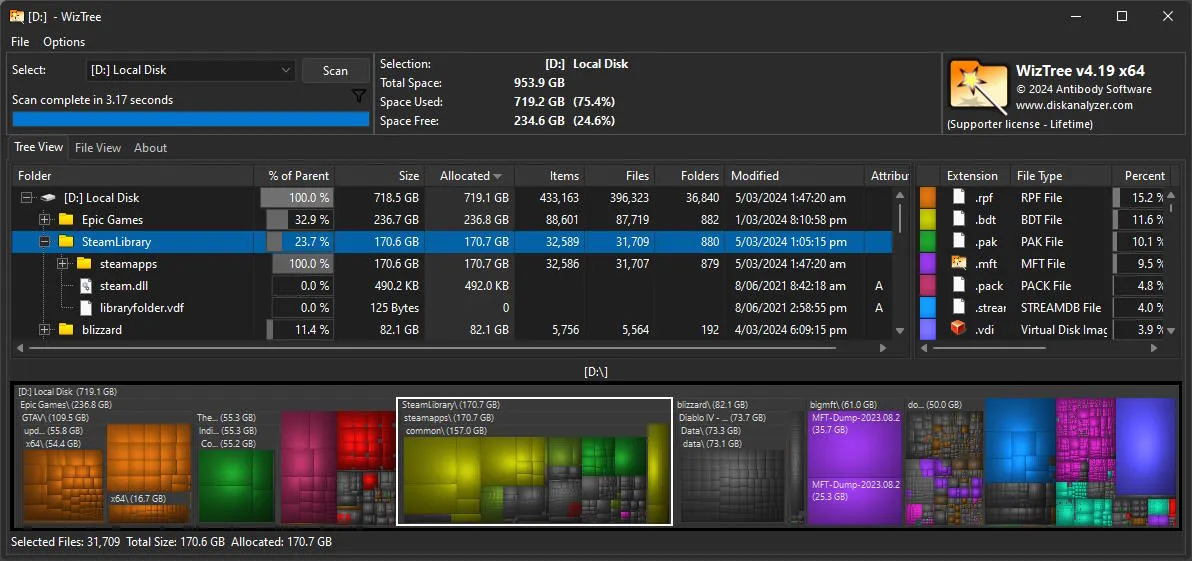
WizTree is a focused disk-space analyzer for Windows. Its useful question is narrow: what is consuming space on this drive? It shows folders, files, and a visual treemap so that a full SSD does not remain an abstract “low disk space” warning. That makes it a sensible first diagnostic step before moving a game library, archiving video, clearing old installers, or reviewing a backup destination.
It is not a PC cleaner, recovery tool, uninstaller, or repair utility. WizTree can help locate a large folder; it cannot establish that the folder is disposable. That boundary matters around Windows directories, application data, source-code workspaces, cloud-sync folders, virtual machines, and backup sets. A useful scan ends with a named candidate and a verification step—not a blind delete.
Choose WizTree when the problem is storage triage
WizTree fits a Windows user who needs to make a storage decision quickly. Examples include an SSD that has unexpectedly filled up, a Downloads folder with years of installers, a media project that has multiplied exports, or a developer machine with several old build folders. It is also useful before a migration: an inventory can show which folders should move to external storage and which should stay with the system.
The vendor explains that WizTree reads the NTFS Master File Table directly when scanning NTFS volumes. That is the product-specific reason it emphasizes speed on a typical Windows system drive. The same direct-MFT explanation does not apply to every situation: the official site also documents scanning non-NTFS drives and network locations, but the scan path and performance characteristics may differ. If your drive is external, networked, encrypted, or uses a non-NTFS format, treat the result as an inventory and allow more time rather than assuming the headline behavior will be identical.
Installer or portable package: make the smaller operational choice
On 29 July 2026, the official download page listed WizTree 4.31, dated 23 March 2026, as both a 4.9 MB installer and a 7.4 MB portable package. The page lists Windows 11, 10, 8, 7, Vista, XP, and Windows Server 2003 or later. Check the live page for current support before relying on that list for an older or managed device.
- Choose the installer for a PC where WizTree will be part of a repeatable troubleshooting toolkit and the normal Windows installation process is acceptable.
- Choose the portable package when a support workflow calls for a self-contained tools folder or when you do not want to make a conventional installation on that machine.
- Pause before either option on a company-managed device: business use is not covered by the vendor’s free personal-use tier.
The official update notes say that an installed copy can be updated by downloading and running the current installer without first removing the old version. For the portable edition, the vendor says to download the portable ZIP and unzip it over the existing WizTree files. Those are publisher instructions, not a substitute for an organization’s own software-change policy.
A safe workflow after the scan
- Start with the biggest recognizable category. Look for old downloads, duplicate exports, obsolete installers, caches documented by their application, or media you can archive.
- Open the folder and identify ownership. Confirm which application, account, or backup process created it before touching the files.
- Protect recoverability. For valuable files, copy or back up first. For a folder that may be part of an application or a sync client, read that product’s documentation instead of guessing.
- Delete in small, reversible steps. Empty a known temporary folder or recycle bin, then recheck available space. Do not use a treemap block as proof that an unfamiliar system folder is safe to remove.
This workflow is deliberately slower than “find the largest folder and delete it.” A disk analyzer reduces the search time; it does not remove the need to understand the data.
How WizTree differs from nearby Windows tools
| Tool | Use it when | Decision boundary |
|---|---|---|
| WizTree | You need a disk-space inventory and visual map, especially for a Windows storage-triage task. | It identifies candidates; it does not clean or validate a deletion for you. |
| TreeSize Free | You prefer an Explorer-like folder reporting workflow and want to compare the free edition with a vendor’s paid options. | Review which reporting or automation features belong to the edition you choose. |
| Everything | You know a filename, extension, or path fragment and need very fast file-name search. | Filename search is not the same as a complete disk-space treemap. |
| WinDirStat | You want a familiar visual disk-usage tool and are comfortable with its classic workflow. | Do not choose it merely because it is similar; compare scan behavior and maintenance expectations for your own drive. |
For a reader deciding between WizTree and WinDirStat, the practical distinction is not that one tool gives permission to delete more files. It is whether the Windows-focused scan approach and interface help you reach an accurate storage decision faster. If you need filename lookup rather than capacity analysis, Everything is the more direct companion. If you prefer a different reporting style, see Hubkub’s TreeSize Free guide. For a visual disk-map alternative, compare the separate WinDirStat guide.
License and deployment boundary
WizTree’s official page describes the free version as personal-use only. It also lists paid supporter licensing by staff size and a separate enterprise license for large organizations. That makes the safe rule straightforward: a personal Windows PC can use the free tier within the publisher’s terms; an employer, support team, school, or IT department should verify the current commercial terms before installing it across managed machines. Do not infer commercial permission from the word “free.”
Verdict: a useful map, not a cleanup button
WizTree is worth considering when the immediate need is to understand where Windows storage went. Its official source trail is clear, the package choices are explicit, and the NTFS-focused design explains why it is often considered for rapid storage triage. The most responsible way to use it is to let it narrow the investigation, then verify each folder’s purpose before removing or relocating anything.
If the issue is a full drive, start with the official download route, scan the relevant volume, and make one reversible change at a time. If the issue is file recovery, application removal, malware, or system repair, use a tool and procedure designed for that different job.