Quick answer: TreeSize Free is still worth downloading in 2026 if you want a legitimate Windows desktop disk space analyzer from the official JAM Software site and you mainly need fast visual insight into large folders, file-heavy drives, and cleanup candidates. This is an official-source review, not a hands-on test for this update, so the recommendation here is based on official product pages, help resources, and release notes checked on April 20, 2026. The biggest thing to understand before downloading is that TreeSize Free is the free personal-use edition, while TreeSize Personal and TreeSize Professional are paid editions with broader features and business/server positioning.
Last updated: April 20, 2026
- Re-checked the official JAM Software product page, help center, and TreeSize Free changelog for current edition positioning and version markers.
- Confirmed the free edition is still framed for Windows desktop use, while paid editions cover broader power-user and professional needs.
Key takeaways
- TreeSize Free remains a strong download for Windows users who want quick visual disk usage analysis without paying for a storage utility first.
- The free edition is not the same as TreeSize Personal or TreeSize Professional; the paid tiers add broader filtering, duplicate-file tools, comparison features, and more advanced professional workflows.
- Download it from JAM Software only, then compare it with WinDirStat, WizTree, or Windows storage tools if your priority is open-source licensing, maximum scan speed, or built-in Windows simplicity.
Official download path for TreeSize Free Review
Hubkub does not host installers. Use the official vendor/project page first, then use this review to check fit, limits, and safer setup notes.
Hubkub verification notes for TreeSize Free Review
- Official download/support links already cited on this page were checked as the preferred source path for TreeSize Free Review.
- Hubkub does not host installer files; the download action points readers back to the official vendor or project source.
- This page separates practical fit, trade-offs, and safety notes so readers can decide whether TreeSize Free Review matches their workflow.
What I verified for this review
- Review type: official-source review
- Verified on: April 20, 2026
- Latest stable version checked: Version 4.8.1
- Release date shown on the official changelog: 11/20/2025
- Beta version: not checked for this update
- Official OS support checked: Windows desktop positioning on the official editions page; TreeSize Free is stated as not usable on Windows Servers
- Official download URL: https://www.jam-software.com/treesize#different-versions-for-different-requirements
- Official homepage checked: https://www.jam-software.com/treesize
- Docs/help URL checked: https://www.jam-software.com/treesize_free/help.shtml
- Release notes URL checked: https://www.jam-software.com/treesize_free/changes.shtml
- Discovery provenance checked: https://software.thaiware.com/1244.html
- File size: check the official download page before installing
- Display unit used: MB
- Install path tested: check the official source before installing
- Current official package evidence seen: the vendor page still exposes TreeSize official download page options including portable and legacy Windows links from the official TreeSize Free resource area
- Signature check: verify on your device after downloading from the official source
- VirusTotal result: run your own malware scan before installing
- Hash: check the official source before installing
- Specific numeric evidence: the official TreeSize Free changelog currently lists Version 4.8.1, and the editions page still separates three main tiers: Free, Personal, and Professional
Official resources
Use the official links below so you get the real vendor download path, help resources, and release history.
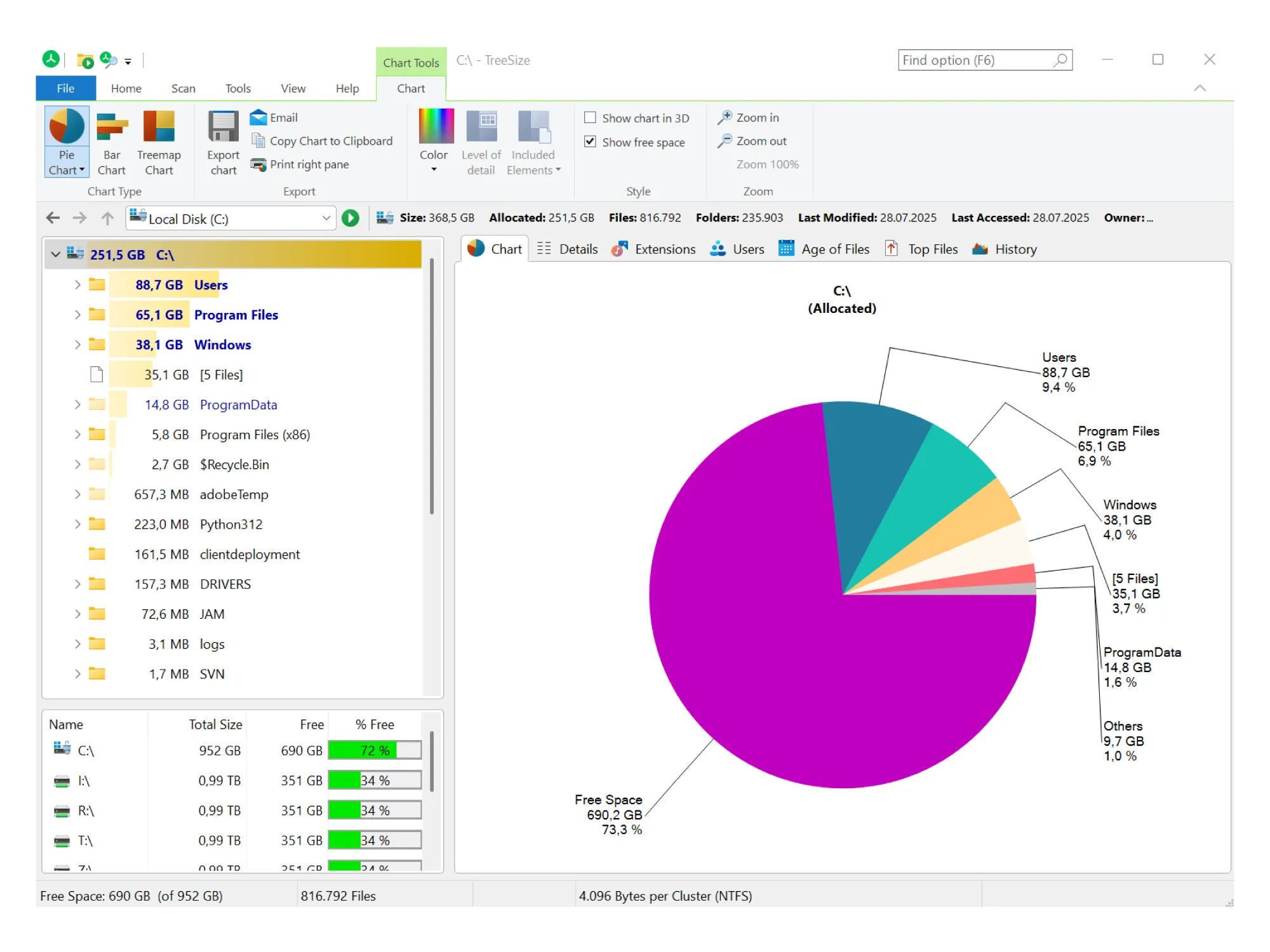
TreeSize Free solves a very specific Windows problem: you know a drive is filling up, but you do not yet know where the space went. Microsoft gives you some built-in storage views, but those are often not the fastest way to move from “my SSD is nearly full” to “this exact folder, backup set, cache, or game library is the reason.” TreeSize Free is built around making that answer visible quickly.
That is why the product still has a place in 2026. The official JAM Software positioning continues to emphasize disk space visualization, folder-level breakdowns, and cleanup help on Windows desktop systems. For a reader deciding whether to download it today, the main question is not whether TreeSize is famous enough. The real question is whether the free edition gives you enough before you would need the paid product line. For many home users, the answer is yes.
Who should download TreeSize Free?
- Windows home users trying to find large folders, bloated downloads, old backups, or media libraries that are eating local storage
- people who want a more visual disk analyzer than the basic Windows storage settings pages
- users who want an established vendor download rather than a random mirror utility
- beginners who benefit from a Windows Explorer-like layout instead of a more abstract interface
Who should skip TreeSize Free?
- users who need a business or server-ready storage product rather than a free desktop utility
- people who specifically want an open-source disk analyzer and would rather choose WinDirStat for that reason
- users chasing the absolute fastest scan experience and willing to compare WizTree first
- teams that need scheduled reporting, advanced duplicate management, wider export options, or professional administration features
What TreeSize Free actually offers from official sources
From the current official TreeSize page, the free edition is still presented as the Home User option for Windows Desktop and for private use in a non-commercial environment. That wording matters. It tells you this is not being positioned as the free universal edition for every scenario. It is the entry-level edition intended for personal desktop use.
The same official editions page also makes the upgrade ladder unusually clear. TreeSize Free highlights core tasks like one-click visualization of storage allocation down to file level, treemap-style disk usage views, and PDF report creation. Then JAM Software places the paid editions directly beside it. TreeSize Personal is aimed at advanced users, smaller businesses, and freelancers, while TreeSize Professional is aimed at IT professionals managing storage in-house.
That side-by-side edition design is useful for buyers because it prevents a common downloads-page mistake: assuming the free tier contains everything shown in the broader product family marketing. Here, the official page makes it easier to say something precise: TreeSize Free is real software, but it is not the same as the paid tiers. The paid versions add capabilities such as top-largest-file filtering, duplicate file finding and deduplication, comparing disk usage over time, command-line and task-scheduler options, and broader export flexibility. If you need those, you should evaluate the paid editions directly rather than expecting the free release to quietly include them.
Supported OS, version, and safety reality
For this review update, the safest confirmed platform description is Windows desktop. The official TreeSize editions page labels TreeSize Free as a Windows desktop product, and the FAQ text on the same vendor site explicitly states that TreeSize Free is not usable on Windows Servers. That is an important boundary because some readers looking for disk analyzers actually need server storage reporting, not consumer cleanup help.
The official TreeSize Free changelog currently shows Version 4.8.1 with a visible date marker of 11/20/2025. The listed improvements and fixes include the return of TreeSize Free in the Windows context menu for drives and a fix for a possible DLL hijacking vulnerability during installation in the user profile. Those are meaningful release-note details because they speak to both usability and installer security hardening.
This page does not claim fresh hands-on safety testing. I did not rerun installer signature checks, external malware scans, or checksum validation for this update, so those fields remain clearly marked as check the official source before installing. That is the right level of certainty for an official-source review. The grounded recommendation is to download from JAM Software only, avoid repackaged mirrors, and review the official help and changelog if you are deploying the tool on a machine that matters.
What TreeSize Free simplifies for beginners
For non-experts, TreeSize Free makes one task easier than the default Windows experience: it turns “storage pressure” into a visible folder map. Instead of guessing whether your space problem comes from videos, installers, virtual machines, old phone backups, hidden caches, or duplicate downloads, you get a ranked and visualized view of what is consuming disk space.
the practical effect is cleanup decisions are usually not hard in principle. They are hard because the user lacks visibility. TreeSize Free lowers that visibility barrier. The Windows Explorer-like framing mentioned by the vendor should make it approachable for users who are not comfortable with command-line tools or deeply technical storage dashboards.
For advanced users, the same benefit becomes workflow speed. You can move from “drive low on space” to “largest offenders identified” much faster than browsing folders manually. That is the core reason TreeSize Free still deserves a place in the downloads category.
TreeSize Free vs paid TreeSize editions
This is the most important buying distinction on the page. If you only remember one thing, make it this: TreeSize Free is free, but TreeSize as a product family is not entirely free.
- TreeSize Free = the no-cost desktop edition for private, non-commercial use
- TreeSize Personal = paid upgrade for advanced users, smaller businesses, and freelancers
- TreeSize Professional = paid edition for IT professionals and more demanding administration use cases
You should not download TreeSize Free expecting professional administration features, server positioning, or all of the product-family marketing claims to apply automatically. On the other hand, if your need is straightforward desktop storage analysis, that limitation is not necessarily a problem. It just means the free edition has a clearer best-fit audience than some broader “freemium” utilities.
TreeSize Free alternatives that make sense
| Tool | Best for | Why choose it instead | Why still choose TreeSize Free |
|---|---|---|---|
| WinDirStat | users who prefer an open-source classic | Choose it if open-source licensing and its familiar treemap approach matter more than vendor polish. | Choose TreeSize Free if you want an actively maintained commercial-vendor free edition with a clearer official support and documentation footprint. |
| WizTree | people optimizing for scan speed | Choose it if your first priority is very fast drive analysis and you are comparing raw responsiveness. | Choose TreeSize Free if you want the JAM Software product family, cleaner free-vs-paid positioning, and a Windows Explorer-like presentation. |
| Windows Storage settings / File Explorer | users who want a built-in baseline first | Choose the built-in tools if you only need a quick, no-download view of what category is filling your drive. | Choose TreeSize Free if you need deeper folder-level visibility and more useful visual breakdowns than the default Windows storage overview. |
| TreeSize Personal or Professional | power users, freelancers, and IT teams | Choose the paid editions if you need larger-file filtering, duplicate search, comparison over time, broader exports, or professional storage workflows. | Choose TreeSize Free if your need stops at personal Windows cleanup and you do not want to pay for features you may never use. |
The comparison logic is simple. Choose TreeSize Free for personal Windows cleanup and visibility. Choose WinDirStat if open-source status is the deciding factor. Choose WizTree if speed is your obsession. Choose Windows Storage if you want zero extra software. Choose TreeSize Personal or Professional if your needs have clearly grown past the free tier.
Where TreeSize Free Review works well — and where it may not
Pros
- clear official vendor download and documentation path
- free edition is plainly separated from paid editions, which reduces confusion
- strong fit for Windows users who need fast visual storage analysis
- release notes still show active maintenance and security-related fixes
- useful middle ground between bare built-in tools and heavier professional storage products
Cons
- free edition is explicitly limited to personal, non-commercial Windows desktop use
- not positioned for Windows Server use
- some attractive features shown on the overall TreeSize page belong to paid editions, not the free one
- source-verified recommendation here is strong, but this review does not include fresh hands-on benchmark evidence
Who should download TreeSize Free Review?
Yes, TreeSize Free is worth downloading in 2026 if your actual need is simple: find what is using space on a Windows desktop PC, visualize it quickly, and clean up with better confidence than Windows alone usually gives you. The page is easiest to recommend to home users who want a trustworthy official download and who appreciate that JAM Software clearly distinguishes the free edition from the paid product line.
Skip it if you need server support, business deployment, or guaranteed access to the broader advanced features marketed under the TreeSize family. In those cases, compare the paid TreeSize editions directly or choose a different tool class altogether. But for personal Windows storage cleanup, TreeSize Free still looks like a sensible, legitimate download.
Related Hubkub downloads
TreeSize Free Review download and safety questions
Is TreeSize Free really free?
Yes, but only in the specific way JAM Software describes it. TreeSize Free is the no-cost edition for private use in a non-commercial environment on Windows desktop systems. The broader TreeSize product family also includes paid Personal and Professional editions.
Is TreeSize Free the same as TreeSize Professional?
No. TreeSize Free is the free entry edition, while TreeSize Professional is a paid product aimed at IT professionals and more advanced storage workflows. You should not assume that professional features are included in the official download page.
Does TreeSize Free work on Windows Server?
According to the official FAQ text on the current TreeSize page, no. JAM Software explicitly states that TreeSize Free is not usable on Windows Servers, which is one of the clearest reasons to rule it out for server-focused needs.
Is TreeSize Free safe to download?
The safest path is to download it from JAM Software only. This review verified the official product page, official help page, and official TreeSize Free changelog, but it did not rerun checksum, signature, or VirusTotal checks for this update.
What is the latest stable version verified for this review?
The official TreeSize Free changelog checked for this article shows Version 4.8.1. The visible date marker on that changelog entry is 11/20/2025.
Should I choose TreeSize Free, WinDirStat, or WizTree?
Choose TreeSize Free if you want a polished official vendor download with clear free-vs-paid edition boundaries. Choose WinDirStat if open-source status is your main priority. Choose WizTree if raw speed is the main thing you care about.
Is TreeSize Free good for beginners?
Yes, it looks beginner-friendly because the vendor still emphasizes a Windows Explorer-like interface and visual disk-usage views. That combination is useful for people who understand folders and drives but do not want a technical storage tool.
Reader-first software checklist
Before installing or switching to this software, use this quick checklist to confirm whether it fits your needs and risk tolerance.
- Official source: prefer the developer website, official documentation, or a clearly trusted distribution channel.
- Platform fit: check whether your Windows, macOS, Linux, Android, or iOS version is supported.
- License and cost: confirm whether the app is free, open source, freemium, trial-based, or paid.
- Privacy and permissions: review what files, folders, network access, account data, or browser permissions the app may use.
- Backup first: for recovery, storage, networking, privacy, or system utilities, back up important data before changing settings.
Safe download and setup notes
Hubkub does not recommend clicking misleading download buttons or installing unknown bundles. When possible, use the official source and avoid third-party installers that add toolbars, browser changes, or unrelated offers. After downloading, verify the file name, publisher, version, and installer prompts before continuing.
Pros, limits, and alternatives to consider
- Best fit: readers who need the core function described in this guide and prefer a practical setup path.
- Watch out for: outdated versions, unsupported platforms, unclear installers, or features that require paid upgrades.
- Compare alternatives: if this app feels too complex, too limited, or not maintained enough for your workflow, compare it with similar tools before installing.
Related Hubkub resources: Safe Software Downloads, Software Reviews, How We Review Software, and Content Quality Standards.
FAQ
Should I download this software from any mirror site?
Use the official developer website or a trusted distribution channel whenever possible. Mirror sites can be useful in limited cases, but they may also include outdated installers, misleading ads, or unwanted bundles.
What should I check before installing?
Check the publisher, version, license, supported operating system, installer prompts, and whether the app requests sensitive permissions.