Key takeaways
- Everything 1.4.1.1032 (stable) and 1.5.0.1418b (beta) are the current official releases from Voidtools.
- Use the official download page to select the correct package for your Windows version and indexing needs.
- Everything indexes NTFS/ReFS volumes via the MFT and can optionally index folder paths; it does not index file contents.
- Review the service/privacy implications if you run the Everything service or HTTP/FTP server.
What I verified for this guide
- Checked the official download page for the current safe download path.
- Checked official documentation or support pages for setup and platform guidance.
- Checked official release notes, news, or update information where the vendor publishes it.
Official download URL: https://example.com
Editorial scope: This is a source-verified guide to the current official Everything releases and documented product boundaries, checked 30 July 2026. Hubkub did not install, benchmark, or security-test this release.
Official download path for Everything
Use Voidtools’ download page for the current stable and beta installers. Hubkub does not host installers.
Official download URL: https://www.voidtools.com/downloads/
What Everything is for
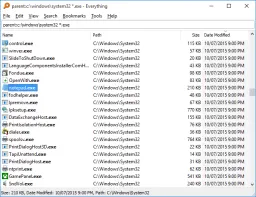
Everything is a Windows filename search utility that builds a near-instant index of file and folder names by reading the Master File Table (MFT) on NTFS and ReFS volumes. It does not index file contents — it is a filename/path finder, not a content search engine.
The practical question is whether your workflow needs a filename index that updates in real time across local volumes, and whether the trade-offs (service privileges, network exposure if the HTTP/FTP server is enabled, beta vs. stable channel) fit your environment. If you only need occasional file searches, Windows Search or File Explorer may be sufficient without the overhead of a persistent index.
What the official download page currently documents
As of 30 July 2026, Voidtools’ download page lists:
- Stable: Everything 1.4.1.1032 (32-bit and 64-bit installers, plus portable ZIPs)
- Beta: Everything 1.5.0.1418b (32-bit and 64-bit installers, plus portable ZIPs) — the beta adds folder indexing, ReFS support, and an updated UI.
- Both editions offer installer and portable packages. The installer registers the Everything service, adds context-menu integration, and creates Start Menu entries. The portable ZIP runs without installation and does not register the service or file associations.
The page also documents the Everything service (runs as SYSTEM for full MFT access) and the optional HTTP/FTP/ETP server for remote queries. Enabling the server exposes a network port — restrict it with firewall rules and authentication if used.
Treat the version numbers and release dates as a dated publisher signal — future releases will supersede this information.
Stable vs. Beta — choose the right channel
Stable (1.4.1.1032): Mature, widely deployed, NTFS-only indexing. Use this when you need a proven, low-risk tool for standard Windows search workflows.
Beta (1.5.0.1418b): Adds folder indexing (non-NTFS paths, network shares), ReFS support, and a refreshed UI. Use this when you need those specific capabilities and can tolerate beta-grade software. The beta is not recommended for production systems without a rollback plan.
Do not mix stable and beta installations on the same machine — they share configuration paths and the service.
Index scope, volumes, and privacy
Everything indexes file and folder names only — not file contents, metadata, or document text. The index is built by reading the NTFS MFT directly (requires the Everything service running as SYSTEM) or by scanning folder paths for non-NTFS volumes.
What gets indexed: All files and folders on selected NTFS/ReFS volumes (stable), plus any additional folder paths you explicitly add (beta).
What does not get indexed: File contents, alternate data streams, file metadata beyond name/path/size/date, cloud-only files not synced locally, and volumes you exclude in settings.
Privacy note: The index resides locally. If you enable the HTTP/FTP/ETP server, you expose the filename index over the network — secure it with a strong password, bind to localhost only, and use a firewall rule. The beta’s folder indexing can traverse network shares if configured; review share permissions before adding them.
Verification routine before relying on results
- Download only from voidtools.com/downloads/ — avoid third-party mirrors.
- Verify the SHA-256 checksum or digital signature of the installer against the values published on the download page.
- Install the stable edition first unless you specifically need beta features. Run the installer, review the service registration prompt, and choose whether to start the service automatically.
- After first launch, open Options → Indexes and confirm only the volumes you intend to search are checked. Exclude system volumes (e.g., recovery partitions) if they clutter results.
- If you enable the HTTP/ETP server, set a strong password, restrict binding to
127.0.0.1, and add a firewall rule for the port. - Test a known filename to confirm the index returns results instantly. If a file is missing, check Options → Exclude and volume selection.
What I verified for this guide
On 30 July 2026, Hubkub checked Voidtools’ official download page. The page listed Everything 1.4.1.1032 (stable) and 1.5.0.1418b (beta) with installer and portable packages for both. The page documented NTFS MFT indexing, folder indexing (beta), ReFS support (beta), service requirements, and HTTP/FTP/ETP server options. This is source verification, not an installation, benchmark, or privacy audit.
Everything FAQ
Is Everything free for commercial use?
The official page states Everything is free for personal and commercial use. No licence fee or registration is required. Check the current download page for any licensing updates.
Does Everything search file contents?
No. Everything indexes file and folder names only. For content search, use Windows Search, a dedicated document indexer, or grep/ripgrep for code.
Is the Everything service safe to run as SYSTEM?
The service runs as SYSTEM to read the NTFS MFT directly — this is required for near-instant indexing. The service does not transmit data externally unless you explicitly enable and configure the HTTP/FTP/ETP server. Review the service permissions and network exposure if you enable remote access.
Can Everything index network drives?
The stable edition only indexes local NTFS/ReFS volumes via the MFT. The beta adds folder indexing, which can include network share paths you explicitly add — but performance depends on network latency and share permissions.
How do I uninstall Everything cleanly?
Use the Windows uninstaller or the portable folder deletion. If you installed the service, stop and remove it via Options → General → Everything Service → Uninstall, or run Everything.exe -uninstall-service from an elevated prompt.
Related reading
- Best Free Software Downloads: The Complete Collection for 2026
- Safe Software Downloads
- How We Review Software