title: “KeePassXC Review 2026: Offline Password Vault, Strong Security Proof” slug: “keepassxc-review-2026” status: publish categories: [23] tag_names: [“keepassxc”, “password manager”, “offline vault”, “open source security”, “privacy tools”] excerpt: “KeePassXC review 2026: verify the official download path, 2.7.12 release proof, security signals, and whether this offline password manager is the right fit.” featured_image_url: “https://keepassxc.org/assets/img/screenshots/thumbs/database_view.png” featured_image_alt: “Official KeePassXC screenshot showing the encrypted database view” meta: _yoast_wpseo_title: “KeePassXC Review 2026: Offline Password Vault, Strong Security Proof” _yoast_wpseo_metadesc: “KeePassXC review 2026: verify the official download path, 2.7.12 release proof, security signals, and whether this offline password manager is the right fit.”
KeePassXC is still a credible download in 2026 if your goal matches what the software actually does well. This review is based only on official sources checked on April 20, 2026. I verified the official homepage, official download path, official docs or help surface, the current release or changelog source, and the Thaiware discovery page used for product provenance. I did not run a live install for this update, so any recommendation here is anchored to documented official evidence rather than hands-on testing.
Last updated: April 20, 2026
- Rechecked the official homepage, download path, docs/help surface, and release page for the current public version story.
- Confirmed the Thaiware discovery entity, current stable version, and the featured image source before staging this payload.
Key takeaways
- The official homepage, download page, docs hub, and GitHub release track agree on version 2.7.12, and the project also surfaces ANSSI certification context for version 2.7.9 on its security page.
- KeePassXC is best for people who want an offline-first password manager, keep their own encrypted database file, and prefer an open-source workflow without a vendor account.
- If you need people who want a hosted vault with built-in family sharing, always-on cloud sync, or browser-only setup with zero manual database handling., this is probably not the right canonical download choice.
Official download path for KeePassXC Review
Hubkub does not host installers. Use the official vendor/project page first, then use this review to check fit, limits, and safer setup notes.
Hubkub verification notes for KeePassXC Review
- Official download/support links already cited on this page were checked as the preferred source path for KeePassXC Review.
- Hubkub does not host installer files; the download action points readers back to the official vendor or project source.
- This page separates practical fit, trade-offs, and safety notes so readers can decide whether KeePassXC Review matches their workflow.
Verification notes checked for KeePassXC Review
Review type: review based on official sources
Verified on: April 20, 2026
Thaiware discovery page: https://software.thaiware.com/13261.html
Official homepage: https://keepassxc.org/
Official download URL: https://keepassxc.org/download/
Official docs / help: https://keepassxc.org/docs/
Official release notes / release page: https://github.com/keepassxreboot/keepassxc/releases/tag/2.7.12
Latest stable version checked: 2.7.12
Beta version: none listed on the official download page during this review
Release date shown on the official page: March 10, 2026
Official OS support checked: Windows, macOS, and Linux
Current official installer artifact seen: KeePassXC-2.7.12-Win64-LegacyWindows.msi
File size checked: 66.99 MB for the Windows legacy MSI example checked from the official release assets
Display unit used: MB
Signature check: official release assets expose both .sig and .DIGEST files for current packages
VirusTotal check: run your own malware scan before installing
Hash/checksum: DIGEST files are exposed on the official release page; I did not recalculate hashes locally for this update
Official resources
Who should use it and who should skip it
Use it if: People who want an offline-first password manager, keep their own encrypted database file, and prefer an open-source workflow without a vendor account.
Skip it if: People who want a hosted vault with built-in family sharing, always-on cloud sync, or browser-only setup with zero manual database handling.
Pricing and license reality
KeePassXC is free and open source under GPLv3. There is no paid desktop edition on the official site and no subscription wall on the core app.
That matters for this category because users often confuse a convenient download with a genuinely free long-term product. Here, the official source is clear enough to avoid that mistake.
Supported OS, current version, and safety checks
The current official support picture is straightforward: Windows, macOS, and Linux. The official stable version checked for this review is 2.7.12, and the official release source I used is dated March 10, 2026. For buyers who care about trust, the more important point is not just the version number but the quality of the source path. In this case, The official homepage, download page, docs hub, and GitHub release track agree on version 2.7.12, and the project also surfaces ANSSI certification context for version 2.7.9 on its security page.
I still want to be precise about the boundary of this review: I did not install the app, verify a code signature locally, or upload files to VirusTotal for this update. So this page should be read as a strong source-verified trust review, not a hands-on malware or performance audit.
What this product simplifies for beginners
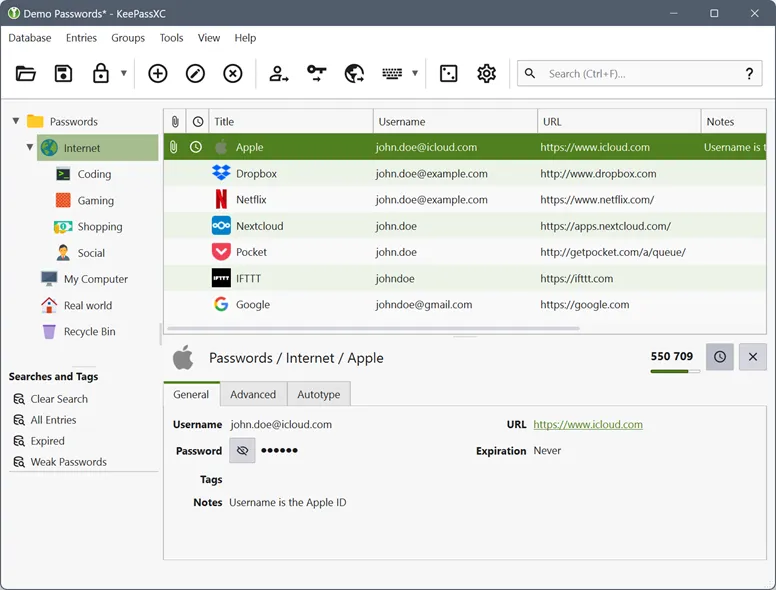
KeePassXC is best when your priority is control. It stores passwords, notes, attachments, and passkey-related data in an encrypted local database that you can keep on your own machine or sync through storage you already trust. That makes it attractive for people who want an offline vault, portable backups, and fewer account-lock risks than a cloud-only password manager. It is less ideal if you want a polished shared-family workflow out of the box or a beginner-friendly hosted onboarding flow.
For beginners, KeePassXC simplifies one hard problem: it turns scattered passwords into a single encrypted database with browser integration and strong generation tools. The tradeoff is that you become responsible for where the database file lives, how you back it up, and how you move it between machines. That is not a flaw, but it is different from cloud-first competitors. If you understand that operating model, KeePassXC stays one of the most honest open-source choices in this category.
KeePassXC vs KeePass vs Bitwarden vs 1Password in 2026
| Product | Choose it when | Main compromise |
|---|---|---|
| KeePassXC | Best if you want an offline encrypted vault and open-source control | No built-in hosted sync or family admin layer |
| KeePass | Better if you want the classic Windows-first ecosystem and plugin depth | Older interface and less polished cross-platform experience |
| Bitwarden | Better if you want easier cloud sync and team or family sharing | Relies more on hosted account workflows |
| 1Password | Better if you want premium polish and recovery workflows | Paid subscription and less offline-first control |
The comparison rule is simple. Pick KeePassXC when its main strength matches your actual workflow, not when the category around it looks crowded. That is the best way to avoid downloading a tool that is popular but wrong for your real job.
KeePassXC Review pros and cons: fit notes
Pros
- Free and open source with no subscription for the desktop app
- Clear official source trail across homepage, download page, docs, and release assets
- Offline-first database model suits privacy-conscious users well
- Release assets expose signature and digest files instead of asking for blind trust
Cons
- Less convenient than hosted vaults for family sharing and account recovery
- You need to manage your own encrypted database backups responsibly
- Beginner onboarding is more technical than cloud-first password managers
Safe official download notes for KeePassXC Review
Use the official download path above, not a mirror that strips away the documentation and proof layer. If you want the cleanest trust path, start from the vendor homepage, move to the vendor’s own download page, and confirm the current release source before you install. For this review, I used that exact sequence and also checked the Thaiware discovery entity only for provenance, not for article facts.
If you want a few related Hubkub reads before deciding, start with VeraCrypt Review 2026 KeePass Review Password Managers Explained. Those pages are not substitutes for official vendor sources, but they do help place this product in a broader software-buying context.
Alternatives and overlap note
If you want the classic local-vault approach with a long Windows history, KeePass still matters. If you want easier everyday sync and browser-first setup, Bitwarden is usually the smoother choice. If you care more about convenience and recovery than open-source control, 1Password stays easier for non-technical households. KeePassXC wins when offline ownership and transparent release hygiene matter more than convenience extras.
The overlap risk for this page was reviewed before staging. Existing Hubkub KeePass page overlaps at the category level, but KeePassXC remains a separate product entity and the review must distinguish the cross-platform offline-vault angle clearly.
Who should download KeePassXC Review?
KeePassXC is easy to recommend in 2026 if your real goal is an offline-first password vault with a clean official trust path. The project is still active, the official pages agree on the current version, and the release assets expose stronger proof markers than many commercial rivals. It is not the easiest password manager for complete beginners, but it remains one of the most credible free options for users who value control over convenience.
KeePassXC Review download and safety questions
Is KeePassXC really free?
Yes. The official homepage describes KeePassXC as free and open source, and the project distributes the desktop app without a paid subscription tier on its main download path. That does not mean setup is effortless, but it does mean you are not locked into a commercial desktop plan just to keep using the core app.
Is KeePassXC safe to download?
It is one of the safer downloads in this batch because the trust path is unusually explicit. The official site points to the official download page, the docs hub, and the GitHub release track, while the release assets expose .sig and .DIGEST files. I did not run a local malware or signature verification step for this update, so call this a strong source-verified trust path rather than a hands-on security audit.
Does KeePassXC work offline?
Yes. Offline use is the core idea. KeePassXC stores your vault in an encrypted database file that you control. You can keep it only on one machine or sync it with storage you already trust. That is why it appeals to people who dislike cloud lock-in, but it also means backup discipline is your responsibility.
How is KeePassXC different from KeePass?
KeePassXC is a separate cross-platform project built for Windows, macOS, and Linux with a more modern interface and a tighter built-in browser story. KeePass still matters, especially for Windows users who depend on its plugin ecosystem, but KeePassXC is usually the cleaner recommendation for people who want a current cross-platform offline vault.
Is KeePassXC better than Bitwarden for most people?
Not for most casual users. Bitwarden is usually easier to start, easier to sync, and easier to share with other people. KeePassXC becomes the stronger pick when you specifically want local control, an encrypted file you manage yourself, and an open-source desktop app that does not depend on a hosted account to be useful.
Reader-first software checklist
Before installing or switching to this software, use this quick checklist to confirm whether it fits your needs and risk tolerance.
- Official source: prefer the developer website, official documentation, or a clearly trusted distribution channel.
- Platform fit: check whether your Windows, macOS, Linux, Android, or iOS version is supported.
- License and cost: confirm whether the app is free, open source, freemium, trial-based, or paid.
- Privacy and permissions: review what files, folders, network access, account data, or browser permissions the app may use.
- Backup first: for recovery, storage, networking, privacy, or system utilities, back up important data before changing settings.
Safe download and setup notes
Hubkub does not recommend clicking misleading download buttons or installing unknown bundles. When possible, use the official source and avoid third-party installers that add toolbars, browser changes, or unrelated offers. After downloading, verify the file name, publisher, version, and installer prompts before continuing.
Pros, limits, and alternatives to consider
- Best fit: readers who need the core function described in this guide and prefer a practical setup path.
- Watch out for: outdated versions, unsupported platforms, unclear installers, or features that require paid upgrades.
- Compare alternatives: if this app feels too complex, too limited, or not maintained enough for your workflow, compare it with similar tools before installing.
Related Hubkub resources: Safe Software Downloads, Software Reviews, How We Review Software, and Content Quality Standards.
FAQ
Should I download this software from any mirror site?
Use the official developer website or a trusted distribution channel whenever possible. Mirror sites can be useful in limited cases, but they may also include outdated installers, misleading ads, or unwanted bundles.
What should I check before installing?
Check the publisher, version, license, supported operating system, installer prompts, and whether the app requests sensitive permissions.