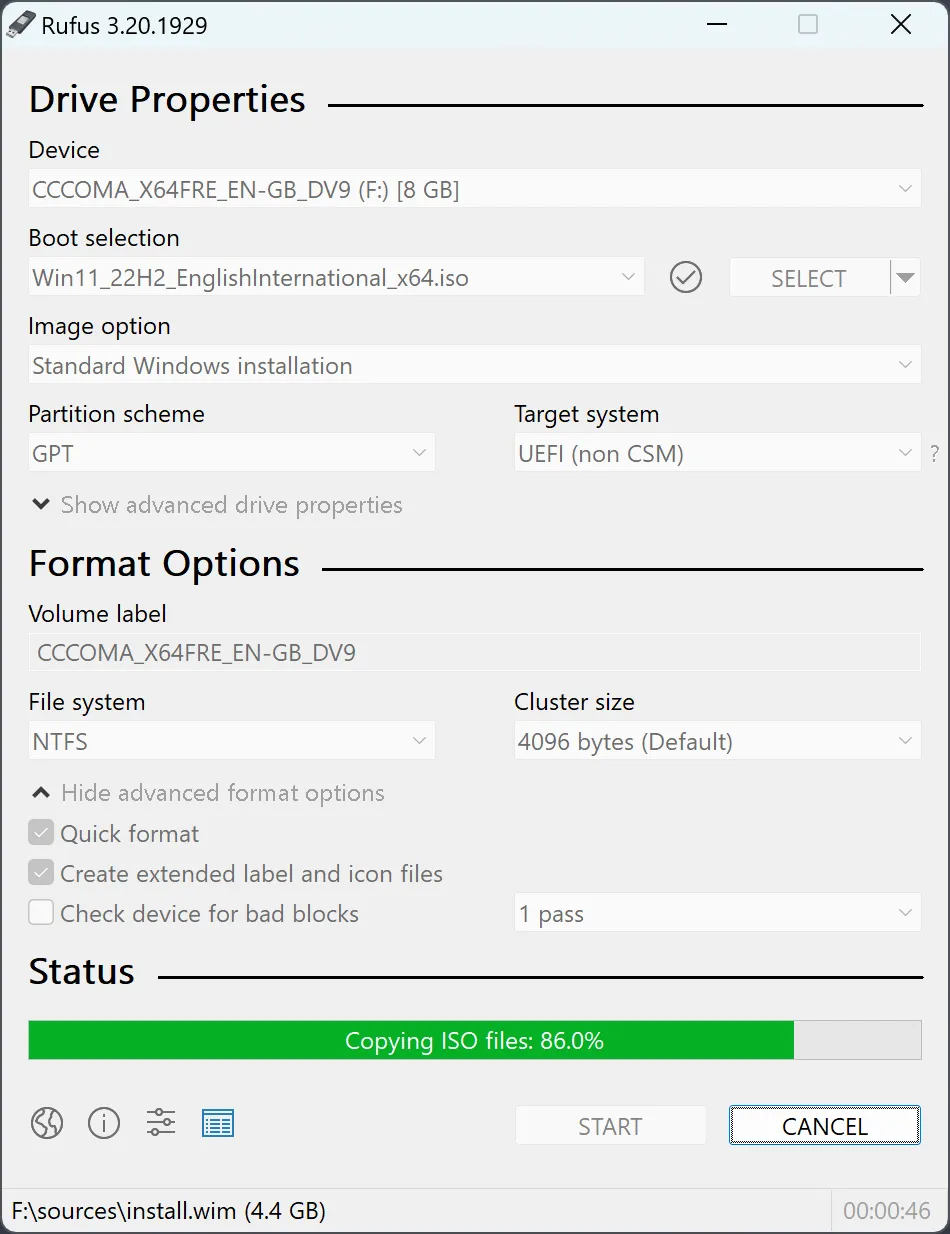
Rufus is still one of the cleanest utility downloads in 2026 when your goal is simple: turn an ISO into a bootable USB drive quickly, with less friction than heavier multi-boot tools. This review is based only on official sources checked on April 20, 2026, including the official Rufus homepage or download page, the official FAQ wiki, and the official GitHub release track. I did not create a fresh bootable drive during this update, so the page stays careful about what the official sources confirm versus what was not retested hands-on.
Last updated: April 20, 2026
- Rechecked the official Rufus homepage, official FAQ wiki, and official GitHub release path for the latest current public build.
- Confirmed the current package names, the portable build option, and the official Windows support baseline shown publicly.
Key takeaways
- Rufus is still free and open source, and the current official release track points to version 4.13.
- Its biggest strength is speed and clarity: download the EXE, choose your ISO, and build a bootable USB without a bloated installer experience.
- It is strongest when you want a straightforward Windows utility, not when you need a persistent multi-boot library or a cross-platform flashing workflow.
Official download path for Rufus Review
Hubkub does not host installers. Use the official vendor/project page first, then use this review to check fit, limits, and safer setup notes.
Hubkub verification notes for Rufus Review
- Official download/support links already cited on this page were checked as the preferred source path for Rufus Review.
- Hubkub does not host installer files; the download action points readers back to the official vendor or project source.
- This page separates practical fit, trade-offs, and safety notes so readers can decide whether Rufus Review matches their workflow.
What I verified for this review
Review type: review based on official sources
Verified on: April 20, 2026
Official homepage: https://rufus.ie/en/
Official download URL: https://rufus.ie/en/
Official docs URL: https://github.com/pbatard/rufus/wiki/FAQ
Official release notes URL: https://github.com/pbatard/rufus/releases/tag/v4.13
Latest stable version checked: 4.13
Release date shown on the official release page: 2026-02-17
Current official package examples seen: rufus-4.13.exe; rufus-4.13p.exe
Pricing or license reality: free and open-source utility
Official OS support checked: Windows 8 or later
Capability markers checked: official page still highlights BIOS and UEFI bootable USB creation from ISO images
Who Rufus is best for
Rufus is best for Windows users who need a bootable USB tool they can understand in minutes. It is especially strong for clean Windows installation media, Linux installer USB drives, firmware or recovery environments, and fast one-off device prep. It is not built as a “USB operating system manager” first. It is built as a focused utility that does one job quickly.
If you are assembling a practical Windows toolkit, Rufus fits alongside other direct utilities such as TeraCopy, TreeSize Free, and Total Commander. It solves a different problem, but the same appeal is there: a lightweight utility that gets out of your way.
Pricing and license reality
Rufus is still presented as free open-source software. There is no freemium wall on the official path, no account requirement, and no pro feature matrix pushed in front of the core download. the practical effect is USB boot tools are a category where download mirrors and upsell wrappers are common. Rufus stays refreshingly direct.
The real trade-off is scope. Rufus is not trying to be a broad device-management suite, and it is not the most flexible tool for people who want multiple distros or many advanced persistence workflows on one stick. The benefit of that narrower scope is speed.
What the official proof layer says
The official page exposes the current release number prominently and keeps the downloads simple. The package names shown publicly include the standard executable and the portable executable. The project also continues to route release-note detail through the official GitHub release page, which is useful because it gives you a dated release anchor instead of a vague “latest version” badge.
Just as important, the official homepage still frames Rufus around BIOS and UEFI bootable USB creation from ISO images and states a Windows 8 or later support baseline. That is enough to answer the core buyer-intent question for most users: is this still the right utility for building boot media on a current Windows machine? Yes, if your need is speed and clarity more than breadth.
Comparison snapshot
| Tool | Best for | License model | Why you would choose it |
|---|---|---|---|
| Rufus | Fast Windows-based bootable USB creation | Free and open source | Choose it when you want a fast standard or portable executable and a clear one-drive workflow. |
| balenaEtcher | Cleaner cross-platform image flashing | Free and open source | Choose it when you value a friendlier cross-platform interface over low-level boot-media options. |
| Ventoy | Multi-ISO flexibility | Free and open source | Choose it when you want to carry multiple installers on one USB drive without reflashing each time. |
| UNetbootin | Legacy simple Linux USB creation | Free and open source | Choose it only if you already know it fits your distro workflow; for many users today, Rufus feels more current. |
Rufus is often the easiest recommendation when you are following a build guide like Hubkub’s article on building a home server from old hardware. If your workflow needs grow into more niche boot-library use cases, that is where alternatives start to make more sense.
Safe official download notes for Rufus Review
The safe path is simple: use the official Rufus site, and if you want version-level proof, cross-check the official GitHub release page linked from the project. Avoid third-party mirror sites that repackage USB tools or bury the portable build. With software that writes boot media, you want the cleanest possible source path because a bad download is not just annoying; it can waste installation time or create confusing boot failures.
If you are preparing a machine for later setup work, you may also end up using tools such as PuTTY, WinSCP, or Python afterward. Rufus sits earlier in that chain: it helps you get the installer or recovery environment onto removable media in the first place.
Where Rufus Review works well — and where it may not
Pros
- Official download path is clean and direct.
- Portable build remains a real advantage for technicians and IT users.
- The current official release story is easy to verify across the site and GitHub release page.
- Still one of the fastest tools to explain to a non-expert Windows user.
Cons
- Windows-focused, so it is not the best fit for cross-platform teams.
- Less flexible than tools built around multi-ISO libraries.
- This review is source-verified only, not a new hands-on flash test.
- Some advanced boot scenarios still require technical judgment beyond the default UI.
Alternatives worth checking
If your priority is a polished cross-platform image flasher, balenaEtcher is the natural alternative. If your priority is carrying many ISO files on one stick, Ventoy is the better conceptual competitor. But if your priority is a small, familiar Windows executable that gets a bootable USB job done quickly, Rufus still holds its place.
Who should download Rufus Review?
Rufus remains one of the easiest safe recommendations in the downloads category because the official proof layer is clean, the utility’s purpose is narrow and obvious, and the current release track is easy to verify. I would still point most Windows users to Rufus first when they need a bootable USB utility now, not a broader media-management platform later.
Rufus Review download and safety questions
Is Rufus safe to download?
Yes, when you use the official Rufus site and cross-check the official GitHub release page for version-level proof. The biggest risk in this category is not the product itself but fake or bundled mirror downloads, so staying on the official source path matters.
Is Rufus still free?
Yes. Rufus is still presented as free open-source software. There is no paid consumer tier on the official download path, which keeps the buying decision simple: you are choosing the workflow, not comparing subscription levels.
What operating systems does Rufus support?
The official site still shows a Windows 8 or later support baseline. Rufus is primarily a Windows utility, so if you need a native macOS or Linux flashing experience, a cross-platform tool such as balenaEtcher will usually fit better.
Rufus vs Ventoy: which is better?
Rufus is usually better for users who want to create one bootable USB quickly and move on. Ventoy is better when you want one drive that can hold multiple ISO files without reflashing each time. Convenience depends on whether you value simplicity or a reusable ISO library.
Should I use the standard or portable build?
The portable build is useful if you want a lightweight utility you can keep in a toolkit without a normal installer flow. The standard executable is fine for most users. The key point is that the official site still exposes both choices clearly, which makes the decision easy.
Reader-first software checklist
Before installing or switching to this software, use this quick checklist to confirm whether it fits your needs and risk tolerance.
- Official source: prefer the developer website, official documentation, or a clearly trusted distribution channel.
- Platform fit: check whether your Windows, macOS, Linux, Android, or iOS version is supported.
- License and cost: confirm whether the app is free, open source, freemium, trial-based, or paid.
- Privacy and permissions: review what files, folders, network access, account data, or browser permissions the app may use.
- Backup first: for recovery, storage, networking, privacy, or system utilities, back up important data before changing settings.
Safe download and setup notes
Hubkub does not recommend clicking misleading download buttons or installing unknown bundles. When possible, use the official source and avoid third-party installers that add toolbars, browser changes, or unrelated offers. After downloading, verify the file name, publisher, version, and installer prompts before continuing.
Pros, limits, and alternatives to consider
- Best fit: readers who need the core function described in this guide and prefer a practical setup path.
- Watch out for: outdated versions, unsupported platforms, unclear installers, or features that require paid upgrades.
- Compare alternatives: if this app feels too complex, too limited, or not maintained enough for your workflow, compare it with similar tools before installing.
Related Hubkub resources: Safe Software Downloads, Software Reviews, How We Review Software, and Content Quality Standards.
FAQ
Should I download this software from any mirror site?
Use the official developer website or a trusted distribution channel whenever possible. Mirror sites can be useful in limited cases, but they may also include outdated installers, misleading ads, or unwanted bundles.
What should I check before installing?
Check the publisher, version, license, supported operating system, installer prompts, and whether the app requests sensitive permissions.