Last updated: April 19, 2026
- Added a visible verification block so this page clearly states what was checked from the official Notepad++ site and user manual.
- Confirmed the official project still shows Notepad++ 8.9.3 as the current version and keeps the user manual updated for the current 8.x branch.
Key Takeaways
- Notepad++ is still one of the best lightweight code and text editors for Windows if you want speed, tabs, plugins, and almost no setup overhead.
- It is free and open source, but it is still a Windows-first tool, so developers who need a deeply cross-platform workflow may prefer Visual Studio Code or Sublime Text.
- Download it from the official Notepad++ site only, then compare it with Visual Studio Code if you need stronger extensions, Git integration, or AI-assisted workflows.
Official download path for Notepad++ Review
Hubkub does not host installers. Use the official vendor/project page first, then use this review to check fit, limits, and safer setup notes.
Hubkub verification notes for Notepad++ Review
- Official download/support links already cited on this page were checked as the preferred source path for Notepad++ Review.
- Hubkub does not host installer files; the download action points readers back to the official vendor or project source.
- This page separates practical fit, trade-offs, and safety notes so readers can decide whether Notepad++ Review matches their workflow.
What I verified for this review
- Review basis: official source checks
- Verified on: April 19, 2026
- Latest stable version checked: Notepad++ 8.9.3
- Beta version: no separate beta track highlighted on the official downloads page when checked
- Official OS support checked: Windows
- Project/manual freshness checked: the official user manual still describes the current 8.x branch and is marked current up to 8.9.3
- Official download URL: https://notepad-plus-plus.org/downloads/
- Package variants checked: the official downloads page still organizes current releases by installer/portable builds rather than treating Notepad++ as a store-only app
- File size: not checked for this update
- Signature check: not re-tested for this article update
- VirusTotal check: not re-tested for this article update
- Hash/checksum: not checked for this update
- Official sources: Notepad++ homepage + official downloads page + user manual
Official resources
Use the official links below so you get the latest version and documentation from the real vendor.
Need setup help? Read the official documentation.
If you want a fast editor that opens instantly, handles large plain-text files well, and supports coding without feeling bloated, Notepad++ is still an easy recommendation in 2026. The project is actively maintained, the official downloads page is live, and the user manual is still updated for the current 8.x series.
What keeps Notepad++ relevant is not flashy AI or cloud features. It is the opposite: speed, stability, and a low-friction editing workflow. For many Windows users, that is exactly the point.
What Is Notepad++ Best For in 2026?
Notepad++ is best for people who need a reliable editor for:
- code snippets and small scripts
- log files and config files
- search-and-replace across text
- quick edits without opening a full IDE
- plugin-based enhancements on Windows
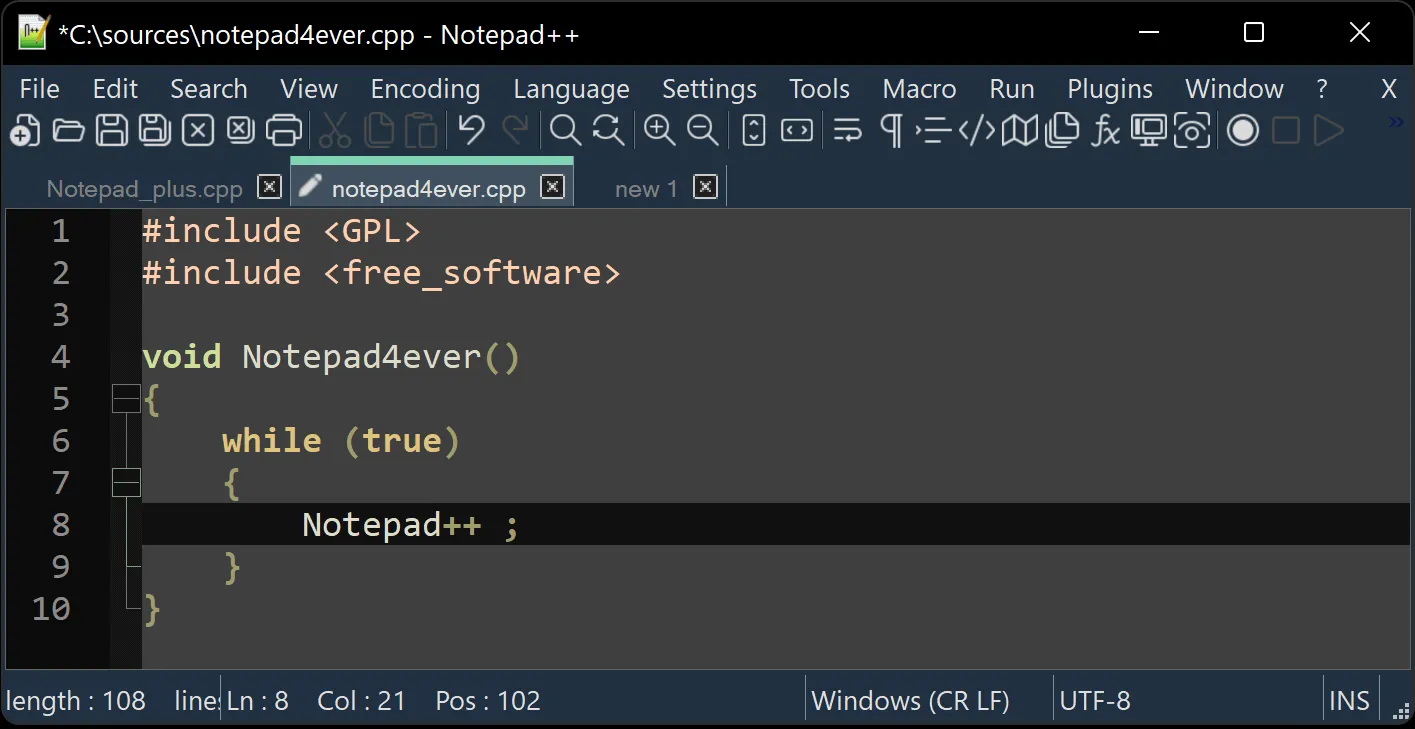
This is why it still sits in a useful middle ground between old-school Notepad and a heavier environment like VS Code. If your work is mostly editing, comparing, searching, and saving text fast, Notepad++ often feels more efficient than launching a bigger workspace editor.
For developers who want a broader toolchain, Hubkub already covers heavier alternatives like Visual Studio Code and terminal-friendly tools like Windows Terminal.
Is Notepad++ Free, Safe, and Still Maintained?
Yes. Based on the official project site, Notepad++ remains free and open source. The official downloads page also shows current stable releases, and the official user manual is still maintained for the modern 8.x branch.
the practical effect is many old utility downloads pages on the web still rank well in search even when they are outdated, bundled, or mirrored. With Notepad++, the safe path is simple:
- use the official homepage
- open the official downloads page
- avoid random software mirror sites unless you have a strong reason
The project also still has public release activity, which is a strong sign that it is not abandonware.
Notepad++ vs Visual Studio Code: Which One Should You Download?
| Category | Notepad++ | Visual Studio Code |
|---|---|---|
| Best for | fast local editing on Windows | broader development workflows |
| Performance feel | very light | heavier but more capable |
| Platform support | Windows-first | Windows, macOS, Linux |
| Plugins/extensions | yes | yes, much broader ecosystem |
| Git workflow | basic/manual | much stronger |
| AI tooling | limited compared with newer editors | stronger ecosystem and integrations |
If your question is, “What is the best free code editor overall?” then VS Code is usually the broader answer.
If your question is, “What opens instantly and lets me edit text, logs, scripts, and config files without getting in my way?” then Notepad++ still wins for a lot of Windows users.
That distinction is important. Notepad++ is not trying to be everything.
What Does Notepad++ Do Better Than Windows Notepad?
The biggest jump from plain Windows Notepad is workflow efficiency. Notepad++ gives you:
- tabbed editing
- language-aware syntax highlighting
- plugin support
- macro and search tools
- better handling for large text and repetitive edits
- multiple-document workflows that feel normal for developers and power users
For anyone who edits text more than casually, those features are not luxuries. They are time savers.
This is also why Notepad++ fits well beside tools like Git and Postman: it is part of a practical Windows toolkit, even if it is not a full integrated environment.
Who Should Use Notepad++ in 2026?
Notepad++ is a great fit for:
- Windows developers who want a fast secondary editor
- sysadmins editing logs, config files, and quick scripts
- students learning to code who do not need a full IDE yet
- users replacing plain Notepad with something more capable
- people who value local, lightweight tools over cloud-heavy workflows
It is a weaker fit for:
- developers who want seamless cross-platform parity
- teams that rely on richer extensions, Git panels, remote dev, and integrated debugging
- users who want built-in AI coding assistants
For those users, VS Code, Cursor, or a JetBrains stack may be a better main editor.
How to Download and Install Notepad++ Safely
The safe installation process is straightforward:
- Visit the official Notepad++ homepage.
- Open the official downloads page.
- Choose the current stable release.
- Pick the installer or portable option that matches your workflow.
- After install, add only the plugins you actually need.
A good practical rule: start simple. If your goal is fast text editing, do not overload Notepad++ with plugins on day one. Install what solves a real problem.
Where Notepad++ Review works well — and where it may not
Pros
- free and open source
- very fast on Windows
- excellent for text, logs, config files, and quick code edits
- mature plugin ecosystem
- low system overhead
Cons
- Windows-first rather than truly cross-platform
- weaker integrated Git and modern dev workflow features than VS Code
- not the best fit for AI-first coding workflows
- interface can feel utilitarian compared with newer editors
Best Alternatives to Notepad++
If Notepad++ is not the right fit, the best alternatives depend on your use case:
- Visual Studio Code for a broader development environment
- Sublime Text if you want speed plus a more polished premium editor feel
- Cursor if your workflow is increasingly AI-assisted
If you are building a Windows developer stack around this article, the most natural related reads on Hubkub are:
Who should download Notepad++ Review?
Yes — if you want a fast, trustworthy, no-nonsense Windows editor.
Notepad++ is not the most modern developer environment, and it is not the most ambitious. But that is exactly why it still works so well. It opens fast, stays out of your way, and solves a very real class of editing problems better than many larger tools.
For Windows users who want a lightweight editor first and a full IDE second, Notepad++ is still one of the easiest downloads to recommend in 2026.
Notepad++ Review download and safety questions
Is Notepad++ still safe to download in 2026?
Yes, as long as you download it from the official Notepad++ site and official downloads page rather than random third-party mirrors.
Is Notepad++ better than Windows Notepad?
For most technical users, yes. Notepad++ offers tabs, syntax highlighting, plugins, better search, and a much stronger editing workflow.
Can Notepad++ replace VS Code?
Sometimes. If your work is mostly text editing, scripts, logs, and config files, it can. If you need broader development tooling, VS Code is still the stronger all-around platform.
Does Notepad++ support plugins?
Yes. Plugin support is one of the main reasons power users still choose it over plain editors.
Reader-first software checklist
Before installing or switching to this software, use this quick checklist to confirm whether it fits your needs and risk tolerance.
- Official source: prefer the developer website, official documentation, or a clearly trusted distribution channel.
- Platform fit: check whether your Windows, macOS, Linux, Android, or iOS version is supported.
- License and cost: confirm whether the app is free, open source, freemium, trial-based, or paid.
- Privacy and permissions: review what files, folders, network access, account data, or browser permissions the app may use.
- Backup first: for recovery, storage, networking, privacy, or system utilities, back up important data before changing settings.
Safe download and setup notes
Hubkub does not recommend clicking misleading download buttons or installing unknown bundles. When possible, use the official source and avoid third-party installers that add toolbars, browser changes, or unrelated offers. After downloading, verify the file name, publisher, version, and installer prompts before continuing.
Pros, limits, and alternatives to consider
- Best fit: readers who need the core function described in this guide and prefer a practical setup path.
- Watch out for: outdated versions, unsupported platforms, unclear installers, or features that require paid upgrades.
- Compare alternatives: if this app feels too complex, too limited, or not maintained enough for your workflow, compare it with similar tools before installing.
Related Hubkub resources: Safe Software Downloads, Software Reviews, How We Review Software, and Content Quality Standards.
FAQ
Should I download this software from any mirror site?
Use the official developer website or a trusted distribution channel whenever possible. Mirror sites can be useful in limited cases, but they may also include outdated installers, misleading ads, or unwanted bundles.
What should I check before installing?
Check the publisher, version, license, supported operating system, installer prompts, and whether the app requests sensitive permissions.