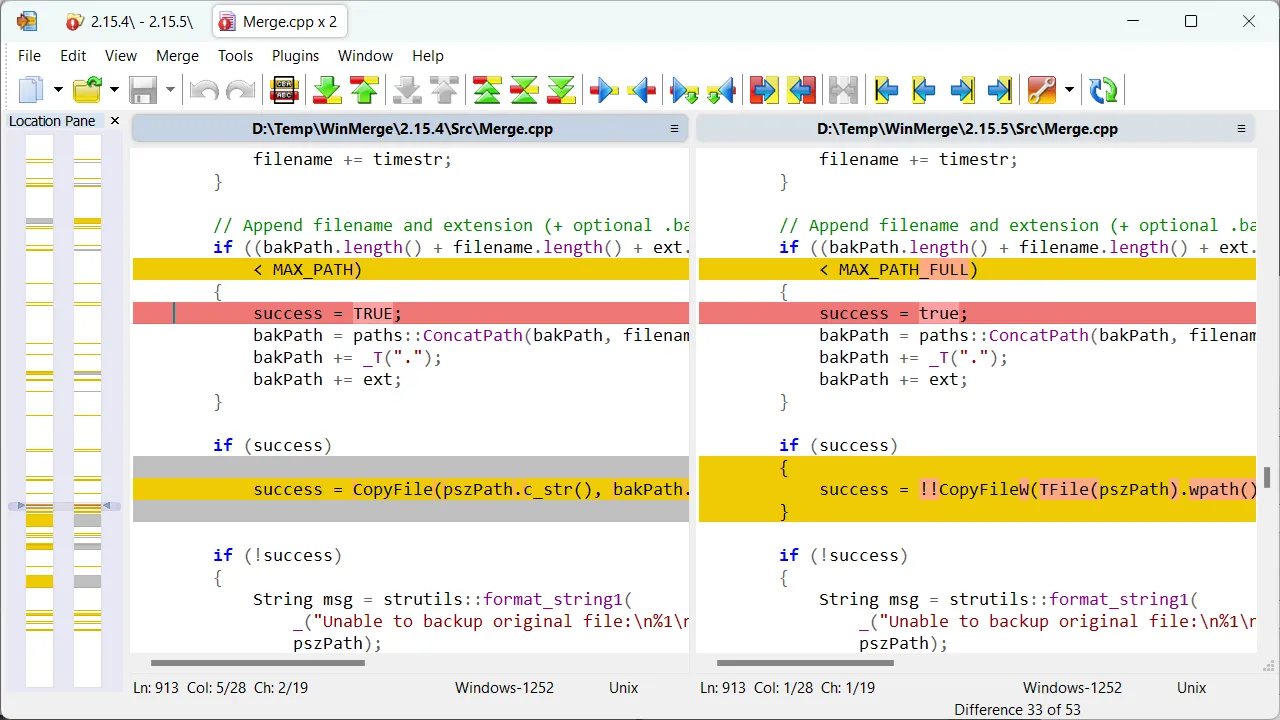
- WinMerge is a Windows-focused tool for comparing text files, folders, images, and tables, then reviewing or copying selected differences.
- The official download page listed WinMerge 2.16.58, released July 27, 2026, when this guide was checked.
- Use it to understand differences before changing or deleting files; it is not a backup system, a hosted code-review platform, or a substitute for Git history.
- For a normal Windows installation, start at the official download page and choose the installer that matches the device architecture or deployment policy.
- Guide type: source-verified download and workflow guide, not a hands-on review.
- Release checked: WinMerge 2.16.58, released July 27, 2026.
- Publisher pages checked: the official download page, online manual, and project release record.
- What this does not claim: a personal installation, merge test, benchmark, screenshot, or compatibility test.
- What to verify yourself: the current version, installer type, and any organization-specific deployment or file-handling rule before installing.
Official download URL: https://winmerge.org/downloads/
When WinMerge is the right tool
WinMerge is most useful when the question is concrete: what changed between these two files, folders, or text revisions? It gives a local visual comparison rather than a general-purpose coding environment. That makes it relevant for source files, configuration changes, exported text, documentation drafts, logs, and two folder copies that should be reconciled before one is archived or removed.
The official project describes file, folder, image, table, and version-control comparison features. The practical boundary matters more than the feature list. WinMerge can help identify differences and copy a selected change from one side to the other; it does not establish which copy is authoritative. Keep an untouched copy or a versioned backup before applying merges to work that cannot be recreated.
Choose the official package deliberately
At the July 30, 2026 source check, the official page identified version 2.16.58, released on July 27, 2026. It listed standard installers as well as x64, ARM64, and per-user options, plus ZIP packages. The exact list can change, so treat the publisher page—not this article—as the final source before downloading.
- Standard installer: appropriate when the Windows device and local installation policy allow a normal application install.
- x64 or ARM64 installer: choose only after checking the device architecture; do not assume an ARM64 package is interchangeable with a typical x64 PC.
- Per-user installer: may suit a user-level deployment, but managed devices can still have restrictions that the installer cannot override.
- ZIP package: useful only when its operational trade-offs are understood; it is not automatically safer or more portable for every workplace.
Use the official WinMerge download page rather than a search-result mirror. A comparison utility may open code, logs, documents, or configuration files, so the download route deserves the same care as the comparison itself. If a security product, browser warning, or company policy changes the expected route, stop and follow that local policy instead of forcing an installation.
File comparison: inspect first, merge second
For two text files, the safer workflow is to begin in read-only terms: identify which file is the known-good baseline, open the other copy for comparison, then inspect each highlighted difference in context. A visible difference can be meaningful, harmless, or a symptom of an encoding or line-ending change. Copying a block across without understanding the surrounding setting can replace a working value with an older or incomplete one.
This is especially relevant for configuration files and generated text. Before saving a merged result, preserve the originals and give the result a distinct filename if the task is exploratory. If the files belong to a repository, use the repository’s normal branch, review, and commit process as the record of authority; a local visual comparison is an aid, not a replacement for that process.
Folder comparison is a triage tool, not a deletion command
Folder comparison can surface files that differ, exist on only one side, or appear to match. That can speed up a migration check or cleanup investigation, but it should not become an automatic deletion decision. Date stamps, generated files, hidden application data, and files with the same name but different purpose can all make a folder list misleading when viewed without the surrounding workflow.
A conservative sequence is: compare the folders, record why a difference is expected or unexpected, preserve a recoverable copy, then make one reversible change at a time. For long-term backup retention, use backup software or versioned storage. WinMerge helps answer “what differs?”; it does not promise that one folder is a complete recovery point.
Filters, encoding, and manual checks
Comparison results depend on what is included and how text is interpreted. File filters can hide items; encoding and line-ending settings can make otherwise similar text appear different; binary, image, and table comparisons have their own limits. The official manual is the right place to confirm a setting before relying on a result for a production change.
For a sensitive change, validate the conclusion outside the comparison window as well. Check the application that consumes the file, a documented checksum or release note where available, or the project’s version-control history. This extra step is more valuable than treating any diff view as proof that a merge is safe.
Where WinMerge stops and other tools begin
| Need | Better starting point | Why |
|---|---|---|
| Two local Windows files or folders | WinMerge | Focused visual comparison and selective merge work. |
| Branches, commits, pull requests, and remote collaboration | A Git client or repository platform | These tools preserve history, review context, and team workflow. |
| Cross-platform visual comparison | Meld or another cross-platform tool | Choose based on the operating systems in the actual workflow. |
| Commercial support or specialized formats | A paid comparison product such as Beyond Compare | Evaluate its format support and licensing against the specific job. |
| Backup and restoration | Backup software or versioned storage | A diff result is not a recoverable backup plan. |
Who should keep it on a shortlist
WinMerge is a sensible shortlist item for Windows users who routinely compare source files, text revisions, configuration snapshots, or local folders and need a focused interface. It is less suitable when the central problem is team review, repository history, cloud collaboration, or backup retention. In those cases, use the system that owns the work and treat a local diff utility as a supporting tool.
The honest recommendation is conditional: choose WinMerge when a local visual comparison is the job, download it from the publisher’s route, and protect the originals before merging. Skip it when the work needs a platform that records decisions, permissions, or recoverable history.
Next Read
FAQ
Is WinMerge free?
The WinMerge project presents the application as free and open source. Check the project’s current download and license information before deployment, especially if an organization has software-approval requirements.
Can WinMerge compare folders?
Yes. Folder comparison is a core use case, but the result should be reviewed before copying or deleting files. Preserve a known-good copy when the folders contain irreplaceable work.
Does WinMerge replace Git?
No. It can help inspect local differences, but Git and repository platforms handle commits, branches, remote collaboration, and historical review. They solve a broader workflow problem.
Which WinMerge installer should I use?
Use the official download page to confirm the current options, then match the installer to the device architecture and installation policy. On managed devices, follow the organization’s deployment process rather than bypassing it with a different package.
Is a matching comparison result proof that two folders are safe to delete?
No. A comparison result is evidence to investigate, not a retention policy. Confirm what the files are, keep a recoverable copy, and use a backup or versioned-storage process for data that matters.