ShareX is still one of the strongest free Windows capture downloads in 2026 if you want more than a basic snip tool. This review is based only on official ShareX sources checked on April 20, 2026, including the main site, official downloads page, official changelog, official documentation pages, and the official GitHub release.
Last updated: April 20, 2026
- Rechecked the official ShareX homepage, downloads page, changelog, docs pages, and latest GitHub release.
- Confirmed the stable version, official setup file size, release-date marker, visible checksum, and current Windows support baseline.
Key takeaways
- ShareX is a serious power-user screenshot tool, not just a quick snipping replacement, and its biggest advantage is how deeply capture, recording, OCR, upload, and automation features connect.
- The safe path is simple: start from the official ShareX downloads page, then use the official changelog and GitHub release to confirm the current build.
- If you only want a minimal capture app, ShareX can feel heavier than necessary. If you want repeatable workflows, scrolling capture, screen recording, or custom upload logic, it remains one of the best free options on Windows.
Official download path for ShareX Review
Hubkub does not host installers. Use the official vendor/project page first, then use this review to check fit, limits, and safer setup notes.
Hubkub verification notes for ShareX Review
- Official download/support links already cited on this page were checked as the preferred source path for ShareX Review.
- Hubkub does not host installer files; the download action points readers back to the official vendor or project source.
- This page separates practical fit, trade-offs, and safety notes so readers can decide whether ShareX Review matches their workflow.
Verification notes checked for ShareX Review
- Review basis: official source checks
- Verified on: April 20, 2026
- Official download URL: https://getsharex.com/downloads
- Latest stable version checked: 19.0.2
- Beta version: no newer beta was listed during verification; the official downloads page still showed ShareX 19.0.1 as an older pre-release entry.
- Release date shown on the official source: January 28, 2026
- Official OS support checked: Windows 10 64-bit or higher
- Account requirement: no account is required to download ShareX; some upload destinations may require their own service credentials.
- File size: 108.25 MB for ShareX-19.0.2-setup.exe on the official downloads page; the portable ZIP was also listed at 160.98 MB.
- Display unit used: MB
- Current official installer artifact seen: ShareX-19.0.2-setup.exe
- Installation path: use the official installer defaults unless your setup requires changes
- Signature check: verify on your device after downloading from the official source
- VirusTotal result: run your own malware scan before installing
- Hash: setup SHA-256 listed on the official GitHub release: 30A3172FA3C8D8F998A3D21180CE0FAC7761C74E78B701577FE028902B014D1B
- Specific numeric evidence: the official downloads page showed 30,730,542 total downloads and 1,150,455 downloads for the 19.0.2 release entry when checked.
- Official sources used: getsharex.com homepage, downloads page, changelog, scrolling screenshot guide, actions page, custom uploader docs, and the ShareX GitHub release.
Official resources
Use the official links below so you get the latest ShareX build and product documentation from the actual project.
Need feature detail? Read the official Actions guide or the official scrolling screenshot guide.
For release history, use the official changelog entry for v19.0.2.
The simplest way to think about ShareX is this: it starts as a screenshot tool, but it is really a workflow tool for people who capture, process, and share things constantly. The official homepage describes it as a screen capture, file sharing, and productivity tool, and that wording matches the current feature list much better than calling it a basic snipping app.
the practical effect is many people search for ShareX as if it were only a screenshot download. In practice, the official feature set goes much further. The homepage currently lists fullscreen, active window, region capture, screen recording, GIF recording, OCR, image editing, QR code scanning, video conversion, hash checking, and a large set of upload-related tasks. The official docs also show that scrolling screenshots, actions, and custom uploaders are all first-class parts of the product rather than hidden extras.
For readers who care about free software, ShareX stays attractive because the official site still presents it as completely free and open source, with no advertisements and over 18 years of active development. That combination gives it a stronger long-term trust story than a random utility download that looks polished for one year and disappears the next.
Who should use ShareX?
- Windows users who capture screenshots many times per day
- people who need scrolling capture, GIF capture, or quick upload destinations
- users who want OCR, image effects, and post-capture automation in one desktop tool
- power users who like building repeatable hotkeys and task chains instead of doing every step manually
- teams or individuals who prefer free open-source tools over freemium capture apps
Who should skip ShareX?
- users who only need a simple rectangle snip a few times per week
- people who want the lowest-possible learning curve and almost no settings
- macOS or Linux users looking for a native ShareX desktop build, because the official ShareX messaging is Windows-focused
- readers who dislike complex menus, workflow options, and upload configuration
Supported OS, stable version, file size, and safety checks
The official title and homepage positioning make one thing clear immediately: ShareX is for Windows. The stronger version-specific support clue comes from the official changelog for ShareX 18.0.0, where the project states that the move to .NET 9 means Windows 7 is no longer supported and that .NET 9 officially supports only Windows 10 64-bit or higher. Because the latest stable release is now 19.0.2, that Windows baseline is the safest current support statement to use for this review.
The latest stable release checked from the official GitHub release page was ShareX 19.0.2, published on January 28, 2026. The official downloads page still marked that release as Latest and exposed both the setup EXE and portable ZIP. For people who want the standard install path, the setup file is the cleaner recommendation because it is the most obvious path on the official downloads page and is the artifact most casual readers will choose.
On safety signals, this review stays honest about what was and was not rechecked. The official release page did expose a SHA-256 for the setup file, which is a strong primary-source trust marker. However, I did not rerun a local signature verification or a fresh VirusTotal scan for this update, so those fields stay labeled as not tested instead of being padded with assumptions. If you are installing ShareX on a work-managed machine, treat the official downloads page and official GitHub release as your starting trust anchors, then do your own policy-driven checks before deployment.
What ShareX simplifies for beginners
Even though ShareX is built for power users, the official feature set still solves several beginner problems very well. It gives you one place to capture a region, save to file, copy to clipboard, annotate an image, upload a result, generate a QR code, or run a follow-up action. That means the real beginner benefit is not simplicity of interface. It is reduction of tool switching.
The official scrolling screenshot guide is a good example. Instead of needing a browser extension, a separate stitcher, and extra manual cropping, ShareX documents a built-in capture flow for long pages and documents. The same pattern shows up in the official Actions page, where post-capture tasks can hand a file off to other tools automatically. If your workflow repeatedly turns screenshots into documentation, bug reports, tutorials, or shared references, ShareX saves friction by keeping those steps close together.
The custom uploader documentation also reveals why advanced users stay loyal to ShareX for years. The tool is not limited to one cloud service or one share destination. It lets you work with custom request methods, headers, body types, and output URL handling. That is a niche feature for casual users, but it is exactly the kind of depth that makes ShareX more than a temporary toy.
Early-use reality: where the learning curve shows up
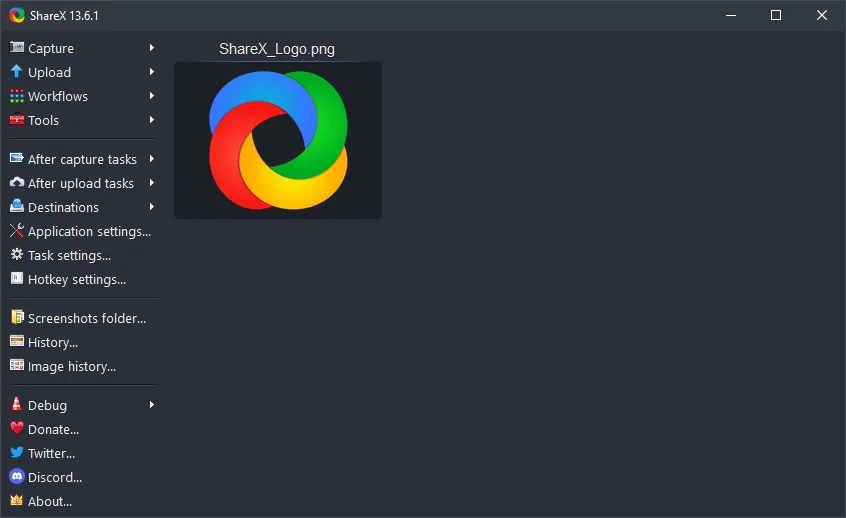
The downside of that depth is obvious. ShareX does not present itself like a stripped-down snipping utility, and the official screenshots page reflects that. The main window, capture menus, upload menus, tools menu, task settings, region capture settings, and custom uploader screens all suggest the same thing: this app rewards curiosity, but it also expects some patience.
For many readers, the right decision comes down to how often they capture and share things. If your only goal is occasional screenshots for chats or quick notes, the native Windows Snipping Tool or another calmer capture app may be enough. If you work in support, documentation, QA, developer communication, tutorials, or content operations, ShareX starts making more sense because its workflow depth is the main reason to install it.
ShareX vs direct alternatives
| Tool | Best fit | Main reason to choose it | Main reason to skip it |
|---|---|---|---|
| ShareX | Windows users who want capture plus workflow automation | Deep feature stack across screenshots, recording, OCR, uploads, and actions | Can feel too busy if you only need quick basic snips |
| Greenshot | Users who want a calmer screenshot-first workflow | Simpler mental model for quick capture and annotation | Less attractive if you specifically want ShareX-style automation depth |
| Windows Snipping Tool | People who want the built-in baseline | No separate download habit or feature exploration required | Not the right substitute if you want the broader ShareX workflow stack |
| PicPick | Users choosing between bundled screen utilities | Can appeal if your priority is a different UI and toolkit balance | Less compelling if your main priority is a free open-source automation-heavy capture app |
The most direct internal comparison on Hubkub today is still Greenshot. Greenshot remains easier to recommend when the buyer wants a screenshot-and-annotation tool with less setup friction. ShareX is the stronger recommendation when the buyer keeps asking for one more feature: scrolling capture, GIF capture, OCR, upload routing, task chains, or custom uploader behavior.
If you want to understand how Hubkub separates direct testing from source-only checks, read How We Review Software. If you are browsing similar catalog entries, the Downloads > Personal archive is the closest internal category fit for ShareX.
Where ShareX Review works well — and where it may not
Pros
- officially free and open source
- feature breadth goes far beyond screenshots
- official docs cover advanced features like scrolling capture, actions, and custom uploaders
- current release page exposes direct download artifacts and SHA-256 hashes
- strong fit for repeatable Windows capture workflows
Cons
- Windows-only official fit is limiting if you need the same tool everywhere
- interface depth can overwhelm casual users
- best features take configuration time, so the payoff is higher for heavy users than for occasional users
Who should download ShareX Review?
Download ShareX in 2026 if your real need is not just taking screenshots but building a faster capture workflow on Windows. The official evidence still supports it as a free, open-source, actively maintained tool with real depth in recording, OCR, uploads, and automation. Skip it if you want the simplest possible interface and do not expect to use those extra layers.
ShareX Review download and safety questions
Is ShareX really free?
Yes. The official homepage still describes ShareX as completely free and open source, with no advertisements. That is one of the clearest reasons it still stands out among long-running Windows utilities.
Is ShareX safe to download?
The safest path is to start from getsharex.com/downloads and confirm the current release on the official GitHub release page. This review verified the official download path and the published SHA-256 hash, but it did not rerun a fresh local signature or VirusTotal check for this update.
Does ShareX work on Windows 11?
Yes, based on the official Windows-focused positioning and the current support baseline derived from the .NET 9 transition note in the official changelog. The strongest safe support statement is Windows 10 64-bit or higher, which includes Windows 11.
Does ShareX support scrolling screenshots?
Yes. ShareX has an official documentation page dedicated to scrolling screenshots, including how to start the capture, what the status colors mean, and which common page elements can interfere with the result.
Can ShareX record GIFs and videos?
Yes. The official homepage currently lists both screen recording and screen recording (GIF) among the main capture methods, which is one reason ShareX stays broader than screenshot-only tools.
Do you need an account to use ShareX?
No account is required to download the app itself from the official sources. However, some sharing destinations and custom upload workflows may require credentials for the services you connect to.
Is ShareX better than Greenshot?
ShareX is usually the better pick when you want more workflow depth, more capture modes, and more automation options. Greenshot is easier to recommend when your priority is a simpler screenshot-and-annotation experience with less configuration overhead.
Reader-first software checklist
Before installing or switching to this software, use this quick checklist to confirm whether it fits your needs and risk tolerance.
- Official source: prefer the developer website, official documentation, or a clearly trusted distribution channel.
- Platform fit: check whether your Windows, macOS, Linux, Android, or iOS version is supported.
- License and cost: confirm whether the app is free, open source, freemium, trial-based, or paid.
- Privacy and permissions: review what files, folders, network access, account data, or browser permissions the app may use.
- Backup first: for recovery, storage, networking, privacy, or system utilities, back up important data before changing settings.
Safe download and setup notes
Hubkub does not recommend clicking misleading download buttons or installing unknown bundles. When possible, use the official source and avoid third-party installers that add toolbars, browser changes, or unrelated offers. After downloading, verify the file name, publisher, version, and installer prompts before continuing.
Pros, limits, and alternatives to consider
- Best fit: readers who need the core function described in this guide and prefer a practical setup path.
- Watch out for: outdated versions, unsupported platforms, unclear installers, or features that require paid upgrades.
- Compare alternatives: if this app feels too complex, too limited, or not maintained enough for your workflow, compare it with similar tools before installing.
Related Hubkub resources: Safe Software Downloads, Software Reviews, How We Review Software, and Content Quality Standards.
FAQ
Should I download this software from any mirror site?
Use the official developer website or a trusted distribution channel whenever possible. Mirror sites can be useful in limited cases, but they may also include outdated installers, misleading ads, or unwanted bundles.
What should I check before installing?
Check the publisher, version, license, supported operating system, installer prompts, and whether the app requests sensitive permissions.