IrfanView is still worth downloading in 2026 if you want a fast Windows image viewer that also covers batch conversion, thumbnails, screenshots, scanning, and plug-in-assisted format support without turning into a heavy photo suite. This review is based only on official IrfanView pages checked on April 20, 2026.
Last updated: April 20, 2026
- Verified the official homepage, official download page, FAQ, 64-bit guidance, screenshot gallery, and official version history.
- Confirmed current version 4.73, release-date marker, official SHA-256 hashes, and the current 32-bit versus 64-bit positioning from IrfanView itself.
Key takeaways
- IrfanView remains a strong download for Windows users who want a compact viewer with real utility features beyond simple image opening.
- The biggest decision is not whether IrfanView exists in 32-bit and 64-bit form, but which one fits your workflow: 64-bit is better for very large images, while 32-bit still has broader plug-in compatibility and fewer caveats.
- It is freeware for non-commercial use, but business users should treat it as paid software because the official site says commercial use requires registration and purchase.
Official download path for IrfanView Review
Hubkub does not host installers. Use the official vendor/project page first, then use this review to check fit, limits, and safer setup notes.
Hubkub verification notes for IrfanView Review
- Official download/support links already cited on this page were checked as the preferred source path for IrfanView Review.
- Hubkub does not host installer files; the download action points readers back to the official vendor or project source.
- This page separates practical fit, trade-offs, and safety notes so readers can decide whether IrfanView Review matches their workflow.
Verification notes checked for IrfanView Review
- Review basis: official source checks
- Verified on: April 20, 2026
- Official download URL: https://www.irfanview.com/main_download_engl.htm
- Latest stable version checked: 4.73
- Beta version: none shown on official sources checked
- Release date shown on the official page: 2025-11-13
- Official OS support checked: Windows XP, Vista, 7, 8, 10 and 11 on the homepage; the official 64-bit page says IrfanView-64 runs on 64-bit Vista, Windows 7, 8, 10, and 11
- Account requirement: No account is required for download on the official site
- File size: 4.25 MB for the IrfanView-64 self-extracting EXE listed on the official 64-bit page
- Display unit used: MB
- Current official installer artifact seen: IrfanView-64 version 4.73 self-extracting EXE (4.25 MB) and ZIP package (3.79 MB)
- Installation path: use the official installer defaults unless your setup requires changes
- Signature check: verify on your device after downloading from the official source
- VirusTotal check: run your own malware scan before installing
- Hash/checksum: official SHA-256 for the IrfanView-64 EXE is 724e0a7aa97d10ad76843552ddf648521f60f2809398f7ca9ad4ae4726010e08
- Specific numeric evidence: the homepage still describes IrfanView as “just 8 MB,” while the official 64-bit page lists a 4.25 MB EXE, a 3.79 MB ZIP, and 30.50 MB for the 64-bit PlugIns installer
Official resources
Official download URL: https://www.irfanview.com/main_download_engl.htm
Who should use IrfanView?
- Windows users who want a lightweight viewer but still need batch conversion, thumbnails, format handling, screenshots, and simple editing utilities in one program.
- People who work with many image formats and want the option to add special-format support later through official plug-ins.
- Users who prefer classic Windows software that opens quickly and does not force an account, cloud sync, or an oversized install footprint.
Who should skip it?
- Anyone who needs a native Linux or native Mac app, because the official FAQ says there is no native IrfanView version for either platform.
- Users who want a more modern interface first and are less interested in IrfanView’s long-standing utility-first design.
- Businesses that only want software with fully free commercial terms, because the official site says commercial use requires a paid registration.
Why IrfanView still matters
The strongest official case for IrfanView is not just that it opens images. The homepage and “What is IrfanView?” page describe a tool that stays compact while covering viewing, conversion, optimization, scan and print workflows, slideshow creation, batch processing, multimedia playback, screen capture, file search, and multiple plug-in paths. That broad scope is why IrfanView still deserves a canonical review page: it sits between a simple image viewer and a heavier editor.
For a lot of readers, the real attraction is that IrfanView still behaves like a classic Windows utility. The official pages emphasize that it is fast, compact, simple for beginners, and powerful for professionals. They also stress that there is only one EXE file, no bundled shareware nag flow, and no registry changes without user action or permission. Those claims matter because many download readers are not looking for “creative suite” software; they just want a dependable image tool that respects their system and gets out of the way.
32-bit versus 64-bit: the real download decision
This is the clearest differentiator for IrfanView in 2026. The official 64-bit page says IrfanView-64 can load very large files and images over 1.3 GB in image RAM size and is faster for very large images above roughly 25 megapixels. If you regularly open giant scans, large stitched panoramas, or oversized source files, that is a real reason to choose the 64-bit build.
But the same official page also makes the tradeoff clear. The 32-bit version runs on both 32-bit and 64-bit Windows, needs less disk space, and still loads all files for normal needs. More importantly, the official note says all plug-ins will work in the 32-bit version, while not all plug-ins are ported to 64-bit, some 32-bit plug-ins still have to be used in IrfanView-64, and some work only with limitations. It also says scanning command-line options work only in 32-bit because 64-bit TWAIN drivers are rare. In plain English: the modern default for many users is 64-bit, but the compatibility-safe choice is still 32-bit if your workflow depends on old plug-ins or scanning.
The official FAQ reinforces that installation is straightforward. It says the normal installer should be run with administrator permissions for standard installation into Program Files, while advanced users can take the ZIP version and unpack it into a writable folder. That ZIP option matters because the same FAQ also says every IrfanView version is portable. You can copy an existing install to a USB stick, install directly to a USB folder, or simply unzip the ZIP package to portable storage. That flexibility is still a real strength in 2026.
Supported OS, pricing, and safety reality
Officially, IrfanView is a Windows product. The homepage still lists support for Windows XP, Vista, 7, 8, 10, and 11. The FAQ adds that there is no native Linux version and no native Mac version, although the author says the ZIP build can be used with Wine, emulators, or virtual machines on Linux and with Wine-based tools on Mac. For a canonical review, that means the honest answer is simple: treat IrfanView as Windows-first software and treat Linux or Mac usage as workaround territory, not first-class support.
Pricing also needs careful wording. The “What is IrfanView?” page describes IrfanView as freeware for non-commercial use and explicitly says it is free for educational use, museums, libraries, and charity or humanitarian organisations. The same page also says commercial users should register and purchase it, giving a single-license price of US$18.00 or EUR15.00 and describing that as a perpetual license for all 32-bit and 64-bit versions. So if you are a home user, the free label is real. If you are buying for work, budget for the license.
On safety, the official material gives helpful but incomplete proof. The download page publishes SHA-256 hashes, and the FAQ warns readers to be careful with software sites not listed on the official download page because some use custom or unknown downloaders that may contain malware or ask users to pay for a official download page. The FAQ also answers the spyware question directly, saying “NO” if IrfanView was downloaded from the official homepages. That is useful source evidence, but this review did not rerun signature verification or VirusTotal checks for this update, so those items stay disclosed as not tested instead of being guessed.
Common tasks this tool makes easier
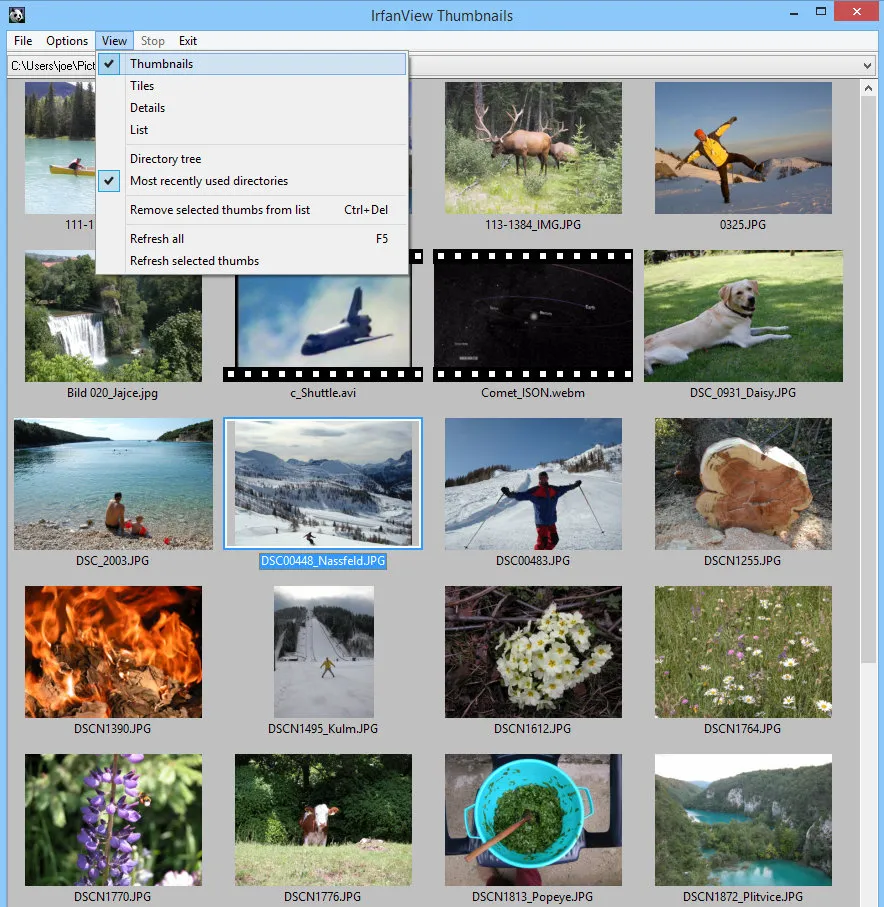
Officially, IrfanView is broader than a simple image viewer. The feature list on the “What is IrfanView?” page includes thumbnail and preview views, lossless JPG rotation and crop, EXIF and IPTC support, batch conversion with multithreading, multipage TIF editing, screen capture, print support, scanning, file search, slideshow export, watermark overlays, Adobe Photoshop filter support, and a multimedia player. That mix explains the product’s staying power: it helps beginners with everyday viewing, but it also covers the repetitive file-handling jobs that usually push users toward bigger tools.
If your daily needs are practical rather than artistic, IrfanView still looks well positioned. Need to browse folders quickly, check metadata, rotate a JPG without a destructive workflow, run a batch resize, save a slideshow, capture a screen region, or add a watermark? The official documentation shows each of those as a core, visible part of the program rather than an afterthought. That makes IrfanView easier to justify than a viewer that only opens files and leaves everything else to separate utilities.
IrfanView vs direct substitutes
| Tool | Best for | Main reason to compare it |
|---|---|---|
| IrfanView | Windows users who want a compact viewer plus real utility depth | Its strongest edge is the mix of speed, portability, batch tools, and long-standing plug-in support |
| XnView MP | Readers who want a different image-management interface before committing | It is one of the closest category substitutes when your decision is really about workflow style |
| FastStone Image Viewer | People comparing classic Windows image tools rather than modern cloud-first apps | It is a reasonable checkpoint if you want another established Windows viewer/editor path |
| ImageGlass | Users who want a more viewer-first alternative | It is worth comparing if IrfanView’s utility-heavy feel seems broader than you need |
IrfanView’s official material makes its own fit clear enough that the comparison rule becomes simple. Choose IrfanView if you want a classic Windows utility that does more than basic viewing while staying small and direct. Compare another viewer first if your main priority is a different interface style, not maximum utility per megabyte.
Where IrfanView Review works well — and where it may not
Pros
- Officially still fast, compact, and beginner-friendly while covering advanced utility features.
- Strong 32-bit versus 64-bit guidance helps readers make an informed download choice.
- Portable ZIP workflow is officially supported and every version can be used portably according to the FAQ.
- Official download pages publish SHA-256 hashes and warn against unknown third-party downloaders.
Cons
- No native Linux or native Mac release according to the official FAQ.
- Commercial use is not free, despite the strong freeware reputation among home users.
- The 64-bit build has plug-in limitations compared with 32-bit on the official documentation.
- The interface and screenshots still feel classic rather than modern, which some readers will either love or reject immediately.
Who should download IrfanView Review?
Download IrfanView in 2026 if you want a fast Windows viewer that still reaches into batch conversion, thumbnails, screenshots, metadata, and plug-in-assisted file support without becoming bloated. The biggest reason this review stays positive is the official clarity around the two main editions: 64-bit is the better choice for very large images, while 32-bit remains the safer compatibility option. Skip it if you want a native cross-platform app or if your commercial environment needs fully free licensing terms.
IrfanView Review download and safety questions
Is IrfanView really free?
Yes for the audience the official site defines as non-commercial. The official “What is IrfanView?” page says it is freeware for private, non-commercial use and also free for schools, universities, museums, libraries, and charity or humanitarian organisations. Commercial users are told to register and purchase a license.
Is IrfanView safe to download?
It is safest when you use the official IrfanView site only. The official FAQ warns against software sites that are not listed on the official download page because some may use custom or unknown downloaders or ask users to pay for a official download page. The official pages also publish SHA-256 hashes, which is useful proof, but this review did not rerun independent malware scans for this update.
Should I download the 32-bit or 64-bit version?
Use 64-bit if your priority is very large images and speed on large files. Use 32-bit if your priority is broader plug-in compatibility, lower disk-space use, or older scanning-related workflows. That recommendation comes directly from the official 64-bit guidance page, which explains the tradeoffs more clearly than many software sites do.
Does IrfanView work on Linux or Mac?
Not natively according to the official FAQ. The author says the ZIP version can be used with Wine, Linux emulators, virtual machines, or Wine-based Mac tools, but that is different from official native support. For most readers, the correct expectation is still Windows-first software.
Do I need the plug-ins package?
Probably not at first. The official FAQ says all basic options, features, and plug-ins are included in the standard IrfanView installation and that the separate PlugIns package usually adds support for special file formats. In other words, start with the main app and add the package only if your workflow actually hits a format gap.
Can I use IrfanView portably?
Yes. The official FAQ says every IrfanView version is portable. You can copy an existing install folder to a USB stick, install directly to removable storage, or use the ZIP version and unpack it into a portable folder. That is still a genuine advantage if you like self-contained utilities.
Related Hubkub reads
Reader-first software checklist
Before installing or switching to this software, use this quick checklist to confirm whether it fits your needs and risk tolerance.
- Official source: prefer the developer website, official documentation, or a clearly trusted distribution channel.
- Platform fit: check whether your Windows, macOS, Linux, Android, or iOS version is supported.
- License and cost: confirm whether the app is free, open source, freemium, trial-based, or paid.
- Privacy and permissions: review what files, folders, network access, account data, or browser permissions the app may use.
- Backup first: for recovery, storage, networking, privacy, or system utilities, back up important data before changing settings.
Safe download and setup notes
Hubkub does not recommend clicking misleading download buttons or installing unknown bundles. When possible, use the official source and avoid third-party installers that add toolbars, browser changes, or unrelated offers. After downloading, verify the file name, publisher, version, and installer prompts before continuing.
Pros, limits, and alternatives to consider
- Best fit: readers who need the core function described in this guide and prefer a practical setup path.
- Watch out for: outdated versions, unsupported platforms, unclear installers, or features that require paid upgrades.
- Compare alternatives: if this app feels too complex, too limited, or not maintained enough for your workflow, compare it with similar tools before installing.
Related Hubkub resources: Safe Software Downloads, Software Reviews, How We Review Software, and Content Quality Standards.
FAQ
Should I download this software from any mirror site?
Use the official developer website or a trusted distribution channel whenever possible. Mirror sites can be useful in limited cases, but they may also include outdated installers, misleading ads, or unwanted bundles.
What should I check before installing?
Check the publisher, version, license, supported operating system, installer prompts, and whether the app requests sensitive permissions.