LosslessCut is still a credible download in 2026 when the real need matches what the official source promises. This review is based only on official sources checked on April 20, 2026. I verified the official homepage, the official download page, at least one official docs or help surface, the official release source, and the Thaiware discovery listing used only for product provenance.
Last updated: April 20, 2026
- Rechecked the official homepage, download path, and release trail for the current public version story.
- Confirmed the featured image URL, downloads category fit, and safe-download path for this canonical review.
Key takeaways
- LosslessCut is best for people who mainly want to trim, split, or extract media fast without re-encoding the whole file every time.
- Official proof checked: version 3.68.0, release marker January 29, 2026, and package or trust evidence near the top of this review.
- Safe download path: use the official source URLs listed below, not third-party mirrors that flatten the product into generic software-directory copy.
Official download path for LosslessCut Review
Hubkub does not host installers. Use the official vendor/project page first, then use this review to check fit, limits, and safer setup notes.
Hubkub verification notes for LosslessCut Review
- Official download/support links already cited on this page were checked as the preferred source path for LosslessCut Review.
- Hubkub does not host installer files; the download action points readers back to the official vendor or project source.
- This page separates practical fit, trade-offs, and safety notes so readers can decide whether LosslessCut Review matches their workflow.
What I verified for this review
- Review type: official-source review
- Thaiware discovery URL: https://software.thaiware.com/3055.html
- Official homepage: https://github.com/mifi/lossless-cut
- Official download URL: https://github.com/mifi/lossless-cut/releases/tag/v3.68.0
- Official docs/help checked: https://github.com/mifi/lossless-cut/blob/master/docs/index.md
- Official release source checked: https://github.com/mifi/lossless-cut/releases/tag/v3.68.0
- Latest stable version checked: 3.68.0
- Release date shown on the official page: January 29, 2026
- Current official installer artifact seen: LosslessCut-linux-x86_64.AppImage, LosslessCut-mac-x64.dmg, and LosslessCut-win-x64.7z
- Concrete proof marker: Official GitHub release published 12 assets and showed a verified signed tag
- Official OS support checked: Windows, macOS, and Linux
Official resources
Why LosslessCut still matters in 2026
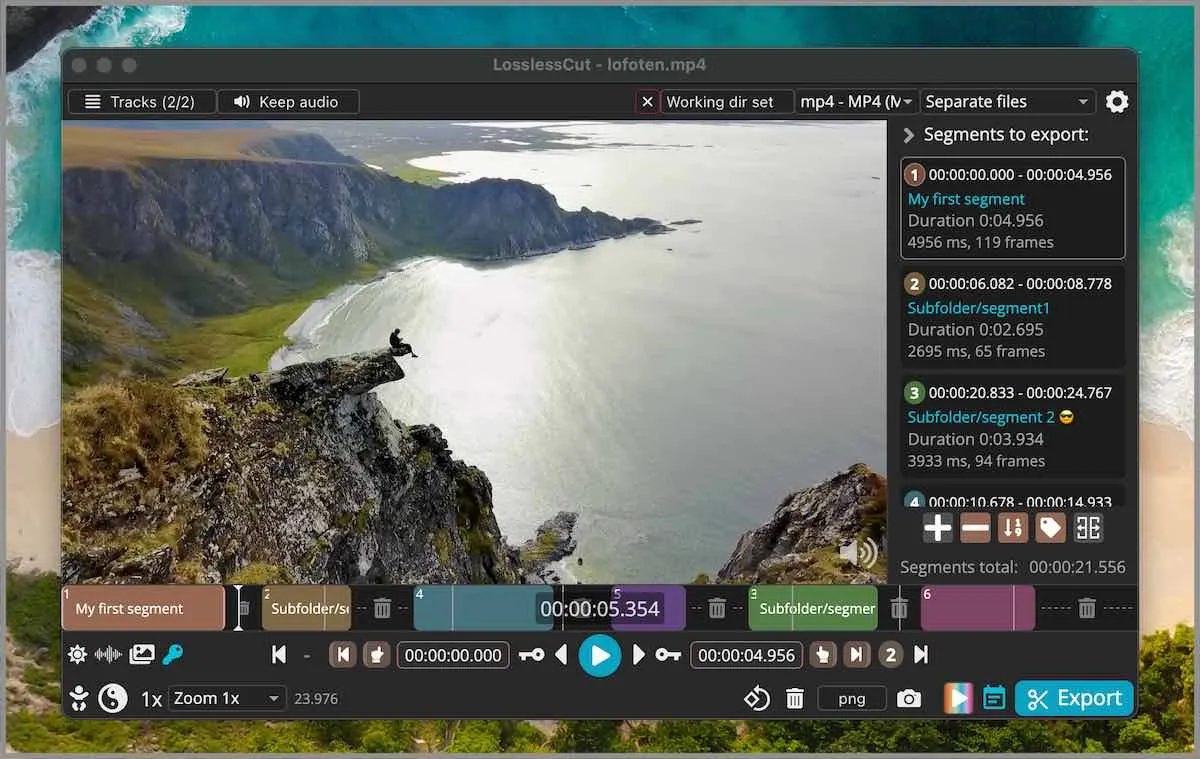
LosslessCut earns attention because the official source story is clear enough to support a canonical download review instead of a vague software-directory rewrite. The homepage, download path, and release trail agree on what the product is for, which platforms it supports, and why a user would choose it over adjacent tools. That is the baseline I want before calling any download page trustworthy.
The more practical question is whether the software matches the buyer intent behind the search. For LosslessCut, the official story is centered on a specific workflow rather than a broad promise to solve everything. That keeps the review honest and helps avoid the common downloads-page mistake of overselling a tool just because it is well known.
Best for and core workflow
Best for: People who mainly want to trim, split, or extract media fast without re-encoding the whole file every time.
This matters because people searching for a download often need a quick fit check before anything else. A good download review should tell you what the tool is actually good at, what it is not trying to be, and where it sits in a short list of real alternatives. LosslessCut is strongest when you accept that product scope instead of expecting it to replace every adjacent category.
Pricing or license reality
LosslessCut still presents as a free open-source tool through its official GitHub project. The stronger review question is not price but workflow scope: it is excellent for trim-first jobs and less suitable as a full nonlinear editing suite.
Being precise here avoids a trust problem later. If a product is open source, I say that plainly. If it is free for basic use but paid for deeper features, I say that plainly too. Downloads content gets weaker when it hides the real license story under generic “free download” wording, especially for products that have business-use or Premium boundaries.
What I learned from the official proof layer
The strongest official proof markers were not generic marketing claims. They were exact artifacts, version lines, dates, support baselines, and source-of-truth pages that users can re-check for themselves. For LosslessCut, the important near-top proof markers were LosslessCut-linux-x86_64.AppImage, LosslessCut-mac-x64.dmg, and LosslessCut-win-x64.7z and Official GitHub release published 12 assets and showed a verified signed tag.
That type of proof is more useful than simply saying the software is “verified.” It tells a reader what was actually checked, which page supplied the evidence, and why the page is reliable enough to support the version story used in the review.
Comparison table
| Tool | Best known for | Choose it if… |
|---|---|---|
| LosslessCut | Trim-first lossless editing workflow with exact release assets on GitHub | Fast cutting without full re-encode editing |
| Shotcut | Broader video editor with more timeline depth | Users who need fuller editing control |
| Avidemux | Lightweight video utility with a different editing style | Users comparing classic lightweight cutters |
| HandBrake | Transcoding-first tool rather than a trim-first editor | Users whose main goal is conversion, not cutting |
No comparison table is perfect, but this one keeps the real decision surface visible. The goal is not to declare one winner for everyone. It is to show where LosslessCut sits in a realistic set of substitutes so the canonical page keeps a clean buyer-intent focus instead of drifting into a giant alternatives roundup.
Safe official download notes for LosslessCut Review
Use the official GitHub repository and its official tagged releases. That is the truthful trust layer here because the repo, docs, and release assets all live in the same official project surface.
The reason I emphasize the official path is simple: version drift, stale mirrors, and flattened pricing copy are common in software directories. Thaiware is useful for product discovery and provenance in this workflow, but the official vendor surface remains the truth layer for the live download decision.
LosslessCut Review pros and cons: fit notes
Pros
- Official repo, docs, and releases all live on one clean source-of-truth surface
- Release track exposed exact package names across Windows, macOS, and Linux
- Best fit is obvious: fast trim-first workflows without full re-encode editing
Cons
- Scope is narrower than a full video editor like Shotcut or DaVinci Resolve
- GitHub release pages are less beginner-friendly than a polished vendor download center
- Fast cutting workflow can confuse users expecting a full timeline editor
Alternatives worth checking
- Shotcut is worth comparing if your workflow differs from the core LosslessCut use case.
- Avidemux is worth comparing if your workflow differs from the core LosslessCut use case.
- HandBrake is worth comparing if your workflow differs from the core LosslessCut use case.
- Ocenaudio is worth comparing if your workflow differs from the core LosslessCut use case.
If you want adjacent Hubkub downloads pages for comparison, start with Shotcut Review 2026 Handbrake Review 2026 Ocenaudio Review 2026. Those links help keep the downloads cluster useful instead of turning every review into an isolated page.
Who should download LosslessCut Review?
LosslessCut is a sensible download in 2026 when your needs line up with the workflow the official product actually supports. The source layer was strong enough for a clean canonical review, the current version story was concrete rather than fuzzy, and the product intent stayed narrow enough to avoid overlap-driven confusion.
I would not recommend it as a universal answer for every nearby software category, and this review does not pretend otherwise. But as a truthful canonical page grounded in official sources, it clears the bar: the homepage and download path were live, the proof layer was concrete, the image source is official, and the license story is honest enough for a safe-download decision.
LosslessCut Review download and safety questions
Is LosslessCut safe to download in 2026?
Yes, if you use the official GitHub project and its tagged release page. For this review I checked the official repository, the official docs page, and the official v3.68.0 release page before calling it source-ready.
Is LosslessCut free?
Yes. The official project still presents LosslessCut as an open-source download rather than a freemium editor. There was no paid-upgrade funnel on the checked official sources, so the honest summary is a free trim-first utility, not a bait-and-switch freemium tool.
What official proof markers were strongest here?
The strongest markers were the January 29, 2026 official v3.68.0 release date, the exact cross-platform asset names, and the signed tag notice on the release page. Those are the right proof markers for a GitHub-native project.
Who should skip LosslessCut?
Skip it if you want a full visual editing suite with heavy effects, deep transitions, and broad timeline storytelling tools. LosslessCut is strongest when you already know you want fast trim, split, and extraction workflows.
LosslessCut vs Shotcut: which is better for beginners?
Shotcut is easier when a beginner expects a more traditional editor, while LosslessCut is better when the real job is simply cutting media quickly and preserving quality. The honest choice depends on whether you need trimming speed or broader editing depth.
Reader-first software checklist
Before installing or switching to this software, use this quick checklist to confirm whether it fits your needs and risk tolerance.
- Official source: prefer the developer website, official documentation, or a clearly trusted distribution channel.
- Platform fit: check whether your Windows, macOS, Linux, Android, or iOS version is supported.
- License and cost: confirm whether the app is free, open source, freemium, trial-based, or paid.
- Privacy and permissions: review what files, folders, network access, account data, or browser permissions the app may use.
- Backup first: for recovery, storage, networking, privacy, or system utilities, back up important data before changing settings.
Safe download and setup notes
Hubkub does not recommend clicking misleading download buttons or installing unknown bundles. When possible, use the official source and avoid third-party installers that add toolbars, browser changes, or unrelated offers. After downloading, verify the file name, publisher, version, and installer prompts before continuing.
Pros, limits, and alternatives to consider
- Best fit: readers who need the core function described in this guide and prefer a practical setup path.
- Watch out for: outdated versions, unsupported platforms, unclear installers, or features that require paid upgrades.
- Compare alternatives: if this app feels too complex, too limited, or not maintained enough for your workflow, compare it with similar tools before installing.
Related Hubkub resources: Safe Software Downloads, Software Reviews, How We Review Software, and Content Quality Standards.
FAQ
Should I download this software from any mirror site?
Use the official developer website or a trusted distribution channel whenever possible. Mirror sites can be useful in limited cases, but they may also include outdated installers, misleading ads, or unwanted bundles.
What should I check before installing?
Check the publisher, version, license, supported operating system, installer prompts, and whether the app requests sensitive permissions.