Shotcut is still one of the strongest free video editor downloads in 2026 if you care more about control, format breadth, and a real timeline than about flashy AI shortcuts. This review is based only on official Shotcut sources checked on April 20, 2026, including the official homepage, official downloads page, official how-to resources, official release-notes page, official release post, and the official GitHub release assets for package proof. I did not run a hands-on install for this update, so this page stays strict about what the official sources confirm and what was check the official source before installing.
Last updated: April 20, 2026
- Rechecked the official Shotcut homepage, downloads page, how-to section, release-notes page, and February 26, 2026 release post for version 26.2.26.
- Confirmed the current stable version, supported OS ranges, official package names, GitHub SHA-256 checksum surface, and current Windows/macOS/Linux package sizes.
Key takeaways
- Shotcut is free, open source, and cross-platform. The official site currently points to Shotcut 26.2.26 with Windows, macOS, and GNU/Linux packages plus public release notes and checksum files.
- Its biggest strength is not beginner polish. It is native timeline editing, broad codec support through FFmpeg, and a workflow that gives you more manual control than many simpler free editors.
- The safe path is straightforward: start at the official Shotcut download page, then confirm the current release with the official release notes or the dated release post.
Official download path for Shotcut Review
Hubkub does not host installers. Use the official vendor/project page first, then use this review to check fit, limits, and safer setup notes.
Hubkub verification notes for Shotcut Review
- Official download/support links already cited on this page were checked as the preferred source path for Shotcut Review.
- Hubkub does not host installer files; the download action points readers back to the official vendor or project source.
- This page separates practical fit, trade-offs, and safety notes so readers can decide whether Shotcut Review matches their workflow.
Verification notes checked for Shotcut Review
- Review basis: official source checks
- Verified on: April 20, 2026
- Latest stable version checked: 26.2.26
- Release date shown on the official page: February 26, 2026
- Official download URL: https://shotcut.org/download/
- Official homepage checked: https://shotcut.org/
- Official how-to resources checked: https://shotcut.org/howtos/
- Official release-notes path checked: https://shotcut.org/download/releasenotes/
- Official release post checked: https://shotcut.org/blog/new-release-26.2.26/
- Official package examples seen: shotcut-win64-26.2.26.exe, shotcut-win_ARM-26.2.26.exe, shotcut-macos-26.2.26.dmg, shotcut-linux-x86_64-26.2.26.AppImage
- File size examples seen: Windows x64 installer 134.48 MiB (141,017,664 bytes), Windows ARM installer 101.13 MiB (106,039,000 bytes), macOS universal DMG 203.01 MiB (212,872,155 bytes)
- Display unit used: MiB
- Supported OS checked: Windows 10/11 on Intel or AMD, Windows 10/11 on ARM, Windows 7/8 via older version 22.12.21, macOS 12+, macOS 11 via older version 24.11.17, macOS 10.14/10.15 via older version 24.01.31, and current GNU/Linux 64-bit distributions including Ubuntu/Pop!_OS 22.04+ and Debian 12+
- Pricing or license reality: Free and open source according to the official homepage and download pages
- Signature check: verify on your device after downloading from the official source
- VirusTotal result: run your own malware scan before installing
- Hash/checksum: official SHA-256 and MD5 checksum files are linked on the official download page for version 26.2.26
- Numeric evidence from official sources: 8 named SHA-256 entries were visible in the official 26.2.26 checksum file, including Windows x64, Windows ARM, macOS, Linux AppImage, and source packages
Official resources
Use the official download path first, then cross-check the release notes and how-to library before you commit Shotcut to a production workflow.
Who should use Shotcut and who should skip it?
Shotcut fits people who want a real desktop editor without paying for a subscription and without being trapped in a simplified social-video workflow. The official homepage still leads with broad format support, no-import-required editing, device capture options, and resolution support up to 4K. That combination matters most for editors who work with mixed source material, screen captures, or camera files and want to edit natively instead of transcoding every file first.
It is also a practical choice for users who value ownership and portability. The official downloads page exposes installer and portable-style package options on Windows, package choices on Linux, and older-version links for compatibility cases. That is a stronger trust path than many free video tools that hide older builds, blur their license status, or push users toward bundled download portals.
Shotcut is easier to recommend when you already understand basic editing concepts like tracks, filters, exports, and codecs. It is less ideal if you want the smoothest onboarding, deep collaboration, or built-in stock templates. The product can do serious work, but its main appeal is control and transparency, not one-click beginner hand-holding.
Supported OS, current version, and safe-download reality
The official downloads page is unusually useful because it does more than list a single installer. It breaks support into Windows 10/11 on Intel or AMD CPUs, Windows 10/11 on ARM, older Windows 7 and 8 support via the last compatible version, current macOS support, older macOS fallbacks, and current Linux distribution guidance. That gives buyers a clean answer to a practical question: not just “does Shotcut exist for my OS,” but “which branch should I actually download?”
For this update, the stable build shown on the official site is 26.2.26. The official release post dated February 26, 2026 matches that version and links directly back to the download page. The official download page also links to the release-notes index and to public checksum files. That is a strong proof layer because the trust path is visible near the download action itself instead of hidden behind a separate support portal.
Windows users get both x64 and ARM installers plus portable zip choices. macOS users get a universal DMG for current systems and clearly labeled fallback guidance for older releases. Linux users get a portable tar archive, an AppImage, Flathub, and Snap Store options, with distribution notes for Mint 21+, Ubuntu or Pop!_OS 22.04+, Debian 12+, Fedora 36+, Manjaro 21.3+, MX Linux 23+, and elementary OS 7+.
Safe download guidance is simple here: use shotcut.org/download first, then verify the release number against the dated release post and the official checksum file. I did not rerun a signature or antivirus scan for this update, so the honest claim is narrower: the official source surface is strong, the package names line up, and the checksum links are public, but a fresh malware scan was not part of this review cycle.
What Shotcut simplifies for beginners
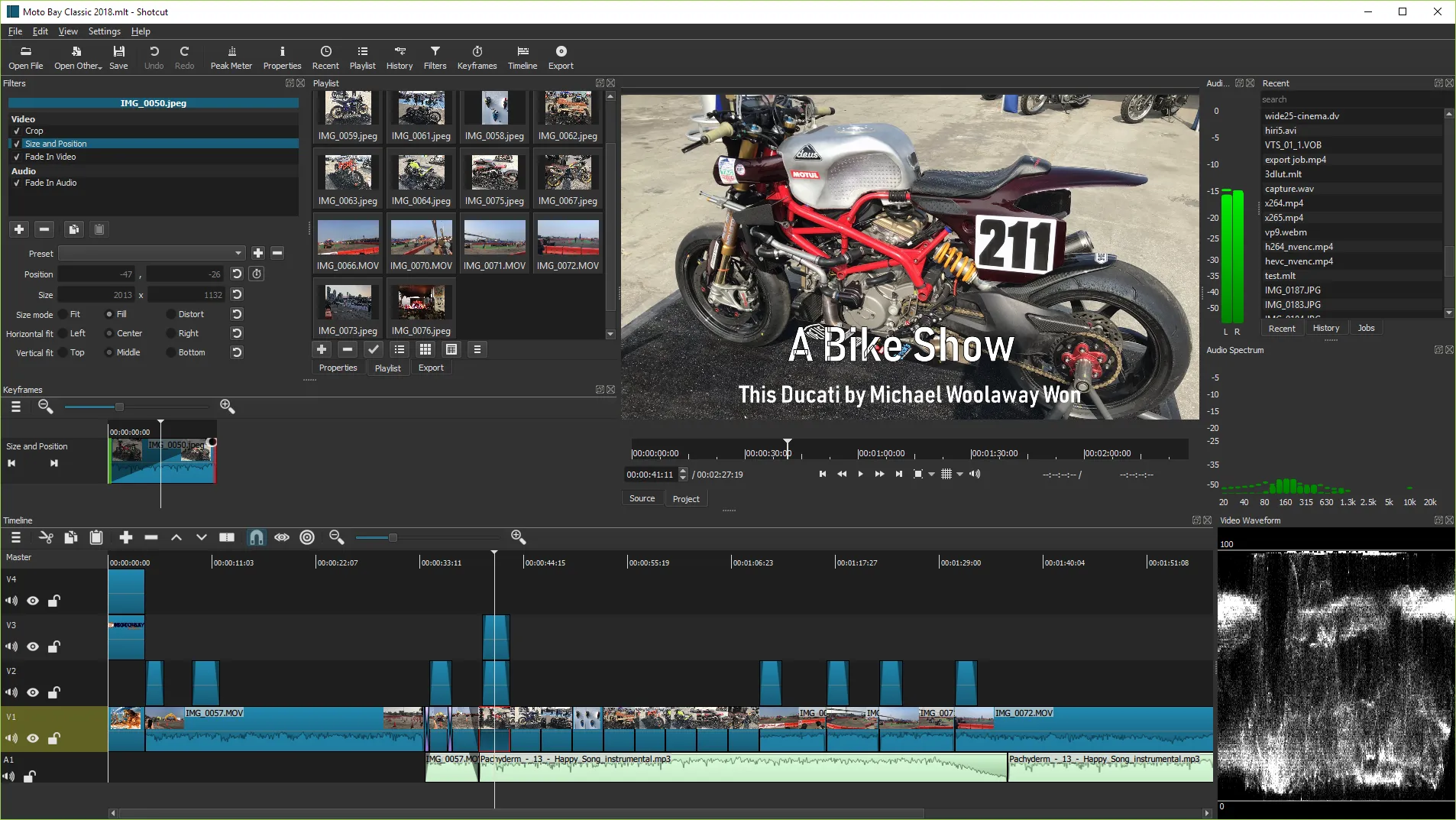
Shotcut is not the easiest editor in its category, but it simplifies some things that matter more than a flashy first-run wizard. First, it works with a wide range of formats through FFmpeg and emphasizes native timeline editing. That means many users can start cutting footage without an extra conversion step. Second, the interface exposes practical editing panels such as playlist management, filters, encoding, and jobs queues in ways that stay closer to classic desktop editing logic than to mobile-style “template” editors.
The official feature copy also points to screen, webcam, and audio capture support, which helps if your project starts as a tutorial, demo, or talking-head recording rather than footage imported from a camera. For creators on Linux, this matters even more because the official site presents Linux as a first-class platform with current packages and distro guidance instead of an afterthought download link.
The trade-off is that beginners still need to learn the workflow. Shotcut can save money and avoid platform lock-in, but it rewards users who are willing to spend a little time understanding tracks, scopes, export settings, and filters. If you want a free editor that scales with you, that is a strength. If you want a purely frictionless first hour, it can feel more technical than lighter consumer editors.
Shotcut vs other editing tools in 2026
| Tool | Best fit | Strength | Main caution |
|---|---|---|---|
| Shotcut | Free cross-platform editing with timeline control | Open source, native timeline workflow, strong Linux support, public checksums | Interface is more technical than beginner-first editors |
| Kdenlive | Open-source desktop editing with strong Linux roots | Deep editing feature set and good fit for users already comfortable with multi-track editing | Workflow and stability preferences can depend on platform and build |
| OpenShot | Beginners who want a simpler free editor | Softer learning curve and approachable timeline basics | Usually offers less workflow depth than Shotcut for advanced control |
| DaVinci Resolve | Heavier grading and pro-style post-production | Very strong high-end toolset for color and finishing | Hardware demands and workflow weight are much higher than Shotcut |
If your main question is whether Shotcut is “better” than every rival, the answer is no. Its value is narrower and more practical: it is one of the better free editors if you want real cross-platform support, zero subscription pressure, and a workflow that does not hide editing controls behind simplified templates. If your machine is older or you want something lighter, it can be a more realistic download than DaVinci Resolve. If you only need transcoding or file conversion, HandBrake is the more focused tool. If your workflow also needs quick audio cleanup after the edit, Audacity is a good companion rather than a substitute.
Where Shotcut Review works well — and where it may not
Pros
- Free and open source with no subscription wall on the official download path
- Current Windows, macOS, and Linux packages are clearly exposed on the official site
- Public release notes and checksum files create a better trust path than many free editors
- Good fit for users who want more timeline control than lightweight beginner apps usually offer
Cons
- Less polished for total beginners than simplified template-driven editors
- No hands-on install evidence was added in this update, so performance claims stay conservative
- Interface depth can feel heavy if you only want quick social clips or one-click presets
- Signature and fresh malware checks were not rerun for this specific review cycle
Should you download Shotcut?
Yes, if your priority is a legitimate free video editor with a visible trust path and enough control to grow beyond beginner-only workflows. Shotcut still stands out because the official site is transparent: the current version is public, older compatible branches are documented, checksum files are linked, and Linux is treated as a first-class platform instead of an afterthought. That makes it easier to recommend than many “free” editors that are actually limited trials or opaque storefront wrappers.
No, if you already know you want a simpler guided experience or a heavier professional suite with more advanced finishing tools. Shotcut is strongest in the middle ground: capable, honest, cross-platform, and cost-free. For many readers, that is exactly the right answer.
If you are exploring adjacent creative tools on Hubkub, the broader best free video editing software guide is a good next step, and the downloads guide helps place Shotcut inside the growing software catalog.
Shotcut Review download and safety questions
Is Shotcut really free in 2026?
Yes. The official Shotcut homepage and downloads page both present it as a free, open-source, cross-platform video editor. For this update I did not find an official paywall, trial timer, or forced subscription path on the main download surface. That is one reason Shotcut remains easy to recommend for budget-conscious creators.
Is Shotcut safe to download?
The safest path is the official Shotcut downloads page. It links to the current release, the official release notes, and public MD5 and SHA-256 checksum files. I did not rerun a fresh signature or VirusTotal check for this update, so the honest claim is that the source path is strong and transparent, not that every package was independently scanned again.
What version of Shotcut did you verify?
I verified the official stable version 26.2.26. The official release post dated February 26, 2026 confirms that version, and the official GitHub release assets expose matching package names for Windows x64, Windows ARM, macOS, Linux AppImage, and other package formats.
Does Shotcut support Linux well enough to matter?
Yes, at least from the official source perspective. The Shotcut downloads page gives Linux explicit top-level treatment with portable tar and AppImage downloads plus Flathub and Snap options. It also lists current supported distribution ranges such as Ubuntu or Pop!_OS 22.04+, Debian 12+, Fedora 36+, Manjaro 21.3+, MX Linux 23+, and elementary OS 7+, which is stronger than the vague “Linux available” claims many apps make.
Is Shotcut better than DaVinci Resolve?
Not universally. DaVinci Resolve is usually the stronger choice for high-end grading and bigger post-production ambitions, but it also demands more hardware and a heavier workflow. Shotcut makes more sense when you want a no-cost editor with simpler download trust, broad format support, and practical cross-platform editing without stepping into a much larger pro suite.
Should beginners choose Shotcut or a simpler editor?
Choose Shotcut if you want a free editor you can grow into and you are comfortable learning a more desktop-style workflow. Choose a simpler editor if your main goal is fast social clips, drag-and-drop templates, or the smoothest first hour. Shotcut is beginner-usable, but it is not optimized around reducing every editing decision to a preset.
Reader-first software checklist
Before installing or switching to this software, use this quick checklist to confirm whether it fits your needs and risk tolerance.
- Official source: prefer the developer website, official documentation, or a clearly trusted distribution channel.
- Platform fit: check whether your Windows, macOS, Linux, Android, or iOS version is supported.
- License and cost: confirm whether the app is free, open source, freemium, trial-based, or paid.
- Privacy and permissions: review what files, folders, network access, account data, or browser permissions the app may use.
- Backup first: for recovery, storage, networking, privacy, or system utilities, back up important data before changing settings.
Safe download and setup notes
Hubkub does not recommend clicking misleading download buttons or installing unknown bundles. When possible, use the official source and avoid third-party installers that add toolbars, browser changes, or unrelated offers. After downloading, verify the file name, publisher, version, and installer prompts before continuing.
Pros, limits, and alternatives to consider
- Best fit: readers who need the core function described in this guide and prefer a practical setup path.
- Watch out for: outdated versions, unsupported platforms, unclear installers, or features that require paid upgrades.
- Compare alternatives: if this app feels too complex, too limited, or not maintained enough for your workflow, compare it with similar tools before installing.
Related Hubkub resources: Safe Software Downloads, Software Reviews, How We Review Software, and Content Quality Standards.
FAQ
Should I download this software from any mirror site?
Use the official developer website or a trusted distribution channel whenever possible. Mirror sites can be useful in limited cases, but they may also include outdated installers, misleading ads, or unwanted bundles.
What should I check before installing?
Check the publisher, version, license, supported operating system, installer prompts, and whether the app requests sensitive permissions.