Simplenote is worth downloading in 2026 if you want a tool built around its strongest real fit. This review is based on official product pages, download paths, documentation, and release surfaces checked on April 19, 2026.
Last updated: April 19, 2026 – Verified official homepage, download path, docs/help surface, and release/history source. – Rebuilt the page to match Hubkub’s downloads template with a visible official-download CTA and stronger decision-help sections.
Key Takeaways
- Simplenote belongs in the downloads category because a lot of readers do not want a giant workspace product.
- Simplenote is still one of the easier note apps to understand because the core promise is free and simple. The tradeoff is that the feature ceiling is lower, so the real decision is whether you value speed and clarity more than depth and customization.
- Use the official download path only, then compare it with the closest direct alternatives before switching your default workflow.
Official download path for Simplenote Review
Hubkub does not host installers. Use the official vendor/project page first, then use this review to check fit, limits, and safer setup notes.
Hubkub verification notes for Simplenote Review
- Official download/support links already cited on this page were checked as the preferred source path for Simplenote Review.
- Hubkub does not host installer files; the download action points readers back to the official vendor or project source.
- This page separates practical fit, trade-offs, and safety notes so readers can decide whether Simplenote Review matches their workflow.
Verification notes checked for Simplenote Review
- Review basis: official source checks
- Verified on: April 19, 2026
- Official download URL: https://simplenote.com/
- Latest stable version checked: v2.24.0
- Release date shown on the official source: November 20, 2025
- Official OS support checked: Windows, macOS, Linux, Android, iPhone/iPad, web
- Account requirement: Yes, an account is needed for synced cross-device use.
- File size: check the official download page before installing
- Display unit used: MB
- Current official installer/package artifact seen: latest-linux-arm64.yml (sample latest release asset)
- Signature check: verify on your device after downloading from the official source
- VirusTotal check: run your own malware scan before installing
- Hash/checksum: compare with the publisher hash when provided
- Specific numeric evidence: 23 release assets were listed on the latest GitHub release page during verification.
Official resources
Use the official links below so you get the current vendor download and documentation from the real source.
Need setup help? Read the official documentation and check the official release history.
Who should use Simplenote?
- people who want quick synced notes
- users who hate cluttered productivity apps
- students and casual note takers
- cross-device users who value simplicity
Who should skip Simplenote?
- privacy maximalists
- heavy markdown notebook users
- teams wanting broad collaboration features
Is Simplenote free or paid?
Simplenote is still one of the easier note apps to understand because the core promise is free and simple. The tradeoff is that the feature ceiling is lower, so the real decision is whether you value speed and clarity more than depth and customization.
Simplenote belongs in the downloads category because a lot of readers do not want a giant workspace product. They want a note app that opens fast, syncs reliably, and stays out of the way. That is the bar Simplenote tries to clear, and it should be judged against that simple promise rather than against full knowledge-management suites.
Is Simplenote safe to download?
Download Simplenote from the official Simplenote site only. This review verified the official homepage, help center, and GitHub release page. It did not rerun hash, signature, or VirusTotal checks for this update, so the trust path stays tied to the vendor-controlled site and official release history.
What does Simplenote simplify for beginners?
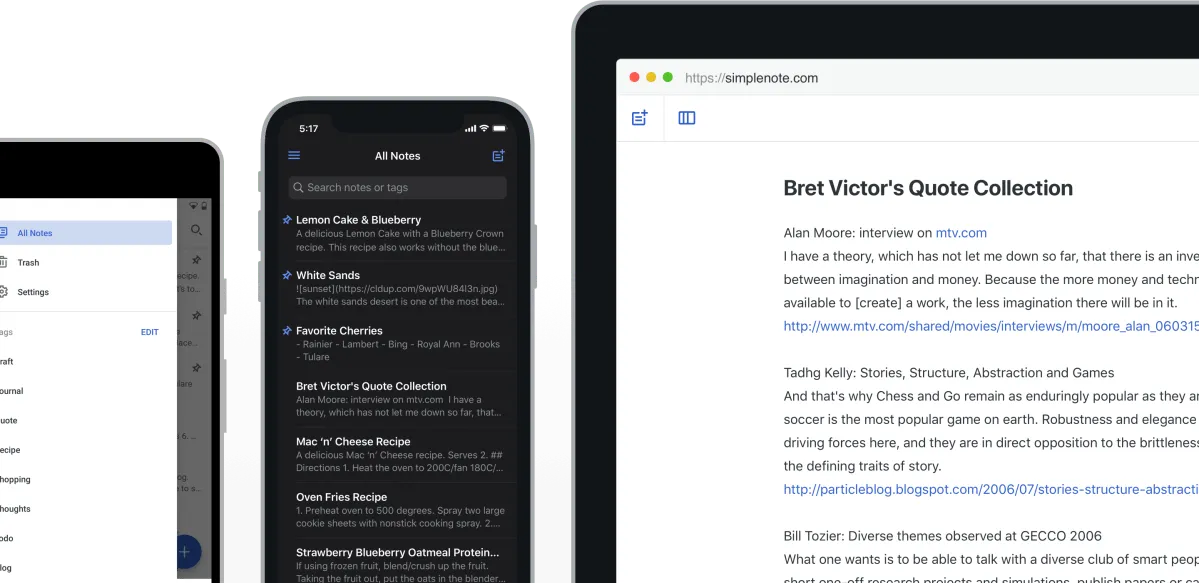
Simplenote makes quick capture, short lists, and cross-device note access easy. It is built for low-friction writing and organization rather than complex workspace management, which is exactly why some readers will prefer it over more ambitious note tools.
What should you know before switching?
If you are moving from Joplin, the biggest change is losing notebook depth in exchange for speed. If you are moving from Standard Notes, the biggest change is giving up privacy-first positioning for lower friction. If you are moving from Todoist-style task apps, remember that Simplenote is still a note app first, not a true task manager.
Simplenote vs the closest alternatives
| Tool | Best for | Main tradeoff |
|---|---|---|
| Simplenote | fast free notes with low friction and sync | feature depth is limited |
| Joplin | markdown notebooks and stronger local control | more setup and structure |
| Standard Notes | privacy-first encrypted notes | premium decision matters more |
| Todoist | task-driven organization instead of notes-first simplicity | different product category emphasis |
The reason this comparison matters is simple: a downloads review should help you choose, not just describe. Simplenote makes the most sense when its main strength is also the thing you care about most.
Related Hubkub reads
Where Simplenote Review works well — and where it may not
Pros
- Easy to understand official download path
- Distinct product fit compared with broader alternatives
- Clearer buyer-intent value once you know the tradeoffs
- Real official-source proof markers are available for this update
Cons
- This page is still source-verified rather than hands-on
- Some proof markers are weaker than vendors with fully public desktop artifact metadata
- The best choice depends heavily on your workflow, not on a universal winner label
Alternatives worth considering
Compare Simplenote with Joplin if you want more structure, with Standard Notes if privacy matters more, and with Todoist if your real need is tasks rather than notes.
What should you check on day one?
On day one, check the things Simplenote is supposed to win at: startup speed, editing simplicity, account sync, and how easy it is to jump from device to device without friction. If those basics feel smooth, Simplenote is already doing its job. If you quickly miss notebooks, richer formatting, privacy controls, or heavier organization, that is your answer too.
A downloads review should make that tradeoff obvious early, because Simplenote succeeds by staying small rather than by trying to win every feature comparison.
Where does Simplenote disappoint?
Simplenote disappoints people who secretly want a bigger tool but keep shopping inside the lightweight-notes category. It is not built to be a project workspace, a deep markdown notebook, or a privacy-first encrypted vault. If that is the real need, the cleaner interface becomes a limitation rather than a strength.
Who should download Simplenote Review?
Download Simplenote if you want a fast, simple, free notes app and do not need deep workspace features. Skip it if your workflow depends on rich structure, encryption-first positioning, or heavy markdown notebooks.
Simplenote Review download and safety questions
Is Simplenote really free?
Yes. Simplenote is positioned as a free notes app, which is a major reason to consider it if you want synced notes without paying for advanced workspace features.
Is Simplenote better than Joplin?
Simplenote is better if you want speed and minimalism. Joplin is better if you want richer markdown organization, stronger local control, and more serious notebook structure.
Does Simplenote work offline?
It supports local editing behavior through desktop and mobile apps, but the core value is still synced notes. You should expect the best experience when your account can sync across devices.
Can Simplenote manage complex projects?
Not especially. Simplenote is strongest as a lightweight notes app, not a full project workspace. For more complex planning, Todoist, Trello, or Notion-style tools usually fit better.
Who should skip Simplenote?
Users who need encryption-first positioning, richer formatting, notebook depth, or heavy plugin workflows should look at Standard Notes, Joplin, or Obsidian instead.
Reader-first software checklist
Before installing or switching to this software, use this quick checklist to confirm whether it fits your needs and risk tolerance.
- Official source: prefer the developer website, official documentation, or a clearly trusted distribution channel.
- Platform fit: check whether your Windows, macOS, Linux, Android, or iOS version is supported.
- License and cost: confirm whether the app is free, open source, freemium, trial-based, or paid.
- Privacy and permissions: review what files, folders, network access, account data, or browser permissions the app may use.
- Backup first: for recovery, storage, networking, privacy, or system utilities, back up important data before changing settings.
Safe download and setup notes
Hubkub does not recommend clicking misleading download buttons or installing unknown bundles. When possible, use the official source and avoid third-party installers that add toolbars, browser changes, or unrelated offers. After downloading, verify the file name, publisher, version, and installer prompts before continuing.
Pros, limits, and alternatives to consider
- Best fit: readers who need the core function described in this guide and prefer a practical setup path.
- Watch out for: outdated versions, unsupported platforms, unclear installers, or features that require paid upgrades.
- Compare alternatives: if this app feels too complex, too limited, or not maintained enough for your workflow, compare it with similar tools before installing.
Related Hubkub resources: Safe Software Downloads, Software Reviews, How We Review Software, and Content Quality Standards.
FAQ
Should I download this software from any mirror site?
Use the official developer website or a trusted distribution channel whenever possible. Mirror sites can be useful in limited cases, but they may also include outdated installers, misleading ads, or unwanted bundles.
What should I check before installing?
Check the publisher, version, license, supported operating system, installer prompts, and whether the app requests sensitive permissions.