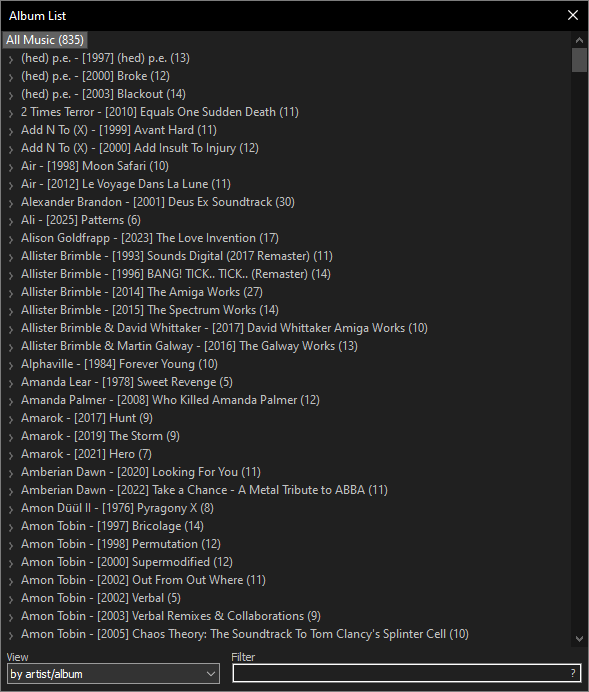
foobar2000 is a Windows audio player for people who keep their own music files and want control over a local library. It is not a streaming catalog, a cloud backup service, or a one-click replacement for every media task. Its useful niche is a library of files, playlists, metadata, playback settings, and optional components that the reader wants to manage deliberately.
Key takeaways
- When checked on July 30, 2026, the official Windows page listed foobar2000 2.25.10; its changelog records that release on June 26, 2026.
- The official page also separates a 2.26 preview dated July 23, 2026. Treat preview software as a deliberate choice, not an automatic replacement for the stable player.
- foobar2000 fits a local music-library workflow where customization, components, and file control matter more than a streaming-style interface.
- Use the project’s own Windows page for the installer and check the displayed version again before downloading.
Official download URL: https://www.foobar2000.org/windows
Editorial scope and source check
This is a source-verified Windows music-library guide. Hubkub checked the official foobar2000 Windows page and official change log on July 30, 2026. It is not presented as a hands-on installation, playback-quality, component, conversion, tagging, benchmark, malware-scan, or screenshot review.
- Stable Windows line checked: 2.25.10
- Stable release record checked: June 26, 2026
- Separate preview line checked: 2.26 preview, July 23, 2026
- Published platform baseline: Windows 7 or newer
Choose foobar2000 for a local-library job
The deciding question is not whether foobar2000 is “the best player.” It is whether the reader needs a focused place for music already stored as files. A collection of FLAC, MP3, AAC, Opus, WAV, purchases, rips, or personal recordings needs different tools from a subscription streaming account. foobar2000 is relevant when the priority is browsing folders, maintaining playlists, inspecting metadata, selecting playback behavior, and keeping the music workflow separate from a video player or browser tab.
That focus also explains its trade-off. The default interface is comparatively plain and its deeper options take attention. Readers who want immediate recommendations, social listening, a cloud catalog, or a polished first-run experience may be better served by a streaming service or a more guided music manager. Readers who value a compact player they can adapt over time have a clearer reason to consider foobar2000.
Stable versus preview is a workflow choice
The official Windows page separates its stable and preview lines. The stable line is the sensible starting point when a player supports an established library and the reader does not need a particular new feature. The preview line exists for readers who intentionally accept a different update and compatibility boundary. It should not be selected simply because its number looks newer.
Before downloading, confirm that the page still identifies the intended Windows build and read the associated official change-log entry. Version information changes, and this guide records a dated source check rather than promising that a version number will remain current. If the project has moved on, use the current official listing rather than a filename repeated by a mirror or an old article.
Official source routing and component boundaries
Start at the project’s own Windows page instead of a repackaged download directory. A familiar audio player can appear on mirror sites with stale builds, unclear preview labels, wrapper installers, or component bundles that are not equivalent to the core project route. The official Windows page, change log, component directory, and encoder resources are the useful trust layer for deciding what belongs in a setup.
Components are part of foobar2000’s appeal, but they also change the maintenance boundary. Add a component only when its origin and purpose are clear, and avoid installing a large bundle merely because it promises a more dramatic interface. A component that affects decoding, library behavior, conversion, or display can change a workflow in ways that are hard to unwind if several changes are applied at once. Keep a short note of what was added and preserve the installer or configuration information needed to reverse a change.
Protect the library before changing metadata or formats
A player can organize files, but it is not a backup plan. Tags, playlists, artwork references, converted copies, and library locations can all be affected by a bulk action or a drive reorganization. Before applying a large metadata edit, conversion, or component-driven workflow, preserve the original files and try the intended action on a small non-critical selection. Verify the output folder and naming rule before processing an entire collection.
Network shares deserve the same caution. The change log includes media-library improvements involving network shares, but a reader should still verify their own paths, permissions, availability, and backup behavior before making a remote folder the only source for a library. If a music archive is irreplaceable, maintain a separate backup strategy; choosing a playback application does not protect it from disk, path, or synchronization mistakes.
What the official release information can and cannot tell you
| Official-source fact checked | Useful decision | What the reader still needs to verify |
|---|---|---|
| 2.25.10 is the stable Windows line recorded on the official page and change log | Use the project page to identify the intended stable build | Whether a particular plugin, device, or older workflow is compatible |
| 2.26 preview is listed separately | Keep preview adoption intentional | Whether preview changes suit a production library |
| Windows 7 or newer is stated as a baseline | Confirm that the reader is in the documented Windows family | Driver, audio-device, accessibility, or legacy-component behavior |
| Official components and change-log resources exist | Prefer identifiable project routes over random bundles | Which optional component actually improves a specific workflow |
Pick the tool that matches the job
| If the main job is… | Better first choice | Why |
|---|---|---|
| Controlling a local Windows music library with detailed customization | foobar2000 | A component-oriented, local-file workflow is the point of the tool. |
| A more guided local music-player experience | AIMP | AIMP is another local-music option with a different interface and workflow emphasis. |
| Opening video files, discs, and broad media formats | VLC | A video-first media player is a clearer category match. |
| Editing music metadata across a collection | Mp3tag | A dedicated tag editor can be a more focused choice than a playback player. |
These are task boundaries, not universal rankings. It is reasonable to use a local music player alongside a video player and a dedicated tag editor, as long as each application comes from an identifiable official source and large file changes are made with a recoverable copy.
A cautious first-setup routine
- Open the official Windows page and confirm whether the stable or preview line is intended.
- Install only the core player before adding optional components.
- Add one music folder or a small copy of a library first, then inspect the resulting paths and metadata display.
- Make one optional change at a time and record what it changes.
- Before a bulk tag edit or conversion, keep originals and test a small sample in a known destination folder.
This routine is a decision aid, not evidence that Hubkub installed or independently validated a particular package. It keeps the publisher route, the software channel, and the user’s file-safety boundary visible.
Questions readers commonly ask
Is foobar2000 free?
The official Windows page presents foobar2000 under the foobar2000 license and offers the Windows player as a free download. That does not make third-party component packs or repackaged installers part of the same trust path; use the project’s own pages for the core application and optional resources.
Is foobar2000 safe to download?
The lower-risk route is the official foobar2000 Windows page. Confirm the product name, the Windows channel, and the currently displayed version there. This guide does not claim an independent malware scan, signature validation, or installation test of any individual package.
What version did Hubkub check?
On July 30, 2026, the official Windows page listed stable 2.25.10 and a separate 2.26 preview dated July 23, 2026. The official change log records 2.25.10 as released June 26, 2026. Check the official page again because release information can change.
Is foobar2000 better than AIMP?
Neither is universally better. foobar2000 is the clearer fit when component-level customization and a local-file workflow are the priority. AIMP can be a better starting point for a reader who prefers a more guided music-player interface. Choose according to the workflow, not a blanket ranking.
Does foobar2000 work on Windows 11?
The official Windows page states Windows 7 or newer as its baseline, which includes Windows 11 in that stated family. Readers using unusual audio devices, legacy components, or network libraries should still check the current project resources and their own compatibility needs.