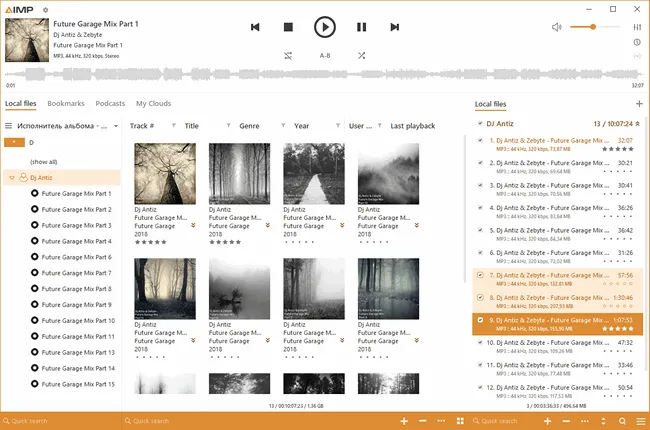
AIMP is a Windows-focused music player for people who keep their own audio files, playlists, and folder-based library. Its value is not a streaming catalog or a video-player replacement: it is a dedicated place to play, organize, tag, and convert local music without relying on a browser tab.
Key takeaways
- The official AIMP download page listed AIMP for Windows 5.40.2722, dated July 1, 2026, when this guide was checked on July 29, 2026.
- Choose AIMP when the job is listening to and maintaining a local music collection; choose a streaming service for subscription catalogs, VLC for broad video playback, or foobar2000 when component-level customization is the main goal.
- Use the publisher’s download center, confirm the Windows PC line and version there, and treat beta builds as a separate choice rather than an automatic update.
Official AIMP download route
Hubkub does not host AIMP installers. The publisher’s download center separates the PC and Android lines and shows the current Windows release.
What I verified for this guide
- Checked the official download page for the current safe download path.
- Checked official documentation or support pages for setup and platform guidance.
- Checked official release notes, news, or update information where the vendor publishes it.
Official download URL: https://example.com
Editorial scope and source check
This is a source-verified Windows music-library guide, checked on July 29, 2026 against AIMP’s official home, download, and PC change-log pages. It is not presented as a installation, playback-quality, conversion, tagging, benchmark, malware-scan, or screenshot review.
What AIMP is designed to do
AIMP is a desktop audio player built around local playback. The official site presents PC and Android editions; this page concerns the Windows PC path. Its product direction is useful when music lives in folders on a computer, removable storage, or a managed local library and the reader wants playlists, tags, format handling, radio, and audio-conversion tools in a music-first interface.
That focus matters because “media player” can mean several different things. AIMP is not a substitute for a subscription music service’s catalog and recommendations. It is also not the default choice for unusual video files, discs, or a general media-troubleshooting workflow. A clear local-library need is the reason to consider it.
Current publisher facts worth checking
| Item | Official-source check | Why it matters |
|---|---|---|
| PC version checked | AIMP for Windows 5.40.2722, dated July 1, 2026 | Confirm the displayed PC version on the publisher page before downloading. |
| Separate channel | The PC change log also lists an AIMP 6 beta line separately | A beta is a deliberate compatibility and workflow choice, not the safest default for every library. |
| Official route | AIMP’s own download center and PC change log | They identify the current vendor build and release notes rather than relying on a mirror filename. |
| Pricing description | The official site describes AIMP as freeware | Freeware does not make third-party repackaged installers equivalent to the publisher’s own file route. |
The version and date above are a dated source check, not a promise that they will remain current. If the download page has moved on, use the publisher’s current PC listing and read the associated change-log entry before choosing an update.
Choose AIMP when your music is local
AIMP is most relevant for a reader who has albums, DJ sets, rips, purchases, or personal recordings organized as files and wants to keep control of that library. In that situation, a practical player needs to make ordinary tasks predictable: open folders, maintain playlists, inspect or edit track information, switch playback order, and keep a listening queue separate from a video or streaming application.
The official product materials also describe internet-radio, tag, and audio-converter functions. Those tools can reduce context switching for common library work, but they do not remove the need to preserve originals before changing tags or converting files. If a collection has irreplaceable recordings, keep a backup and test any bulk change on copies or a small selection first.
When a different tool is a better fit
| If your main job is… | Better first choice | Why |
|---|---|---|
| Playing a local Windows music collection with a focused player | AIMP | Its design centers on audio playback, playlists, library tasks, and adjacent music utilities. |
| Opening video files, discs, or difficult codecs | VLC | A video-first media tool is a clearer match for broad playback troubleshooting. |
| Building a heavily customized audio setup | foobar2000 | Component-oriented customization may be more important than an out-of-box library workflow. |
| Using a paid streaming catalog and recommendations | Your streaming service | A local player does not replace a subscription catalog or cloud-account features. |
These are task boundaries, not a claim that one player is universally better. A reader can reasonably keep a local music player and a separate video player installed, provided each comes from its official publisher route.
A safe download and update routine
- Start at the official AIMP download center. Make sure the page is on
aimp.ruand choose the PC/Windows route rather than an unrelated mobile or mirror listing. - Read the version line before opening the file. Compare it with the PC change log if an update matters to a particular feature or fix.
- Decide whether you need stable or beta. For a library that must remain predictable, the stable PC line is the conservative starting point. A beta should be chosen only after reading its release context and considering compatibility with the rest of the workflow.
- Protect the library before bulk changes. Keep copies of important audio files and, where relevant, exported playlists or metadata backups before a large tag or conversion operation.
- Record the source for managed devices. A work, school, or shared-PC deployment should retain the version, date, and official source URL approved by its administrator or policy.
This routine does not claim that a particular installer has been independently scanned or signature-verified by Hubkub. It is a way to keep the publisher route, product line, and library-risk boundary visible to the reader.
Library, tag, and conversion boundaries
AIMP’s local-library orientation is useful only when the reader knows where the files and metadata live. Playlists can point to paths that change after a drive move or folder reorganization. Tags can make a collection easier to browse but can also overwrite fields if a bulk edit is applied carelessly. Conversion can create additional copies or replace a workflow that depends on a particular format.
For that reason, treat a player’s library features as organization tools, not archival protection. Before consolidating folders, rewriting tags, or converting a large collection, preserve a copy of the original files and test the intended action on a limited set. If the real requirement is long-term backup or catalog migration, plan that separately from choosing a playback application.
Who should skip AIMP
Skip AIMP as the first download if the goal is primarily streaming, video playback, or professional audio production. It is also a poor fit when an organization prohibits unmanaged software or when the reader cannot identify where the music library is stored. In those cases, the right next step is the approved media application, a video player, a streaming client, or an IT-managed deployment route—not a generic download recommendation.
Official sources
- Official download URL: AIMP download center
- PC change log: AIMP for PC change log
- Official homepage: AIMP official site
Before downloading, check the publisher’s page again for the current version and platform line. This guide does not assert an independent install, audio-quality comparison, malware scan, or benchmark result.
Related Hubkub reads
- foobar2000: lightweight Windows music-player guide
- VLC: video and broad-format playback guide
- Downloads complete guide
AIMP questions
Is AIMP free?
The AIMP site describes the player as freeware. Use the publisher’s own download center for the current PC file route, and consult the publisher’s terms or organizational policy for a managed deployment.
What version of AIMP did Hubkub check?
On July 29, 2026, the official Windows download and PC change-log pages listed AIMP 5.40.2722 dated July 1, 2026. The site also listed a separate AIMP 6 beta line; check the current official page before downloading.
Is AIMP a Spotify replacement?
No. AIMP is a local player and library tool. It can suit files you keep and organize yourself, but it does not provide a subscription music catalog or the account features of a streaming service.
Is AIMP better than VLC?
Use AIMP when local music-library playback is the main task. Use VLC when the main task is broad video or codec playback. They can serve different jobs rather than being direct substitutes.
Should I use the AIMP beta?
The official PC change log separates beta releases from the 5.40.2722 PC release checked for this guide. Read the publisher’s current notes and consider library or workflow compatibility before choosing a beta; a stable build is the conservative choice for many local collections.