PHP Warning: include_once(/www/wwwroot/hubkub.com/wp-content/mu-plugins/hubkub-noindex-self-canonical.php): Failed to open stream: Permission denied in /www/wwwroot/hubkub.com/wp-settings.php on line 500
Warning: include_once(/www/wwwroot/hubkub.com/wp-content/mu-plugins/hubkub-noindex-self-canonical.php): Failed to open stream: Permission denied in /www/wwwroot/hubkub.com/wp-settings.php on line 500
PHP Warning: include_once(): Failed opening ‘/www/wwwroot/hubkub.com/wp-content/mu-plugins/hubkub-noindex-self-canonical.php’ for inclusion (include_path=’.:/www/server/php/83/lib/php’) in /www/wwwroot/hubkub.com/wp-settings.php on line 500
Warning: include_once(): Failed opening ‘/www/wwwroot/hubkub.com/wp-content/mu-plugins/hubkub-noindex-self-canonical.php’ for inclusion (include_path=’.:/www/server/php/83/lib/php’) in /www/wwwroot/hubkub.com/wp-settings.php on line 500
Key Takeaways
- The best free Windows software in 2026 balances genuine usefulness, active maintenance, and a trustworthy download source — this guide names specific tools and links to their official pages.
- For productivity: Notepad++, Obsidian, Todoist, and Joplin cover text editing, note-taking, and task management without subscription locks.
- For security: Bitwarden, KeePassXC, VeraCrypt, and Malwarebytes free tier handle passwords, encryption, and malware scanning.
- For media: VLC, Audacity, Kdenlive, and GIMP cover playback, audio editing, video editing, and image editing at no cost.
- For development: VS Code, DBeaver, Git/GitHub Desktop, and Node.js give you a professional toolchain for free.
- For utilities: 7-Zip, Everything, Rufus, and WinDirStat solve everyday file management tasks that Windows handles poorly by default.
Windows ships with solid built-in tools, but the default apps leave gaps in file management, security, media handling, and developer workflows. This guide covers the best free software for Windows in 2026 — every recommendation links to an official download source and a detailed review on Hubkub.
Productivity Software
Text Editing: Notepad++
Notepad++ remains the among the fastest lightweight text editor on Windows. It opens files that crash other editors, supports syntax highlighting for 80+ languages, and runs plugins for comparison, formatting, and code folding. The tabbed interface handles dozens of open files without slowdown. If you edit configuration files, write quick scripts, or need a dependable scratchpad, Notepad++ should be your default.
Note-Taking: Obsidian and Joplin
Obsidian stores notes as plain Markdown files in a local vault — no proprietary database, no lock-in. Its linking system creates a knowledge graph that grows more useful as you add notes. For users who want sync without a subscription, Joplin offers end-to-end encryption and cloud sync through Dropbox, OneDrive, or WebDAV at no cost.
Task Management: Todoist
Todoist handles task lists with natural language input — type “Review PR every Friday at 3pm” and it parses the schedule automatically. The free tier supports up to 5 active projects and integrates with Gmail, Slack, and Google Calendar. For users who need offline-first task management, the open-source alternative is Logseq.
Office Suite: LibreOffice
LibreOffice provides Writer, Calc, Impress, and Base — covering word processing, spreadsheets, presentations, and databases. Version 26.2 improved Microsoft Office format compatibility significantly, making it practical for users who receive .docx and .xlsx files but don’t want to pay for Microsoft 365.
Security Software
Password Manager: Bitwarden
Bitwarden is the a strong free password manager in 2026. The free tier includes unlimited password storage, cross-device sync, a separate free authenticator app, and passkey support. Unlike competitors that gate basic features behind paid plans, Bitwarden’s free offering covers everything most users need. The CLI tool lets power users script credential access from the terminal.
Encryption: VeraCrypt
VeraCrypt creates encrypted containers that appear as random data without the correct password. It handles full-disk encryption for system drives and hidden volumes for plausible deniability. For anyone storing sensitive files on a laptop or shared computer, VeraCrypt eliminates the risk of data exposure if the device is lost or stolen.
Secure Messaging: Signal Desktop
Signal Desktop extends the Signal mobile app to Windows with end-to-end encrypted messaging, voice notes, and file sharing. The desktop client syncs with your phone and disappears from no device — a meaningful advantage over web-only alternatives.
Media Software
Video Player: VLC Media Player
VLC plays virtually every video and audio format without additional codecs. It handles broken or partially downloaded files, streams from network sources, and converts between formats. No Windows installation is complete without it.
Audio Editing: Audacity
Audacity is the standard free audio editor. It handles multi-track recording, noise reduction, EQ, compression, and format conversion. Recent versions added improved effect workflows and an updated spectrogram view. For podcast recording, voice cleanup, and music production on a budget, Audacity covers the essentials.
Video Editing: Kdenlive
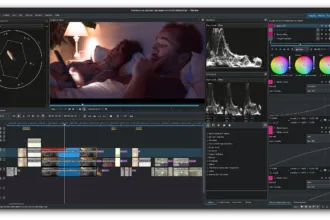
Kdenlive is a professional-grade video editor that’s free and open source. It supports multi-track editing, keyframe animation, color correction, and a wide range of effects and transitions. The timeline interface rivals paid editors like Adobe Premiere Elements, making it the best free option for YouTube creators and video hobbyists.
Image Editing: GIMP
GIMP handles photo retouching, image composition, and graphic design. Version 3.2 brought a modernized UI, non-destructive editing basics, and improved brush dynamics. For users who can’t justify an Adobe Photoshop subscription, GIMP covers 90% of image editing tasks.
Development Tools
Code Editor: Visual Studio Code
VS Code is widely used code editor among developers. Its extension ecosystem covers every major language, debugger integration works with local and remote runtimes, and the integrated terminal means you rarely leave the editor. The built-in Git support handles staging, committing, and branching without command-line switches.
Database Tool: DBeaver Community
DBeaver Community Edition connects to PostgreSQL, MySQL, SQLite, MariaDB, Oracle, SQL Server, and dozens of other databases through JDBC drivers. It handles query editing with auto-complete, result export, ER diagram generation, and data comparison. For developers working with multiple databases, DBeaver eliminates the need for separate client tools.
Version Control: Git and GitHub Desktop
GitHub Desktop provides a visual interface for Git repositories — no memorizing commands for branching, merging, or conflict resolution. It handles commits, pushes, pulls, and pull requests in a clean UI. Power users can drop to the command line for advanced operations.
JavaScript Runtime: Node.js
Node.js powers modern web development, build tools, and server-side applications. Node.js 24.x is the latest LTS release as of August 2026, while 26.x is the Current release. The LTS version provides long-term stability for production use. Installing Node.js also gives you npm — the package manager that installs libraries, frameworks, and CLI tools with a single command.
Utility Software
File Archiver: 7-Zip
7-Zip handles ZIP, RAR, 7z, TAR, and dozens of other archive formats. Its 7z format achieves better compression ratios than ZIP, and the context menu integration means right-click extraction works on any archive. It’s the first utility to install on a fresh Windows setup.
File Search: Everything
Everything indexes every file and folder on your drives in seconds, then searches instantly as you type. It replaces Windows Search, which is slow and often misses files. Everything uses minimal RAM and updates its index in real time as files change.
Bootable USB: Rufus
Rufus creates bootable USB drives from ISO images — essential for installing operating systems, running live Linux distributions, or flashing firmware. It handles Windows installation media, Linux ISOs, and UEFI/legacy boot modes. Ventoy is a newer alternative that supports multiple ISOs on a single drive.
Disk Usage: WinDirStat
WinDirStat visualizes disk usage with a color-coded treemap, making it immediately obvious which files and folders consume the most space. For anyone with a full SSD, WinDirStat identifies large files faster than manually browsing directories.
File Transfer: WinSCP and FileZilla
WinSCP handles SFTP/SCP transfers with a dual-pane interface and scriptable automation. FileZilla covers FTP, SFTP, and FTPS with cross-platform support. Both are free and handle large file transfers reliably.
How to Download Software Safely
When downloading free software, follow these principles:
- Always download from the official website — not from third-party download portals that bundle adware.
- Verify the file hash when available — SHA-256 checksums confirm the download wasn’t tampered with.
- Read the installer carefully — decline bundled toolbars, antivirus trials, and browser extensions that installers often include by default.
- Check the license — “free” can mean freeware, open source, or a limited trial. Open source software (GPL, MIT, Apache) gives you the most freedom.
Comparison: Free vs Paid Alternatives
| Category | Free Tool | Paid Alternative | When to Upgrade |
|---|---|---|---|
| Password Manager | Bitwarden Free | 1Password (~$48/yr) | Need shared vaults for a family or team |
| Office Suite | LibreOffice | Microsoft 365 (~$99/yr) | Heavy Excel macros or Outlook dependency |
| Image Editing | GIMP | Photoshop ($240/yr) | Professional CMYK print work or RAW workflow |
| Video Editing | Kdenlive | Premiere Pro ($240/yr) | Need After Effects integration or advanced color grading |
| Code Editor | VS Code | JetBrains IDEs | Deep language-specific refactoring for large codebases |
FAQ
Is free software safe to download?
Yes, when you download from official sources. Open-source software like Bitwarden, 7-Zip, and VLC has public code that security researchers review regularly. The risk comes from third-party download sites that bundle adware. Always download from the developer’s official website or a verified GitHub release.
What’s the difference between free and open source?
Free software means no cost. Open source means the source code is publicly available under a license (GPL, MIT, Apache) that allows anyone to inspect, modify, and redistribute it. Open-source software is typically free of charge, but open source refers to licensing freedoms, not price — open-source software can also be sold commercially — some freeware is proprietary with closed code.
Can free software replace Microsoft Office?
For most users, yes. LibreOffice Writer and Calc handle documents and spreadsheets with strong Microsoft format compatibility. The main limitations are complex Excel macros, Outlook integration, and OneDrive collaboration features. If you rely heavily on those, Microsoft 365 may still be worth the cost.
Do I need antivirus software if I use Windows Defender?
Windows Defender (now Microsoft Defender) has improved significantly and provides solid baseline protection for most users. The free tier of Malwarebytes adds on-demand scanning for malware that Defender might miss. For most home users, this combination is sufficient. Avoid running multiple real-time antivirus scanners simultaneously.
How do I keep all this software updated?
Most free tools include auto-update checks. For centralized management, tools like Patch My PC (free for home use) scan installed software and batch-update outdated versions. Alternatively, winget (Windows Package Manager) lets you update installed software from the command line: winget upgrade --all.
What’s the best free VPN for Windows?
Free VPNs come with trade-offs — bandwidth limits, speed throttling, or data logging. Tor Browser provides free anonymous browsing for research and privacy. For consistent VPN use, a paid service like NordVPN or ProtonVPN offers better speed and privacy guarantees. Never use an unknown free VPN that logs your traffic.
Last updated: August 2026. All download links point to official sources. This guide is updated quarterly as new versions are released.